

Close Menu
    Facebook X (Twitter) Instagram
    • About
    • Privacy Policy
    • Write For Us
    • Newsletter
    • Contact
    Instagram
    About ChromebooksAbout Chromebooks
    • Linux
    • News
      • Stats
      • Reviews
    • AI
    • How to
      • DevOps
      • IP Address
    • Apps
    • Business
    • Q&A
      • Opinion
    • Gaming
      • Google Games
    • Blog
    • Podcast
    • Contact
    About ChromebooksAbout Chromebooks
    News

    Chrome, ChromeOS 106 getting Partial Translate language feature

    Kevin TofelBy Kevin TofelAugust 12, 2022Updated:September 23, 2025No Comments2 Mins Read

    Google pushed the first ChromeOS 106 Dev Channel update this week and it just arrived on my personal Chromebook. After a quick first pass of looking for new features, one turned up. Both the Chrome browser and ChromeOS 106 are getting a Partial Translate language feature.

    To use it, I had to enable an experimental flag, which I found at chrome://flags#desktop-partial-translate. The flag description does a good job of explaining the feature:

    Enables the Partial Translate feature on Desktop, which allows users to translate text selections on the page through the right-click context menu.

    Similar to Google Translate, this feature adds a “Translate to English” menu option after highlighting any website text. Note that the menu option uses English for my device, as that’s the primary language I use. I anticipate it will change based on the localization options of Chromebooks that use a different language.
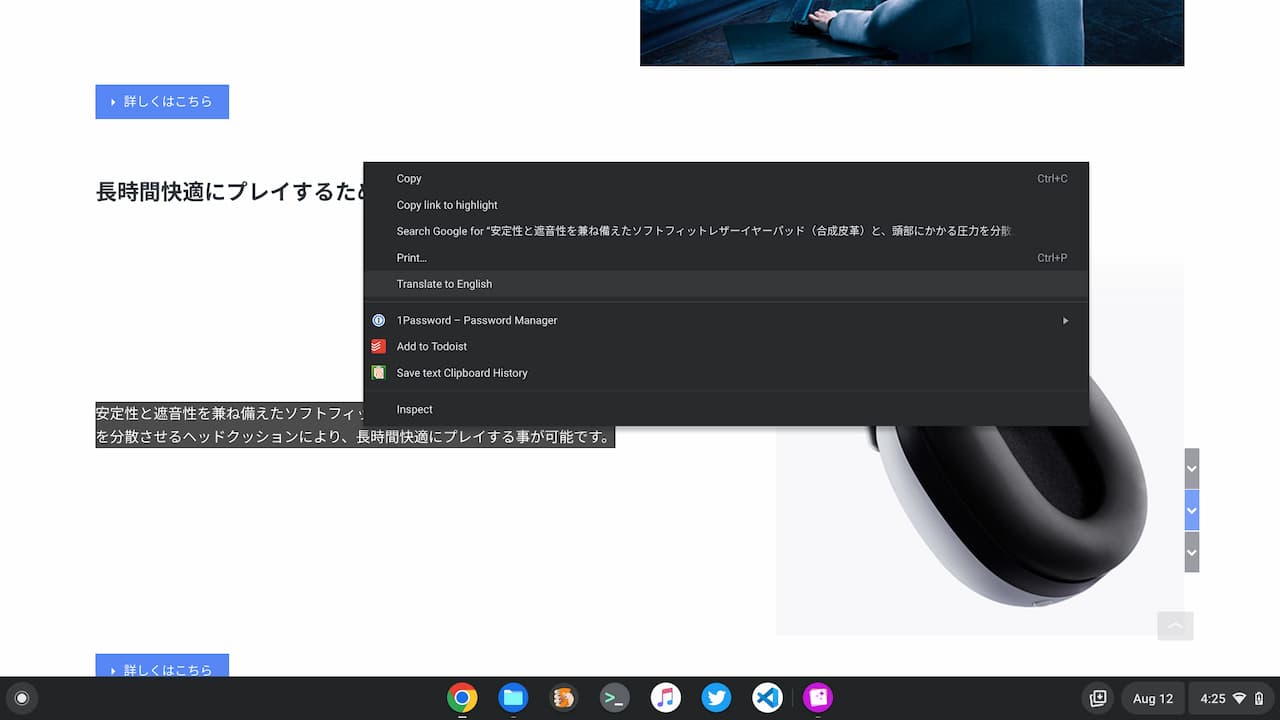
    ChromeOS 106 Partial Translate

    Choosing the translate menu option opens a small popup showing the highlighted text. At the moment, the translation feature isn’t working on the few pages and languages I tested, however.
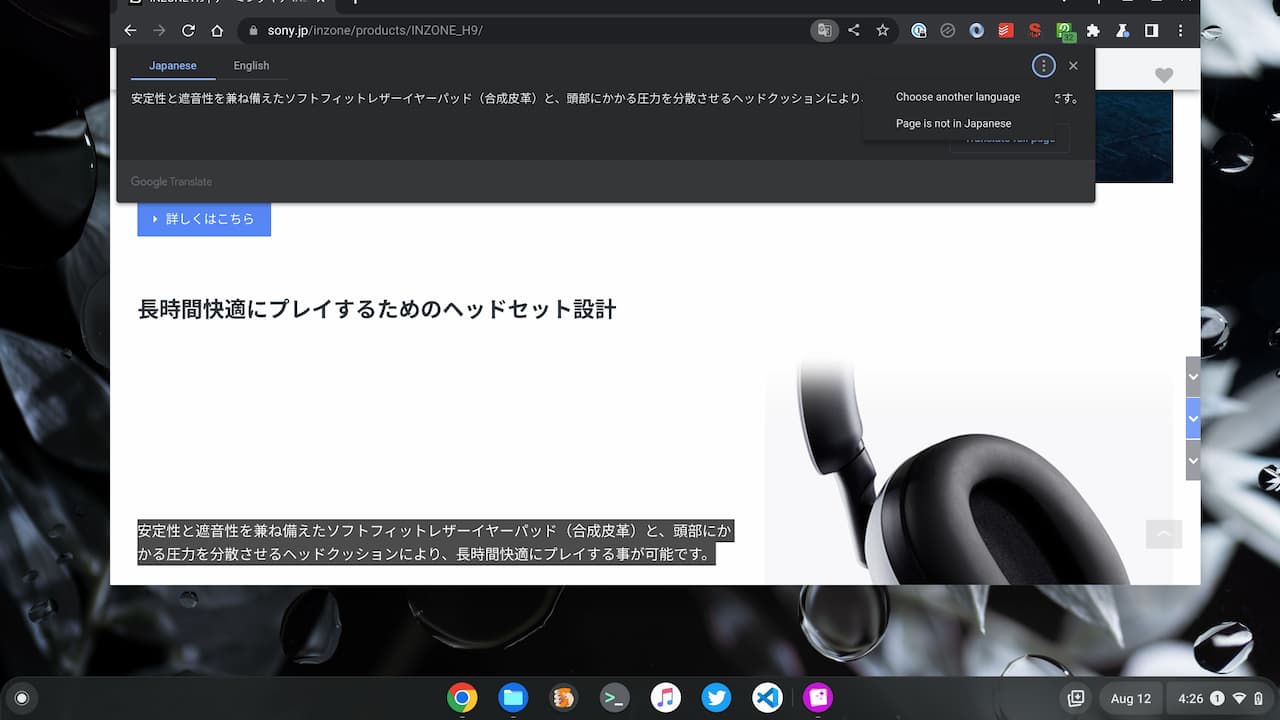
    ChromeOS 106 language translations

    There are also options to modify the source and target languages in case Google misidentifies either. Additionally, you can choose to have the entire page translated.

    Based on the flag details, this feature isn’t just coming to ChromeOS devices. It will be supported on the Chrome browser for Linux, MacOS, and Windows as well. Of course, that includes Lacros as well, which is the Linux browser that will be used on Chromebooks in the future.

    I tend to translate whole pages, even when I need to understand just a snippet of text in a foreign language. Still, I can see the utility in the Chrome and ChromeOS 106 Partial Translate feature to focus on a small amount of information.

    I’d anticipate this feature does make it into the ChromeOS 106 Stable Channel since much of the Google Translate code can be leveraged. If that’s the case, Chromebooks should see Partial Translate in roughly 6 to 8 weeks.

    Kevin Tofel
    • Website

    After spending 15 years in IT at Fortune 100 companies, Kevin turned a hobby into a career and began covering mobile technology in 2003. He writes daily on the industry and has co-hosted the weekly MobileTechRoundup podcast since 2006. His writing has appeared in print (The New York Times, PC Magazine and PC World) and he has been featured on NBC News in Philadelphia.

    Best of AI

    Turn Photos to Videos: A Product Marketing Playbook

    August 18, 2026

    DeepSeek Statistics 2026: Users, Token Share, Pricing and Benchmark Data

    August 15, 2026

    Cursor AI Statistics 2026

    August 14, 2026

    AI Hardware Market Share Statistics 2026

    August 12, 2026

    AI Startup Funding Statistics by Region Statistics 2026

    August 7, 2026
    Trending Stats

    Two-Factor Authentication Adoption Statistics 2026

    August 15, 2026

    Chromebook Detachable VS Clamshell Sales Statistics 2026

    August 13, 2026

    MacOS Version Distribution And Demographics Statistics 2026

    August 5, 2026

    Small Language Model Adoption Statistics 2026

    August 3, 2026

    Linux Distribution Popularity Statistics 2026

    August 3, 2026
    • About
    • Tech Guest Post
    • Contact
    • Privacy Policy
    • Sitemap
    © 2026 About Chrome Books. All rights reserved.

    Type above and press Enter to search. Press Esc to cancel.