


Let’s be honest about why most students open an AI chatbot for homework: they want the answer, fast. Fine for a one-off question.
Bad habit if it’s your whole study strategy — the exam won’t let you copy-paste, and “I got the right answer once, in a chat window, three weeks ago” doesn’t help much when you’re staring at a blank test with different numbers.
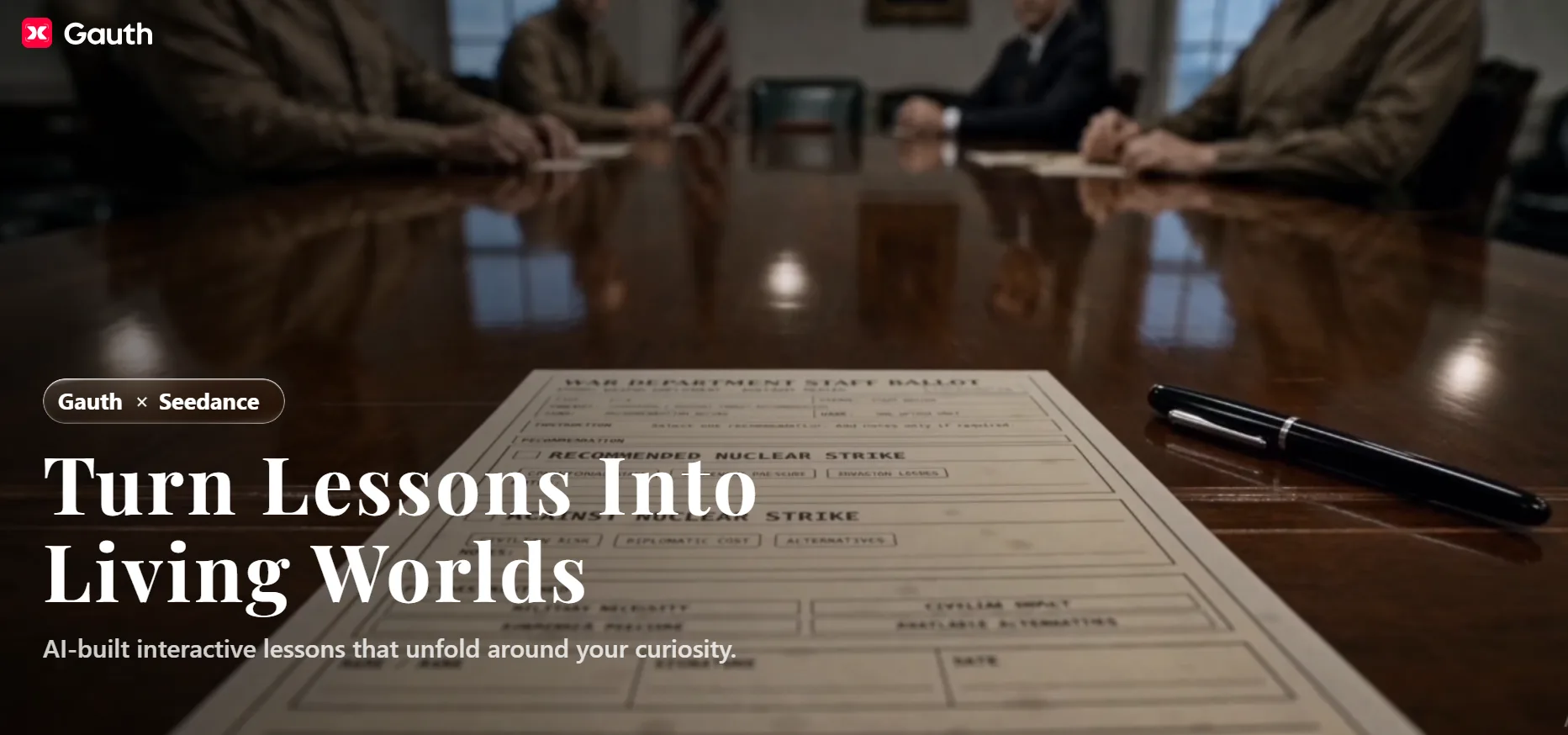
Gauth is trying to build a study tool around that gap. It’s an AI study companion for students roughly middle school through college — and honestly, anyone picking up a new subject later in life — built around one idea: teach the concept, don’t just hand over the number. We put that pitch to the test, feature by feature.
Quick take
- What it is: An AI study app that combines problem explanations, an always-on tutor, note-to-flashcard conversion, and AI-generated courses in one place.
- Who it’s for: Middle school through college students who want actually to understand material, not just get through it.
- What stands out: Study Converter (turns messy notes into ready-made study material) and a live, voice-based AI Tutor.
- What to watch for: AI Course is new and still finding its footing; answer formatting can vary since it’s not one single model doing everything.
Gauth doesn’t run on one single AI model. It routes each question to whichever model and format fits best — a graph where a graph makes sense, a table where a table makes sense, written steps where that’s what your teacher actually wants to see.
Whether that routing genuinely beats a well-prompted general chatbot is hard to verify from the outside — that’s a claim, not a settled fact.
What you can check yourself: everything bundled into one app — notes, tutoring, flashcards, quizzes, full courses — instead of four separate apps duct-taped together.
So What’s Actually Going On Under the Hood?
Gauth doesn’t run on one single AI model. It routes each question to whichever model and format fits best — a graph where a graph makes sense, a table where a table makes sense, written steps where that’s what your teacher actually wants to see.
Whether that routing genuinely beats a well-prompted general chatbot is hard to verify from the outside — that’s a claim, not a settled fact.
What you can check yourself: everything bundled into one app — notes, tutoring, flashcards, quizzes, full courses — instead of four separate apps duct-taped together.
The Standout: Study Converter
Your second academic brain.
Real learning doesn’t happen in one heroic all-nighter — it happens in small, repeated moments. But most study material actively fights against that. A phone photo of a whiteboard nobody erased in time. A lecture recording you’ll never actually sit through again. Handwriting only you (maybe) can read. None of it is small. None of it is repeatable. So it just piles up, and the habit never forms.
Study Converter exists to fix that gap. It takes whatever messy, oversized material you throw at it — photos, recordings, handwritten notes — and breaks it down into flashcards, summaries, and quizzes small enough to actually revisit every day.
What makes it worth calling out:
- One input, any format. Photos, recordings, handwritten notes — all go in the same way, no manual retyping, no prep work standing between you and studying.
- Built for the atomic habit, not the marathon session. Output isn’t a wall of text to “get through later” — it’s pre-broken into bite-sized, study-ready units you can pick up in a spare five minutes, not just a scheduled two-hour block.
- Kills the app-hopping. Normally this is transcribe app → notes app → flashcard app → quiz app — enough friction that most people quit by week two. Gauth compresses all of it into one pass, so the habit has fewer places to break.
None of the individual pieces — flashcards, quizzes, summaries — are new. What’s different is that Study Converter isn’t just a formatting tool you use once before an exam; it’s a standing companion that keeps turning your incoming academic chaos into small, daily study moments — the actual unit that habits are built from.
The Rest of the Toolkit
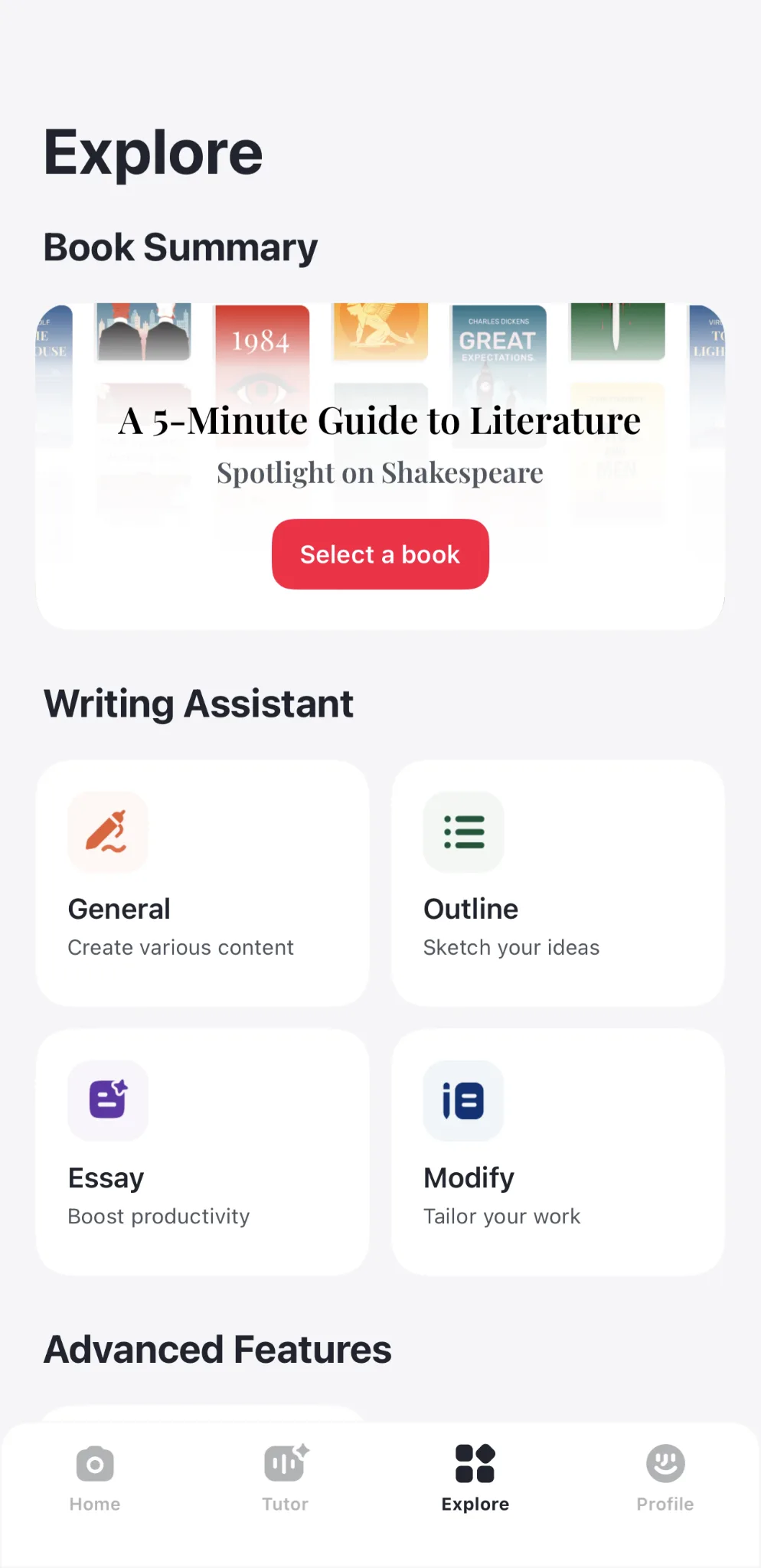
Snap & Solve is the entry point most people actually start with — point your camera at a problem, textbook page, or worksheet, and it identifies what’s being asked and works through it. A few things worth knowing:
- Handles more than typed text — diagrams, graphs, and handwriting all get read, not just clean printed problems.
- The point isn’t the snap itself; it’s what happens after: instead of a bare answer, you get the step-by-step breakdown, which is what turns this from “homework shortcut” into something closer to a worked example in a textbook.
- Fastest way to test whether Gauth’s “explains, doesn’t just answer” claim holds up on your own material, since it takes ten seconds to try.
AI Tutor trades the photo-and-go format for something slower and more conversational:
- Live, voice-based back-and-forth, not a text box you type into and wait.
- A visual “blackboard” builds out step by step as the explanation unfolds, instead of dumping a full wall of text at once.
- You can jump in mid-explanation with a follow-up rather than starting the question over — closer to how an actual tutoring session works than a chat transcript.
AI Course is the newest and most ambitious of the three:
- Takes dense, text-heavy material and turns it into a cinematic AI course — built for visual learners, with quick quizzes woven in for active recall.
- Gauth’s cinematic AI course is powered by Seedance 2.5.
- The bet: engagement, not just correctness, is often what actually trips students up — a wall of textbook text loses people before the material itself gets hard.
- The catch: ambitious AI features tend to shine in a five-minute demo and get uneven across a full semester of real material. Worth trying, worth treating as the least proven part of the stack for now.
⭐As Business Insider reported this week, Gauth described the new feature as transforming subjects into “cinematic, AI-narrated visual stories that make abstract concepts finally click.” (https://www.businessinsider.com/seedance-bytedance-education-push-study-app-gauth-ai-animations-2026-7)
The emphasis on active recall over passive viewing is exactly the bet AI Course is making — that engagement, not just content quality, is what keeps a wall of textbook text from losing students before the material itself gets hard.
Hands-On Benchmark
When something’s confusing — a homework problem, a work email, a symptom you’re Googling at 2 a.m. — most people’s first move now is the same: open ChatGPT. So that’s the real comparison worth making. Not “is Gauth good,” but “is it actually better than the thing everyone already has open in another tab.”
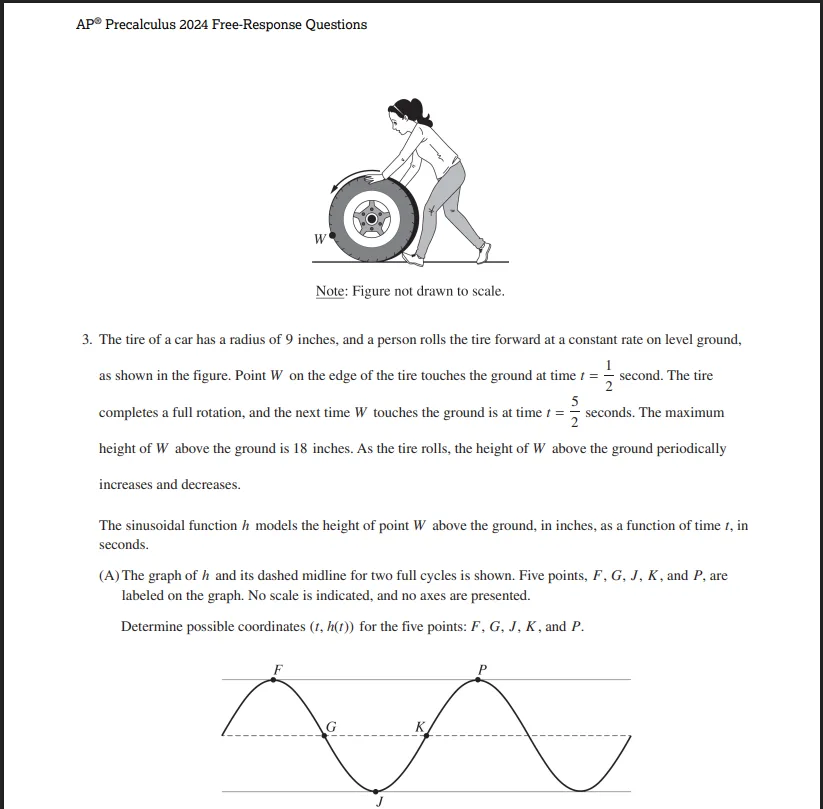
We tested both on a released 2024 AP Precalculus free-response question about a rolling tire, where the height of a point on the tire traces a sine wave over time.
Part (A) gives a graph — no numbers on the axes, just five labeled points (F, G, J, K, P) plotted along the curve — and asks you to work out plausible coordinates for each one based on where they sit on the wave.
Original Question Screenshot:
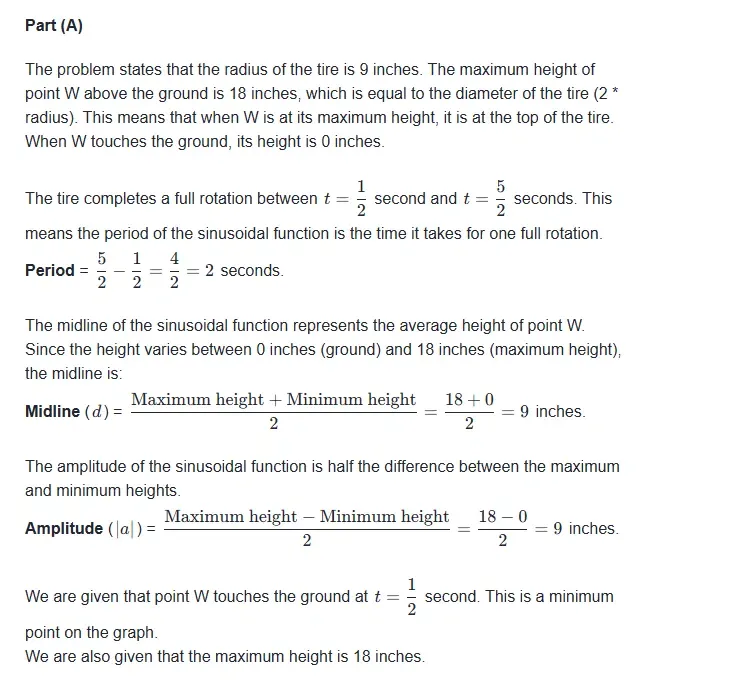
Gauth’s full answer and explanation for part (A)
ChatGPT’s full answer and explanation for part (A)
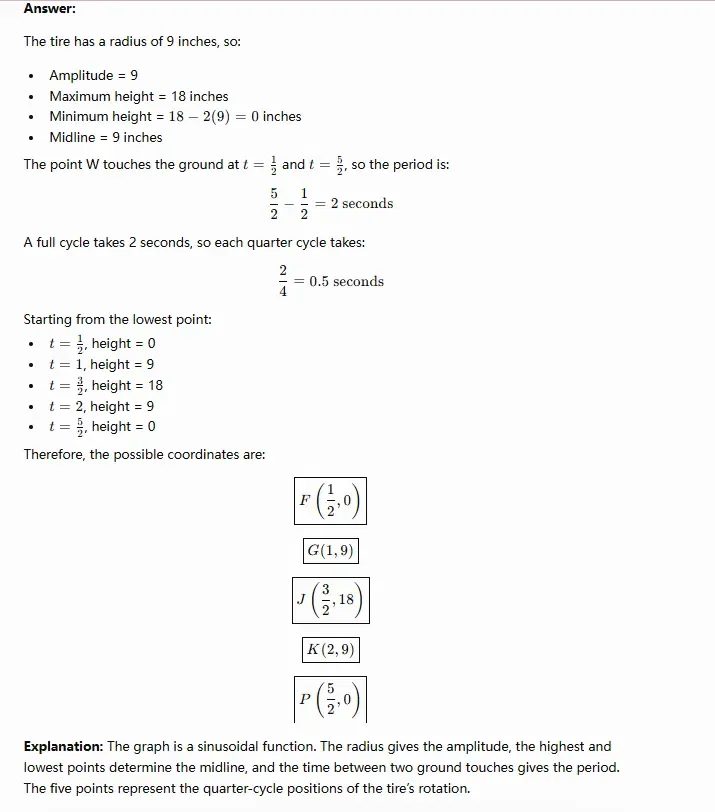
This is a reading-comprehension problem as much as a math one — get the graph wrong and every number after it is wrong too, no matter how clean the algebra looks.
| 1️⃣Gauth | 2️⃣ChatGPT | |
| F and P (the peaks) | Correctly identified as the maximum points (height 18) | Incorrectly labeled as the minimum points (height 0) |
| J (the trough) | Correctly identified as the minimum point (height 0) | Incorrectly labeled as the maximum point (height 18) |
| G and K (midline) | Correctly identified as midline crossings (height 9) | Correctly identified as midline crossings (height 9) |
| Left-to-right order along the curve | Doesn’t quite match the graph — treats J as occurring before F, when the graph shows F first, then a descent to J | Internally consistent, but built on the wrong starting assumption |
ChatGPT swapped the peaks and the trough — it read F as the bottom of the wave and J as the top, the exact opposite of what’s drawn.
That’s not a rounding error or a units slip; it’s a basic misread of which end of the curve is which, and it throws off every coordinate downstream in an otherwise clean, well-organized answer.
Gauth got the actual high and low points right, which matters more for a problem like this than any other single detail, though its answer wasn’t flawless either — the order it assigned to the points along the time axis doesn’t fully line up with how they’re laid out left to right on the graph.
Neither answer is one you’d want to copy onto an exam without double-checking. But between “correctly identified the peaks and troughs, sequencing needs a second look” and “swapped the peaks and troughs entirely,” those aren’t the same size of mistake — and it’s the kind of error a student wouldn’t necessarily catch on their own, since the final answer still looks like a complete, confident solution either way. Worth remembering next time the instinct is to trust the first clean-looking answer a chatbot hands back.
Bottom Line
General chatbots have gotten genuinely good at getting the right answer on contained academic problems — so on raw correctness, it’s often a wash.
Gauth’s real edge is what happens around the answer: Study Converter turning a mess of notes into something you’ll actually study from, and the AI Tutor explaining why something works instead of just stating that it does.
A few honest caveats before you download it: formatting can be inconsistent since multiple models are doing the work, AI Course is still the newest and shakiest part of the app, voice features depend on your mic quality, and none of this replaces a teacher’s judgment on an essay or lab write-up. Reasonable trade-offs for a young, ambitious product — just go in knowing them.
About Gauth — Gauth is an AI-built study platform aimed at students from middle school on up, including anyone picking up a new subject later in life. Instead of one-size-fits-all chatbot answers, it pairs an education-specific multi-model system with a full academic workflow — turning messy notes and photos into ready-to-use flashcards and quizzes through Study Converter, walking through problems live via a voice-and-visual AI Tutor, and packaging dense material into interactive AI-generated Courses. The company behind it, GauthTech Pte. Ltd., builds the platform around a single premise: a study tool should leave students better equipped for the next problem, not just finished with the current one.
Want to see how it handles your own coursework? Check out Gauth online, or grab it for iOS /Android and try it on your next assignment.
