

Close Menu
    Facebook X (Twitter) Instagram
    • About
    • Privacy Policy
    • Write For Us
    • Newsletter
    • Contact
    Instagram
    About ChromebooksAbout Chromebooks
    • Linux
    • News
      • Stats
      • Reviews
    • AI
    • How to
      • DevOps
      • IP Address
    • Apps
    • Business
    • Q&A
      • Opinion
    • Gaming
      • Google Games
    • Blog
    • Podcast
    • Read More
      • Review
      • Insights
    About ChromebooksAbout Chromebooks
    News

    Chrome OS 79 Dev Channel supports Gboard, other Android keyboards on Chromebooks

    Kevin TofelBy Kevin TofelOctober 28, 2019Updated:May 6, 2026No Comments2 Mins Read

    I know that Chrome OS had a flag for Android input methods a few versions back but that flag was removed. It appeared that Android keyboards were or would be supported on Chromebooks with the flag but I haven’t had any luck adding any. However, Phillip tipped me over email that the Chrome OS 79 Dev Channel is supporting Android keyboards; at least when in Tablet Mode.

    I’m not currently running the Dev Channel so I haven’t tested this but Philip did send me screenshots of his successful GBoard installation; no special flag or setting was required.

    Obviously, you need to have a third-party Android keyboard installed from the Play Store on your Chromebook for this to work. Once you do, however, you can choose it in the Chrome OS Keyboard Input Settings:
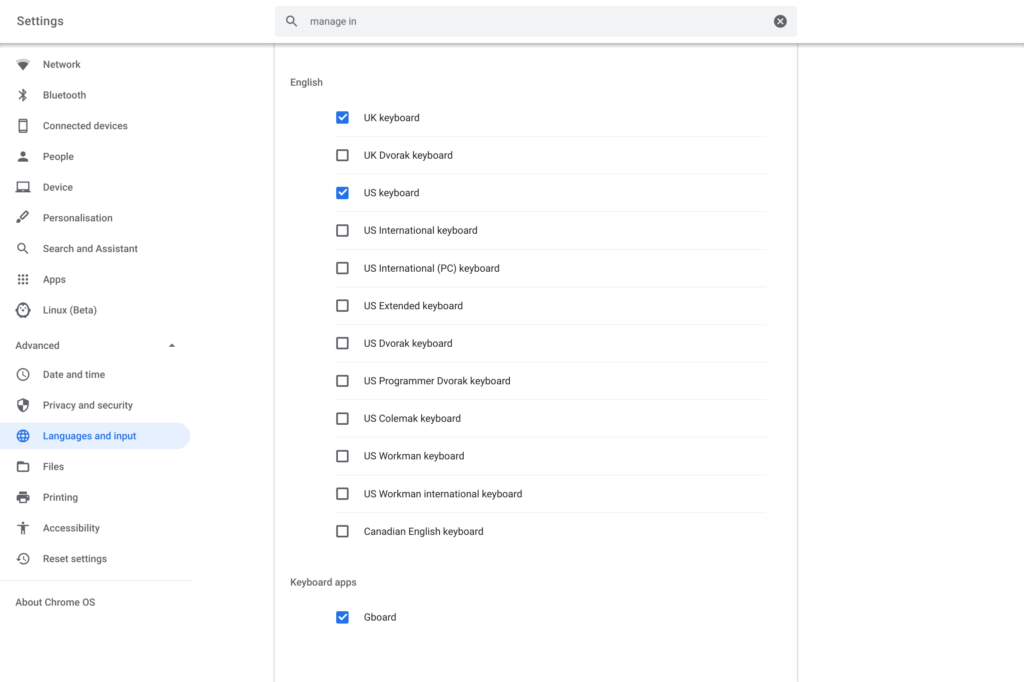
    Based on Phillip’s experience, it appears that this is still a work in progress of sorts:

    One thing to note I have found is after a reboot you might have to click on Gboards Android app to make it available again and select input method as Gboard from inside the Android app then it will appear as an input method in Chrome OS. 

    Also if you have a convertable (like my Pixelbook) if you use the physical keyboard and then switch to tablet mode it will reset back to the Chrome OS keyboard and you have to re-select Gboard.

    So, yeah. It’s not quite ready for daily use on most devices just yet unless you can live with the keyboard getting reset after using a physical keyboard. Still, it’s progress for those who want to use GBoard, SwiftKey or some other software keyboard on their Chrome OS tablet or 2-in-1. Thanks, Phillip!

    Update at 1:45pm, 10/28/2019: I can’t currently test at the moment, but this might work on the current Stable Channel, at least on a Pixel Slate:

    This is already working for me on the stable version of chrome OS with my pixel slate. It's not the default like you indicate in the article so you have to reselect it, but it works.

    — Alex Chapin (@alexchapinGreen) October 28, 2019
    Kevin Tofel
    • Website

    After spending 15 years in IT at Fortune 100 companies, Kevin turned a hobby into a career and began covering mobile technology in 2003. He writes daily on the industry and has co-hosted the weekly MobileTechRoundup podcast since 2006. His writing has appeared in print (The New York Times, PC Magazine and PC World) and he has been featured on NBC News in Philadelphia.

    Best of AI

    Prompt Engineering Salary Statistics 2026

    October 19, 2026

    AI Safety Incident Reporting Statistics 2026

    October 16, 2026

    AI Browser Statistics 2026 [Arc, Dia, Comet]

    October 15, 2026

    ElevenLabs Statistics 2026

    October 9, 2026

    Enterprise LLM Vendor Market Share Statistics 2026

    October 1, 2026
    Trending Stats

    Chromebook Carbon Footprint Statistics 2026

    October 3, 2026

    Linux Kernel Contributor Statistics 2026

    September 26, 2026

    Chromebook Enterprise Deployment Statistics 2026 [Setup Times, Fleet Volumes, Licensing and Migration Data]

    September 22, 2026

    Vector Database Market Statistics 2026

    September 15, 2026

    Chromebook Screen Refresh Rate Distribution Statistics 2026

    September 12, 2026
    • About
    • Tech Guest Post
    • Contact
    • Privacy Policy
    • Sitemap
    © 2026 About Chrome Books. All rights reserved.

    Type above and press Enter to search. Press Esc to cancel.