

Close Menu
    Facebook X (Twitter) Instagram
    • About
    • Privacy Policy
    • Write For Us
    • Newsletter
    • Contact
    Instagram
    About ChromebooksAbout Chromebooks
    • Linux
    • News
      • Stats
      • Reviews
    • AI
    • How to
      • DevOps
      • IP Address
    • Apps
    • Business
    • Q&A
      • Opinion
    • Gaming
      • Google Games
    • Blog
    • Podcast
    • Contact
    About ChromebooksAbout Chromebooks
    News

    Chrome OS notifications settings appear to be getting a revamp

    Kevin TofelBy Kevin TofelDecember 21, 2021Updated:September 16, 2025No Comments2 Mins Read

    If you’re used to clicking the Notifications icon in the system tray of your Chromebook, you might want to consider breaking the habit. According to Google, Chrome OS notifications settings have changed in Chrome OS 96. However, it doesn’t appear that all of the changes are in place just yet.

    Here’s what Google officially says on this topic:

    Notification settings have been moved from Quick Settings to a dedicated new Notifications page within Chrome OS Settings.

    Indeed, I do see an experimental flag at chrome://flags#os-settings-app-notifications-page with the following description: “If enabled, a new App Notifications subpage will appear in the CrOS Settings Apps section. After toggling this flag a few times, it appears that it’s enabled by default in Chrome OS 96. So I went to Settings, Apps to see what’s there. And it’s only slightly different from before.

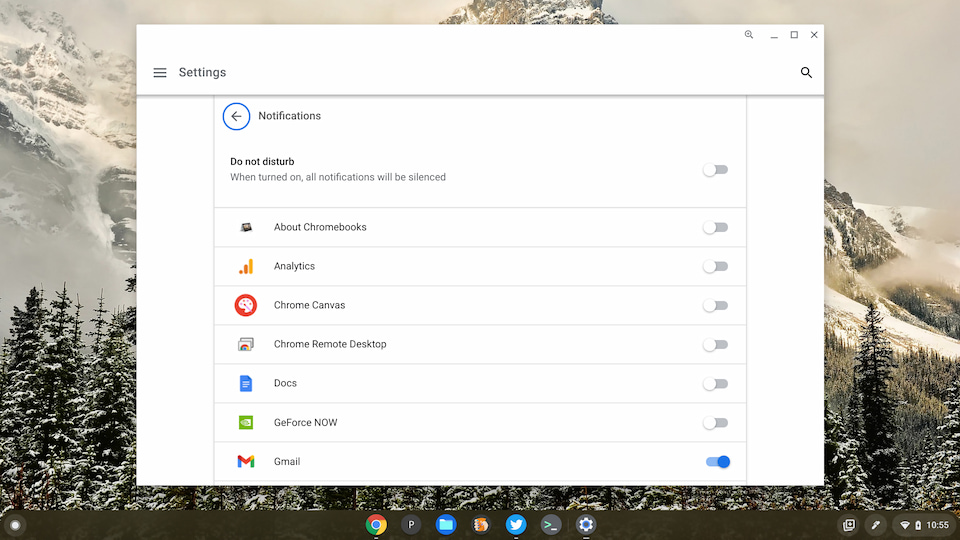
    Here’s what it looks like now with both the Apps settings and when clicking the Chrome OS notification settings:
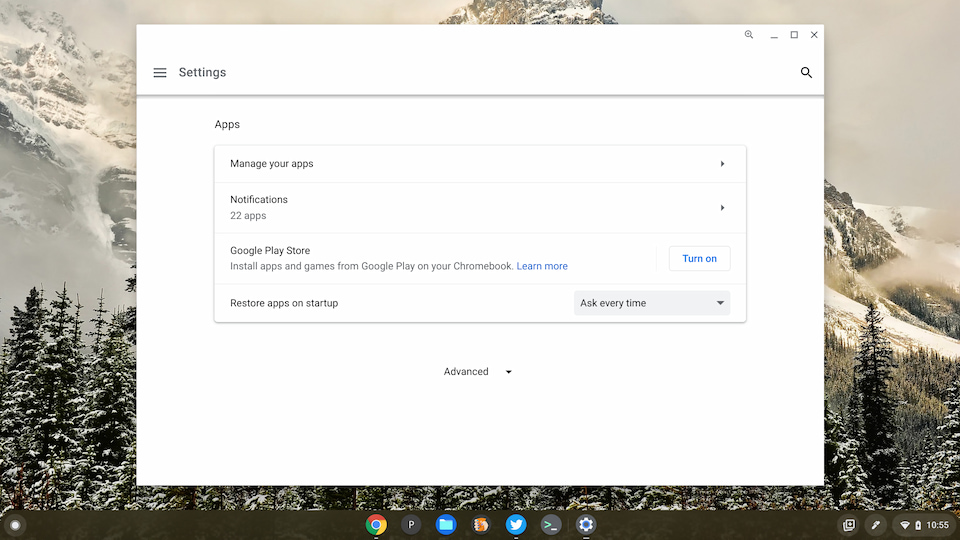
    Chrome OS 96 Apps settings
    Chrome OS notifications settings new

    I don’t have a photographic memory, but it appears to me that these toggle buttons to enable or disable notifications are new. By the way, you can click anywhere on the line of an app to change the toggle.

    If I recall correctly, these used to be clickable arrows that took you to another screen to manage notifications and app permissions. So if my memory is accurate, there’s one less click involved.

    That’s not a huge change by any stretch, of course. However, it looks to me like the Chrome OS notification settings currently available directly from the Quick Settings in the system tray may be going away. I could be wrong on that. It makes sense though, given the specific language that Google used for this feature change in Chrome OS 96.

    Personally, I wouldn’t mind if that happened. It’s a better user experience to have a single place to manage a feature, such as Chrome OS notification settings. I’m sure that others will feel otherwise of course. We’ll have to wait and see if my hunch is correct because for now, it appears that notification settings are in a transitory state.

    Kevin Tofel
    • Website

    After spending 15 years in IT at Fortune 100 companies, Kevin turned a hobby into a career and began covering mobile technology in 2003. He writes daily on the industry and has co-hosted the weekly MobileTechRoundup podcast since 2006. His writing has appeared in print (The New York Times, PC Magazine and PC World) and he has been featured on NBC News in Philadelphia.

    Best of AI

    What Does Adobe Firefly AI Do?

    June 16, 2026

    Is Joyland AI Safe For Kids?

    June 12, 2026

    LMArena AI: Chatbot Ranking Platform 2026

    May 27, 2026

    Will AI Take Over the World

    May 25, 2026

    AI21 Jurassic Statistics 2026: Model Size, Usage and AI Performance Trends

    May 19, 2026
    Trending Stats

    Chromebook Storage Usage Statistics 2026: Device Storage Consumption Trends

    June 18, 2026

    Conversational AI Market Statistics 2026: Chatbot Usage And Enterprise Deployment

    June 17, 2026

    Chromebook Gaming Usage Statistics 2026: Player Engagement And Usage Reports

    June 17, 2026

    Chromebook Battery Degradation Statistics 2026: Lifecycle Performance Testing Data

    June 15, 2026

    Chromebook Touchscreen vs Non-Touchscreen Usage Statistics 2026: Device Interaction and Form Factor Data

    June 11, 2026
    • About
    • Tech Guest Post
    • Contact
    • Privacy Policy
    • Sitemap
    © 2026 About Chrome Books. All rights reserved.

    Type above and press Enter to search. Press Esc to cancel.