

Close Menu
    Facebook X (Twitter) Instagram
    • About
    • Privacy Policy
    • Write For Us
    • Newsletter
    • Contact
    Instagram
    About ChromebooksAbout Chromebooks
    • Linux
    • News
      • Stats
      • Reviews
    • AI
    • How to
      • DevOps
      • IP Address
    • Apps
    • Business
    • Q&A
      • Opinion
    • Gaming
      • Google Games
    • Blog
    • Podcast
    • Contact
    About ChromebooksAbout Chromebooks
    News

    Chrome Reader Mode getting an icon to toggle web page views

    Kevin TofelBy Kevin TofelJuly 9, 2019Updated:September 8, 2025No Comments2 Mins Read

    Now that Chrome OS 75 is slowly rolling out again, Chromebook owners will be able to use the built-in “reader mode” for distraction-free browsing it includes. Unfortunately, the experience of switching a web page from its traditional view to reader mode is a bit esoteric. However, a change is in the works to make it easier with a dedicated icon switch.

    Currently, to use reader mode you have to enable this flag: chrome://flags/#enable-reader-mode. Then you click the three-dot Chrome menu and choose the “Distill Page” option.
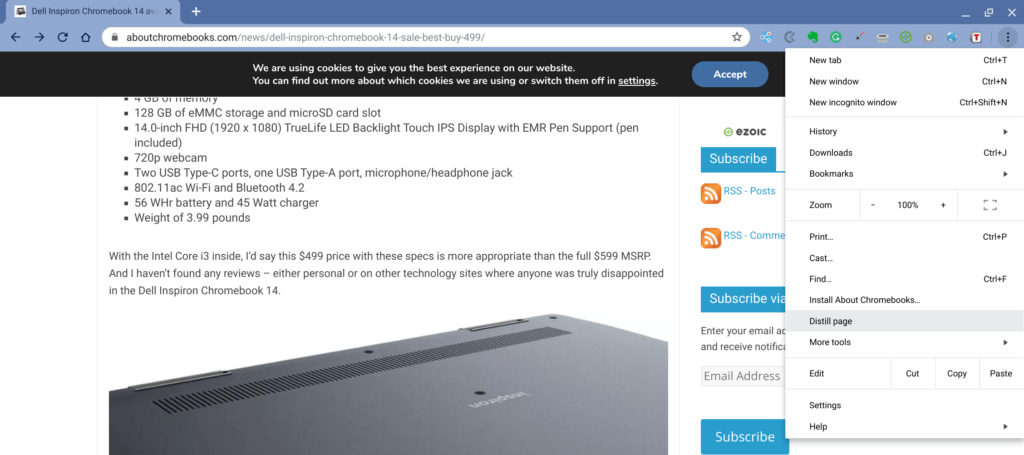
    A new Chromium code commit indicates that reader mode will get its own toggle switch icon in the omnibox.

    Here’s a description of the upcoming change:

    Display Reader Mode icon in omnibox.

    This adds an icon that toggles Reader Mode on and off for the current
    web contents. It is only visible when the enable-dom-distiller switch
    is set to true, either via command line or via chrome://flags.

    Frankly, this is how this feature should have rolled out in the first place from a usability standpoint. However, as is often the case with Chrome OS, functionality – often hidden and not explained well – comes first and refinement then follows. The new icon may also have an explainer for users upon first appearing:

    As for when this icon switch will follow, I can’t say yet.

    There’s no release date tagged to the bug for this functionality, which is still listed as a “work in progress”. Additionally, this new reader mode icon won’t be just for Chromebooks; it will arrive on the Chrome browser for all supported platforms.

    Kevin Tofel
    • Website

    After spending 15 years in IT at Fortune 100 companies, Kevin turned a hobby into a career and began covering mobile technology in 2003. He writes daily on the industry and has co-hosted the weekly MobileTechRoundup podcast since 2006. His writing has appeared in print (The New York Times, PC Magazine and PC World) and he has been featured on NBC News in Philadelphia.

    Best of AI

    Imagen AI: The Best Photo Editing AI In 2026

    April 21, 2026

    Alphafold AI from Google Deepmind 2026

    April 21, 2026

    Agentic AI Pindrop Anonybit: The Future of Secure Identity Verification

    April 17, 2026

    Google Bard Statistics And User Data 2026

    April 10, 2026

    Azure OpenAI Explained

    April 10, 2026
    Trending Stats

    Chromebook Resale Value Depreciation Statistics 2026

    April 27, 2026

    ChromeOS App Ecosystem Growth Statistics 2026

    April 25, 2026

    Chromebook vs Tablet Usage In Education Statistics 2026

    April 23, 2026

    ChromeOS Update Frequency Statistics 2026

    April 22, 2026

    Chromebook Wi-Fi Performance Statistics 2026

    April 18, 2026
    • About
    • Tech Guest Post
    • Contact
    • Privacy Policy
    • Sitemap
    © 2026 About Chrome Books. All rights reserved.

    Type above and press Enter to search. Press Esc to cancel.