

Close Menu
    Facebook X (Twitter) Instagram
    • About
    • Privacy Policy
    • Write For Us
    • Newsletter
    • Contact
    Instagram
    About ChromebooksAbout Chromebooks
    • News
      • Stats
    • AI
    • How to
      • DevOps
      • IP Address
    • Apps
    • Business
    • Q&A
      • Opinion
    • Gaming
      • Google Games
    • Blog
    • Podcast
    • Contact
    About ChromebooksAbout Chromebooks
    News

    Did I miss the ChromeOS 108 virtual desk app switching improvement?

    Kevin TofelBy Kevin TofelDecember 19, 2022Updated:September 12, 2025No Comments3 Mins Read
    Share
    Facebook Twitter LinkedIn Pinterest

    Updated. Although ChromeOS 108 rolled out a few weeks ago, I think I missed a new, useful feature. There’s a ChromeOS 108 virtual desk app switching improvement with the Alt-Tab keyboard shortcut. The option lets you use this keyboard shortcut across your virtual desks or just on the current desk. And Google is working on another related feature to cycle through windows in the active application.

    I didn’t enable an experimental flag for this new feature. I simply noticed it this morning on my Chromebook as I pressed Alt-Tab on my laptop keyboard.

    When I switched between apps using Alt-Tab this morning, this is what I saw:
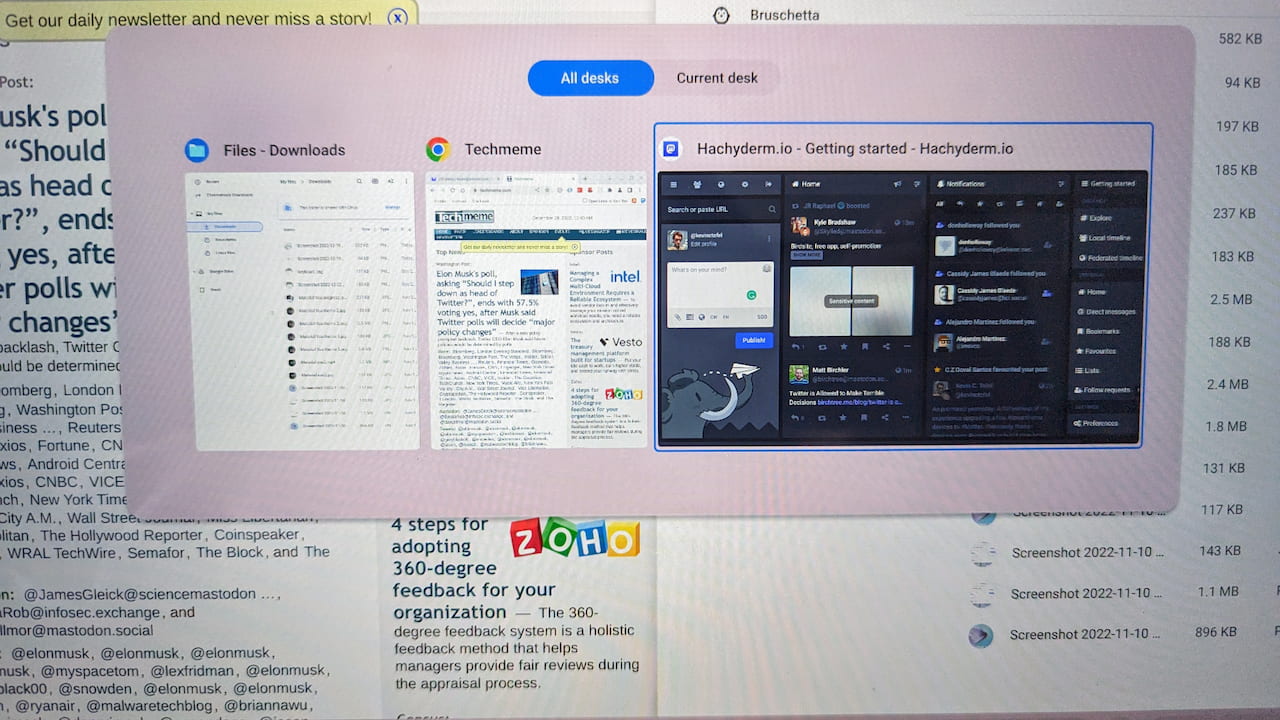
    ChromeOS 110 improves virtual desk app switching with a new option

    Instead of simply showing all of my open windows and apps to cycle through, there are two new options. I don’t recall seeing this with ChromeOS 107, or a prior release, but perhaps I missed it?

    Above I have the default option displaying open apps on “All desks.” This is how ChromeOS currently works although it doesn’t show the two view options. You simply keep clicking Alt-Tab to switch between any of your open apps.

    However, with ChromeOS 108, I can now limit the window cycling and selection to the current virtual desk only, as shown below.
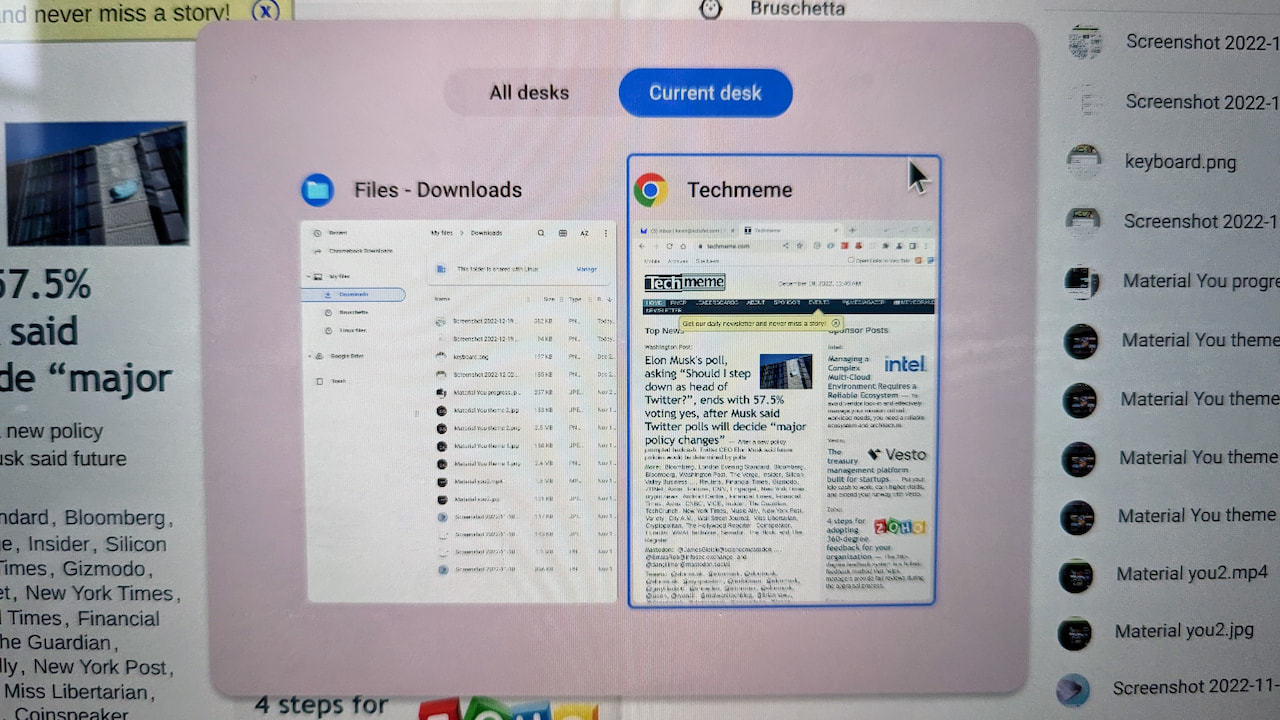
    ChromeOS 110 showing apps on the current virtual desk only

    For folks like me that manage app activities on multiple virtual desks, this is pretty handy. You don’t need to see every open app when cycling through windows if you don’t want to. Instead, you can focus on apps within a virtual desk.

    I did notice a related experimental flag called “Same App Window Cycling”, as well. From what I can gather, it will use “Alt+ ” keyboard shortcut to cycle through different windows within the same application.

    I’m not quite sure how that will work as currently if you press the Alt and + keys at the same time, ChromeOS maximizes the current application. An Alt and – key minimizes it. Perhaps I’m missing something, or Google’s description of this experimental feature isn’t correctly worded.

    I’ll watch that flag and see what comes of it. In the meantime, I’m using the new Alt-Tab switcher as I used to, but with the added bonus of limiting it to a single virtual desk in ChromeOS 108.

    Update on 12/20/2022:

    It was me. I read the Google code description wrong on the experimental feature for cycling through same app windows.

    By pressing Alt plus the single quote key, you can cycle through windows in a single app, such as multiple tabs in the browser. Thanks to CZ Productions on Twitter for the catch:

    @michaelperrigo @GabrielBrangers @chromeunboxed @jojothetechie @robby_payne @KevinCTofel
    You can now move through windows of the same app (For Eg: Chrome Window 1 & Window 2) by pressing Alt + `. It is a pretty cool feature for people who multitask a lot…. pic.twitter.com/PPpVW4Qb6N

    — C2 Productions (@cr_c2cv) December 20, 2022
    Chromebook Virtual Desks Chromebooks ChromeOS ChromeOS 108 ChromeOS 108 virtual desk Virtual Desks on Chromebooks
    Share. Facebook Twitter Pinterest LinkedIn Tumblr
    Kevin Tofel
    • Website

    After spending 15 years in IT at Fortune 100 companies, Kevin turned a hobby into a career and began covering mobile technology in 2003. He writes daily on the industry and has co-hosted the weekly MobileTechRoundup podcast since 2006. His writing has appeared in print (The New York Times, PC Magazine and PC World) and he has been featured on NBC News in Philadelphia.

    Related Posts

    Auto DraftStarbucks Partner Hours: Manual to Managing Work Schedules

    January 26, 2026

    Anon Vault For Private Cloud Storage

    January 23, 2026

    GitHub Copilot Statistics [2026]

    January 7, 2026

    Comments are closed.

    Best of AI

    Chub AI Statistics And User Trends 2026

    February 5, 2026

    Make-A-Video Statistics 2026

    January 30, 2026

    Stable Video Diffusion User Trends And Statistics 2026

    January 29, 2026

    VALL-E Statistics 2026

    January 28, 2026

    StarCoder Statistics And User Trends 2026

    January 27, 2026
    Trending Stats

    Google Penalty Recovery Statistics 2026

    January 30, 2026

    Search engine operators Statistics 2026

    January 29, 2026

    Most searched keywords on Google

    January 27, 2026

    Ahrefs Search Engine Statistics 2026

    January 19, 2026

    Pay Per Click Advertising Statistics 2026

    January 16, 2026
    • About
    • Write For Us
    • Contact
    • Privacy Policy
    • Sitemap
    © 2026 About Chrome Books. All rights reserved.

    Type above and press Enter to search. Press Esc to cancel.