

Close Menu
    Facebook X (Twitter) Instagram
    • About
    • Privacy Policy
    • Write For Us
    • Newsletter
    • Contact
    Instagram
    About ChromebooksAbout Chromebooks
    • Linux
    • News
      • Stats
      • Reviews
    • AI
    • How to
      • DevOps
      • IP Address
    • Apps
    • Business
    • Q&A
      • Opinion
    • Gaming
      • Google Games
    • Blog
    • Podcast
    • Contact
    About ChromebooksAbout Chromebooks
    News

    Acer Chromebook Tab 10 user manual available, indicating direct sales soon

    Kevin TofelBy Kevin TofelJune 13, 2018Updated:September 22, 2025No Comments2 Mins Read

    After missing its initial April release date, the Acer Chromebook Tab 10 is still hard to purchase, with only third-party stores offering the first Chrome OS tablet. Acer may be readying general availability, however, now that the Acer Chromebook Tab 10 user manual(PDF) is on the company’s support site.

    I’ve been checking Acer’s support site daily for the manual and it finally showed up. There aren’t many surprises in the manual, since Acer shared all of the specs and features when it announced the Chrome tablet back in March. In case you missed that news, here’s a quick rundown of what you get for $329:

    • 9.7-inch IPS touchscreen display at 2048 x 1536 resolution
    • A 2 GHz RockChip processor (the same as you’ll find in the Samsung Chromebook Plus)
    • 4 GB of RAM and 32 GB of integrated storage, plus a microSD card slot for additional storage
    • Front-facing 2 MP camera, rear-facing 5 MP camera
    • 802.11ac Wi-Fi and Bluetooth 4.1
    • Wacom digitizer and included stylus
    • Weight of 1.2 pounds

    Although you probably want to use the included Acer power adapter for charging the device through its USB Type C port, you will have other options. The Acer Chromebook Tab 10 says the port supports 45W power bricks with at either 5, 9, 15 or 20V.
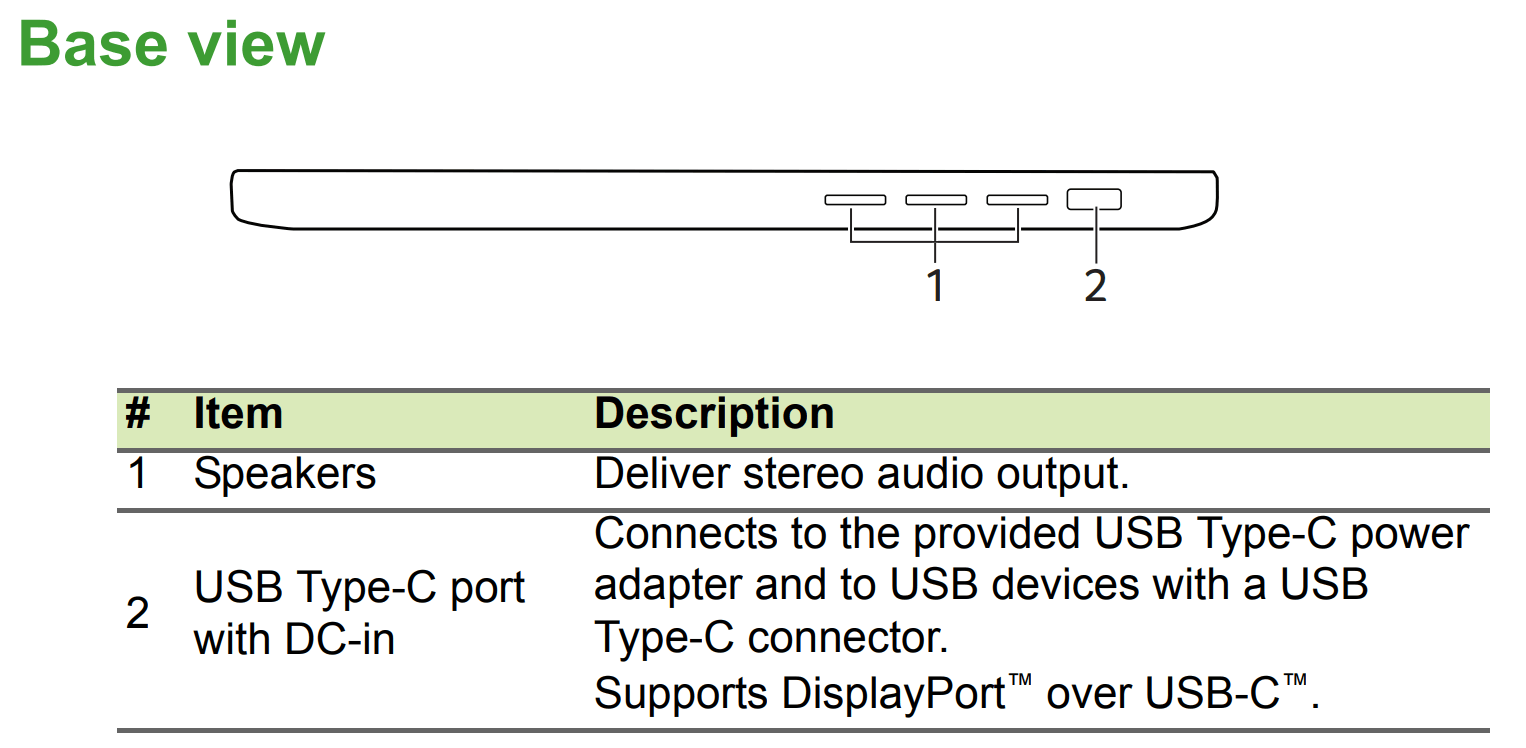
    Acer Chromebook Tab 10 base functions

    And if you’re familiar with any current Chromebook that includes a stylus, the Acer Chromebook Tab 10 works just like those: Remove the stylus and you’ll see a pop-up menu showing various pen functions.
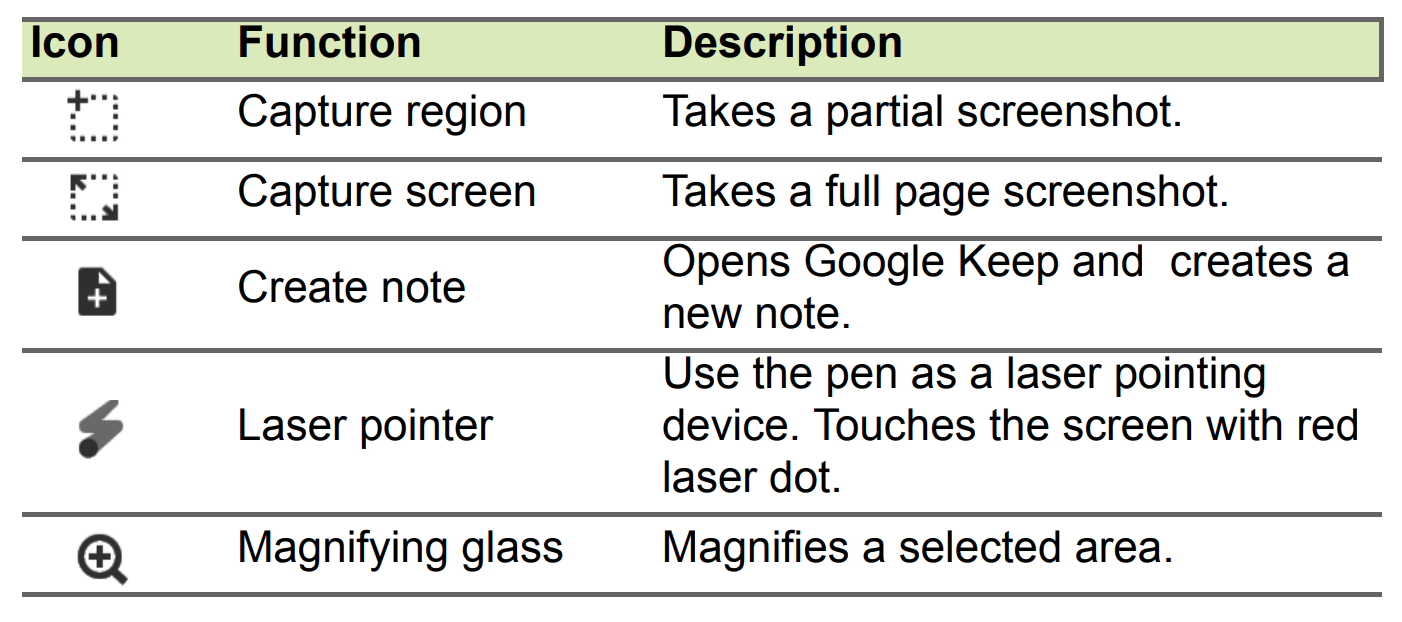
    Acer Chromebook Tab 10 pen options

    With the user manual now available, I’m hoping we see direct sales of this tablet from Acer begin within the next week or two.

    Keep in mind that the device is meant for the education market, so if you plan to buy a Chromebook Tab 10 for personal / consumer use, you’ll want to keep your expectations in check when it comes to build quality, performance and the like. It should be fine for a basic Chrome OS device and Android app support, but you’ll get a more powerful detachable, but larger, tablet with the $599 HP Chromebook X2.

    Kevin Tofel
    • Website

    After spending 15 years in IT at Fortune 100 companies, Kevin turned a hobby into a career and began covering mobile technology in 2003. He writes daily on the industry and has co-hosted the weekly MobileTechRoundup podcast since 2006. His writing has appeared in print (The New York Times, PC Magazine and PC World) and he has been featured on NBC News in Philadelphia.

    Best of AI

    Chub AI Explained

    May 6, 2026

    Stable Diffusion AI: Free Text To Image AI Generator

    May 5, 2026

    Imagen AI: The Best Photo Editing AI In 2026

    April 21, 2026

    Alphafold AI from Google Deepmind 2026

    April 21, 2026

    Agentic AI Pindrop Anonybit: The Future of Secure Identity Verification

    April 17, 2026
    Trending Stats

    Education Sector Chromebook Adoption Statistics 2026

    May 4, 2026

    ChromeOS Data Usage Patterns And Statistics 2026

    May 2, 2026

    Auto Update Expiration (AUE) In Chromebooks Statistics 2026

    May 2, 2026

    Chromebook Vs IPad Adoption In Schools Statistics 2026

    May 1, 2026

    ChromeOS Accessibility Feature Usage Statistics 2026

    April 28, 2026
    • About
    • Tech Guest Post
    • Contact
    • Privacy Policy
    • Sitemap
    © 2026 About Chrome Books. All rights reserved.

    Type above and press Enter to search. Press Esc to cancel.