

Close Menu
    Facebook X (Twitter) Instagram
    • About
    • Privacy Policy
    • Write For Us
    • Newsletter
    • Contact
    Instagram
    About ChromebooksAbout Chromebooks
    • Linux
    • News
      • Stats
      • Reviews
    • AI
    • How to
      • DevOps
      • IP Address
    • Apps
    • Business
    • Q&A
      • Opinion
    • Gaming
      • Google Games
    • Blog
    • Podcast
    • Contact
    About ChromebooksAbout Chromebooks
    News

    Another Chrome OS 91 Stable Channel update has borked user’s Chromebooks

    Kevin TofelBy Kevin TofelJuly 19, 2021Updated:September 22, 2025No Comments2 Mins Read

    I hope this isn’t becoming a trend, but a second Chrome OS 91 Stable Update has caused issues for Chromebook owners. An announced update to version 91.0.4472.165 was pushed out recently and it locked people out of their devices. Android Central noted the issue earlier today and a kind Redditor created instructions to work around the problem.

    The issue appears related to account verification, which… is pretty important on a Chromebook. If you can’t log in with your Google account, you can’t access user data. You can log into Guest Mode on the affected device, but that’s a very temporary solution.
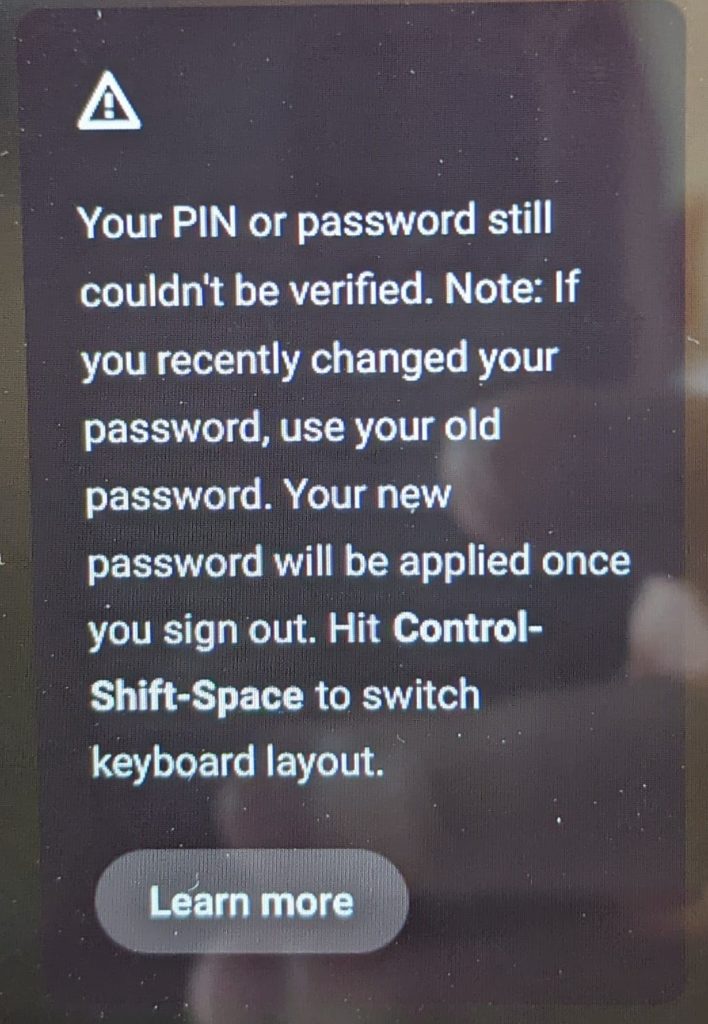
    Chrome OS 91 Stable Channel update bug

    Google has since pulled the update, based on the Chrome release matrix here. If you’re one of the unlucky few that can’t get into your Chromebook, there is an option as noted in the Reddit link.

    First, you can powerwash and revert your device, which will restore the prior version of Chrome OS 91 Stable Channel. Of course, that’s a factory reset, so any locally stored data will be deleted during this process. Unless you have that data backed up somewhere, it’s gone with a powerwash.

    (#ProTip: This is why I don’t store any data locally on my Chromebook. App installs are one thing but they can easily be replaced.)

    I was going to recommend option two, which is to change from Chrome OS 91 Stable to the Chrome OS 92 Beta Channel. That would upgrade the OS but keep your existing data. Unfortunately, if you can’t log in to your Chromebook, you can’t access Settings to change the channel. So it’s either Powerwash or wait and see if Google can find a fix that keeps your local data.

    With another high-impact bug in a prior Chrome OS 91 Stable release just a few weeks ago, this isn’t a good look for Google. Or for Chromebooks, which are supposed to just boot up and work with seamless updates. Changing the Chrome OS release schedule from 6 to 4 weeks later this year is only going to put more pressure on the QA testers to keep issues like this from happening again.

    Kevin Tofel
    • Website

    After spending 15 years in IT at Fortune 100 companies, Kevin turned a hobby into a career and began covering mobile technology in 2003. He writes daily on the industry and has co-hosted the weekly MobileTechRoundup podcast since 2006. His writing has appeared in print (The New York Times, PC Magazine and PC World) and he has been featured on NBC News in Philadelphia.

    Best of AI

    What Does Adobe Firefly AI Do?

    June 16, 2026

    Is Joyland AI Safe For Kids?

    June 12, 2026

    LMArena AI: Chatbot Ranking Platform 2026

    May 27, 2026

    Will AI Take Over the World

    May 25, 2026

    AI21 Jurassic Statistics 2026: Model Size, Usage and AI Performance Trends

    May 19, 2026
    Trending Stats

    Chromebook Storage Usage Statistics 2026: Device Storage Consumption Trends

    June 18, 2026

    Conversational AI Market Statistics 2026: Chatbot Usage And Enterprise Deployment

    June 17, 2026

    Chromebook Gaming Usage Statistics 2026: Player Engagement And Usage Reports

    June 17, 2026

    Chromebook Battery Degradation Statistics 2026: Lifecycle Performance Testing Data

    June 15, 2026

    Chromebook Touchscreen vs Non-Touchscreen Usage Statistics 2026: Device Interaction and Form Factor Data

    June 11, 2026
    • About
    • Tech Guest Post
    • Contact
    • Privacy Policy
    • Sitemap
    © 2026 About Chrome Books. All rights reserved.

    Type above and press Enter to search. Press Esc to cancel.