

Close Menu
    Facebook X (Twitter) Instagram
    • About
    • Privacy Policy
    • Write For Us
    • Newsletter
    • Contact
    Instagram
    About ChromebooksAbout Chromebooks
    • Linux
    • News
      • Stats
      • Reviews
    • AI
    • How to
      • DevOps
      • IP Address
    • Apps
    • Business
    • Q&A
      • Opinion
    • Gaming
      • Google Games
    • Blog
    • Podcast
    • Contact
    About ChromebooksAbout Chromebooks
    News

    Chrome OS change expected to bring 50% faster palm rejection on Chromebooks

    Kevin TofelBy Kevin TofelJanuary 20, 2022Updated:September 22, 2025No Comments2 Mins Read

    If you’ve used a Chromebook and a stylus, you might have noticed that sometimes the native palm rejection isn’t as quick as you might like. You can see this when resting your hand on the display while using a pen, for example. Too much latency, or delay, and the Chromebook registers your hand as a touch rather than using the pen for input. An upcoming change to Chrome OS is expected to bring a 50% speed boost for faster palm rejection on Chromebooks.

    Since Chrome OS 90, Google has used a neural network and training to manage palm rejection on Chromebooks. Recent code changes point to “a new version of neural palm model (v2)” to improve the user experience.

    It’s too early in the code change for me to even test this on a Chromebook today. The two experimental flags to enable the speed boost aren’t showing, even in the Dev Channel of Chrome OS 99. But if you want to keep an eye out for them in the future, they’ll be found at chrome://flags#enable-neural-palm-rejection-model-v2andchrome://flags#enable-neural-palm-adaptive-hold.

    That second one has me stumped little as I’m not aware of what “adaptive hold” means. It’s referenced in the code commit as “support of adaptive hold, which can hold most of palms really early.” Since it references the world “hold”, perhaps this is some optimization for the edges of a Chromebook. That’s where you’re most likely to be holding the device when using a stylus.

    Note that this change has nothing to do with pen latency. That’s the delay you see when dragging a stylus across your screen and the digital ink isn’t keeping up. I know that some apps are better than others when it comes to this type of latency; I recommend trying Squid for Android as it seems to have the least latency in this regard.
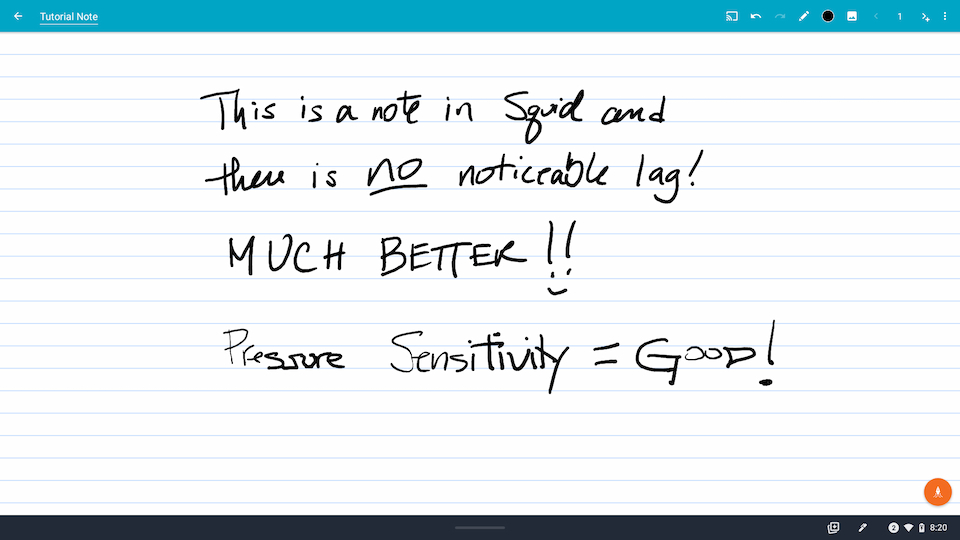
    Squid on Android with palm rejection for Chromebooks

    There’s no timetable or release number that I can see associated with this upcoming change, so I won’t hazard a guess on when it will arrive. Just know that it’s coming. Thanks to the power and science of neural networks used in artificial intelligence, the overall ink experience should be improving on Chromebooks.

    Kevin Tofel
    • Website

    After spending 15 years in IT at Fortune 100 companies, Kevin turned a hobby into a career and began covering mobile technology in 2003. He writes daily on the industry and has co-hosted the weekly MobileTechRoundup podcast since 2006. His writing has appeared in print (The New York Times, PC Magazine and PC World) and he has been featured on NBC News in Philadelphia.

    Best of AI

    Chub AI Explained

    May 6, 2026

    Stable Diffusion AI: Free Text To Image AI Generator

    May 5, 2026

    Imagen AI: The Best Photo Editing AI In 2026

    April 21, 2026

    Alphafold AI from Google Deepmind 2026

    April 21, 2026

    Agentic AI Pindrop Anonybit: The Future of Secure Identity Verification

    April 17, 2026
    Trending Stats

    Education Sector Chromebook Adoption Statistics 2026

    May 4, 2026

    ChromeOS Data Usage Patterns And Statistics 2026

    May 2, 2026

    Auto Update Expiration (AUE) In Chromebooks Statistics 2026

    May 2, 2026

    Chromebook Vs IPad Adoption In Schools Statistics 2026

    May 1, 2026

    ChromeOS Accessibility Feature Usage Statistics 2026

    April 28, 2026
    • About
    • Tech Guest Post
    • Contact
    • Privacy Policy
    • Sitemap
    © 2026 About Chrome Books. All rights reserved.

    Type above and press Enter to search. Press Esc to cancel.