

Close Menu
    Facebook X (Twitter) Instagram
    • About
    • Privacy Policy
    • Write For Us
    • Newsletter
    • Contact
    Instagram
    About ChromebooksAbout Chromebooks
    • Linux
    • News
      • Stats
      • Reviews
    • AI
    • How to
      • DevOps
      • IP Address
    • Apps
    • Business
    • Q&A
      • Opinion
    • Gaming
      • Google Games
    • Blog
    • Podcast
    • Contact
    About ChromebooksAbout Chromebooks
    News

    Chrome OS getting an optimized interface for touch-capable Chromebooks and Chrome tablets

    Kevin TofelBy Kevin TofelApril 10, 2018Updated:September 15, 2025No Comments2 Mins Read

    With more touch-capable Chromebooks and Chrome tablets hitting the market, it makes sense for some updates to make the experience better. That’s exactly what’s happening, at least in the Canary Channel of Chrome OS, according to Google’s “Happiness Evangelist”, François Beaufort.
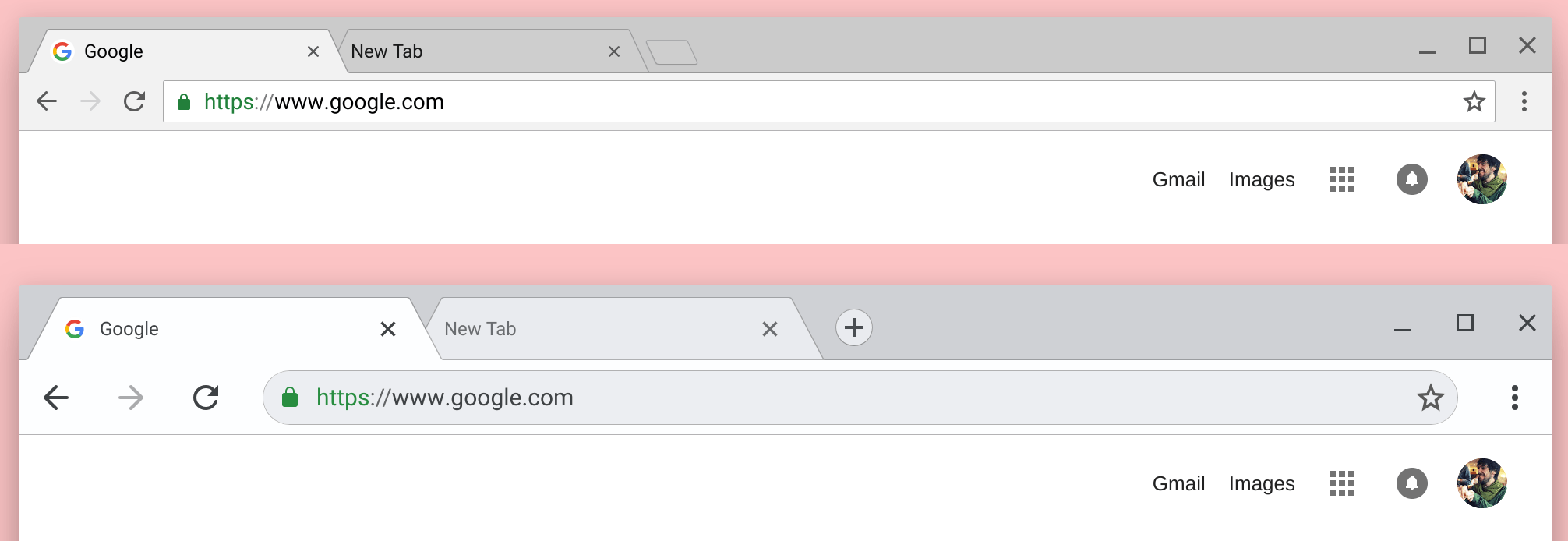
    Chrome OS touch optimized

    In a screenshot Beaufort shared on Google+, you can see both the current and new designs. The changes might be subtle to the eye but they’re important to your hands: larger tabs, buttons, icons and other touch points, as well as the rounded omnibox.

    If the feature makes its way to general availability on the Stable channel, as of now the new look will automatically appear when Chrome OS detects it’s running on a touch capable device. It’s possible that by adjusting the chrome://flags/#top-chrome-md flag on a non-touch Chromebook or Chrome tablet will enable the look, but we’ll have to see.

    Using my touch-capable Pixelbook with the default screen settings, I generally get around OK with the current interface. But occasionally, I’ll miss a touch target here and there, even on the 12.3-inch display, so these changes will be welcome. With its smaller 9.7-inch screen, I suspect the updated interface will be even more welcome on the Acer Chromebook Tab 10. Of course, that tablet is expected to be available later this month so I don’t think it will launch with the touch-optimized changes still in the works.

    Kevin Tofel
    • Website

    After spending 15 years in IT at Fortune 100 companies, Kevin turned a hobby into a career and began covering mobile technology in 2003. He writes daily on the industry and has co-hosted the weekly MobileTechRoundup podcast since 2006. His writing has appeared in print (The New York Times, PC Magazine and PC World) and he has been featured on NBC News in Philadelphia.

    Best of AI

    Chub AI Explained

    May 6, 2026

    Stable Diffusion AI: Free Text To Image AI Generator

    May 5, 2026

    Imagen AI: The Best Photo Editing AI In 2026

    April 21, 2026

    Alphafold AI from Google Deepmind 2026

    April 21, 2026

    Agentic AI Pindrop Anonybit: The Future of Secure Identity Verification

    April 17, 2026
    Trending Stats

    External Monitor Usage on Chromebooks Statistics 2026

    May 15, 2026

    Chromebook Keyboard Failure Rates Statistics 2026

    May 13, 2026

    Chromebook Boot Failure and Recovery Statistics 2026

    May 7, 2026

    Linux Usage on Chromebooks Statistics 2026

    May 7, 2026

    Education Sector Chromebook Adoption Statistics 2026

    May 4, 2026
    • About
    • Tech Guest Post
    • Contact
    • Privacy Policy
    • Sitemap
    © 2026 About Chrome Books. All rights reserved.

    Type above and press Enter to search. Press Esc to cancel.