


Following in the footsteps of the old Chromebit devices, the Lenovo Chromebox Micro was announced on Monday. The downsized Chromebox Micro is primarily meant for digital signage but it’s a full ChromeOS device in its own right. Lenovo introduced the Chromebox Micro at the Digital Signage Experience (DSE) show in Las Vegas.
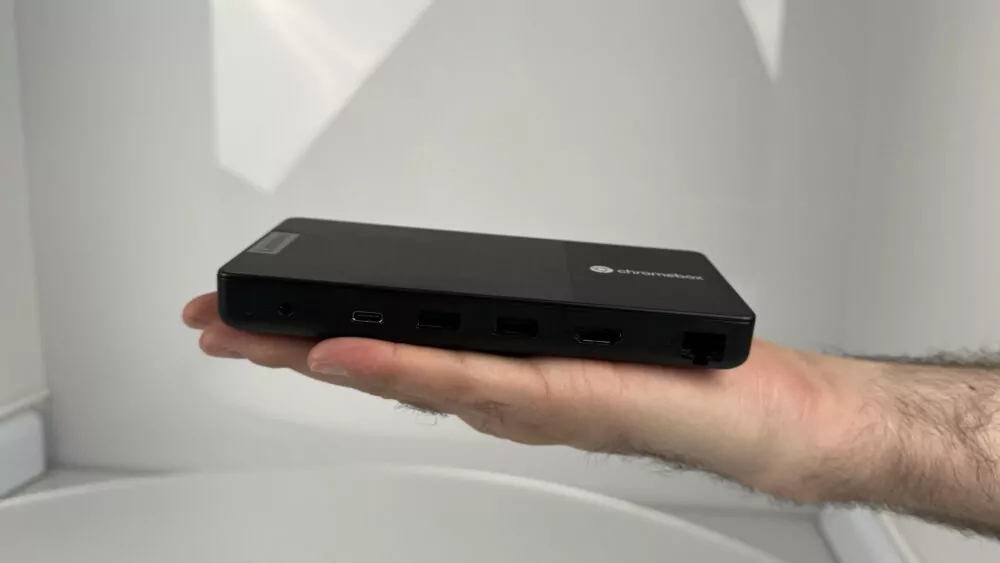
While consumer and enterprise Chromebooks have ranged in performance up to powerful computers, the Lenovo Chromebox Micro is a little more humble.
Powered by an Intel Celeron N4500, this small computer is paired with 8 GB of memory and 32 GB of local eMMC storage. Additional storage capacity is available through a micro SD card slot. The Chromebox Micro also includes a pair of both USB Type-C and USB Type-A ports, full HDMI, Ethernet, and an audio jack. This Chromebox can drive up to a pair of 4K displays
Ok, that sounds like the specs for an entry-level Chromebook, right? And they are. Remember though that the Lenovo Chromebox Micro is purpose-built for digital signage powered by ChromeOS.
You don’t need tons of processing power, for example, to show digital displays. And you don’t have to pay that much for the capabilities either: Lenovo expects the fanless Chromebox Micro to cost $219.
Just from the news itself, I’m intrigued by the Lenovo Chromebox Micro. Mainly because of the size, which is 6.4 x 3.1 x 0.8 inches (163 x 79 x 19.7 mm). Think about it: That’s around half the size and volume of a traditional Chromebook.
As a new ChromeOS form factor, I find it interesting. Indeed, I’m very into mini PCs myself, having bought two in 2023.
One is used as a desktop with a 34-inch ultrawide monitor while the other runs as a networked home server. The positive experience with these showed me how good a $299 Chromebox could be with the right internals.
The Lenovo Chromebox Micro doesn’t have those internals but it does cost less. And to be fair, it’s not meant as a consumer device.
That doesn’t make me stop wanting it to be one, particularly if it ever got a boost in the CPU. I don’t mind adding my own keyboard and monitor to a practically invisible computer. In my use case, it actually is because I have the mini PC behind the massive monitor. Of course, the Lenovo Chromebox Micro can be out of sight as well by attaching it behind a screen with the mounted screw holes.
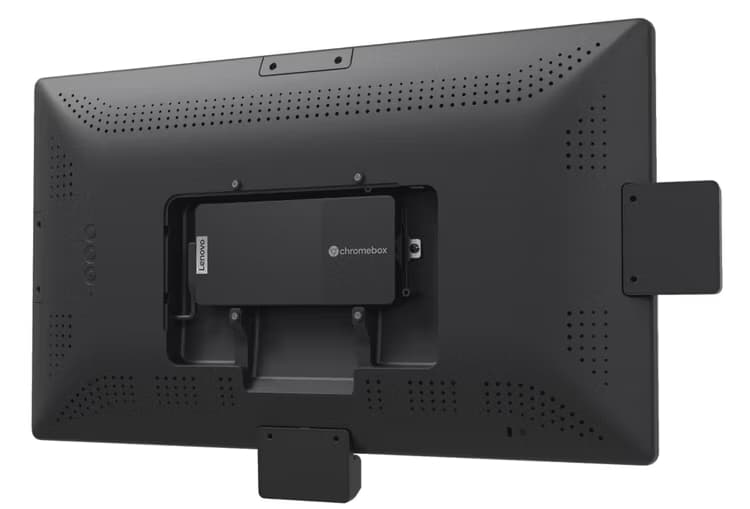
Lenovo is actually using that mounting solution to its advantage with a pair of monitors from Instorescreen made specifically to house the Chromebox Micro. I suspect most of these small Chromeboxes will be attached to larger displays but I like the clever holding area of these screens.
There’s little chance you or I will be able to purchase a Lenovo Chromebox Micro, although it might be possible in the future. What do you think of this ChromeOS device and, more importantly, the form factor and potential capabilities?
