

Close Menu
    Facebook X (Twitter) Instagram
    • About
    • Privacy Policy
    • Write For Us
    • Newsletter
    • Contact
    Instagram
    About ChromebooksAbout Chromebooks
    • News
      • Stats
    • AI
    • How to
      • DevOps
      • IP Address
    • Apps
    • Business
    • Q&A
      • Opinion
    • Gaming
      • Google Games
    • Blog
    • Podcast
    • Contact
    About ChromebooksAbout Chromebooks
    News

    My favorite hidden Chrome OS feature that you’re probably not using

    Kevin TofelBy Kevin TofelDecember 7, 2021Updated:September 17, 2025No Comments3 Mins Read
    Share
    Facebook Twitter LinkedIn Pinterest

    Like most of you, I browse the web. A lot. Probably for 60+ hours a week between work and school, I’m using a web browser with most of that time reading articles and stories. You might not browse as much as I do; in fact, I hope not. Even if you only surf for a third of that time, my favorite hidden Chrome OS feature makes this a better experience.

    This feature is called “Reader Mode” and it’s actually been around since 2019! Essentially, it reduces the clutter from a web page to give you a clean, relaxing interface. And yet, even arriving more than two years ago, this isn’t an easy-to-find feature in Chrome OS. It’s still hidden behind an experimental flag.

    Luckily, it’s easy to enable. Just copy and paste this link in your Chromebook browser: chrome://flags#enable-reader-mode. Then choose either of the Enabled options and restart your browser when prompted.
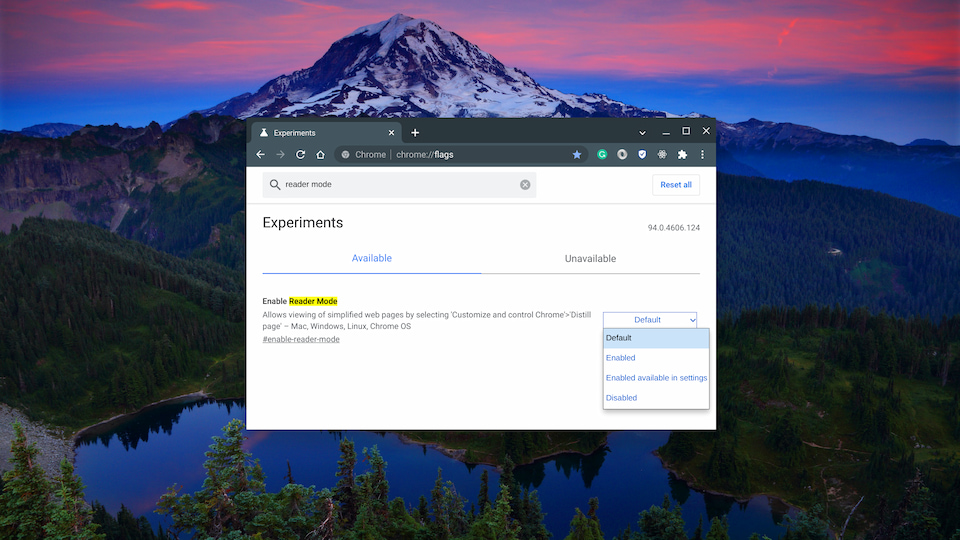
    Enable this hidden Chrome OS feature for reader mode

    Once your browser restarts, you’ll see a new icon in the browser address bar whenever you’re on an individual web page. You can see it below, next to the Bookmark star in my browser. And you can also access it from the three-button Chrome browser menu, which is also shown. I personally prefer a single click, so I use the former method and tap the icon.
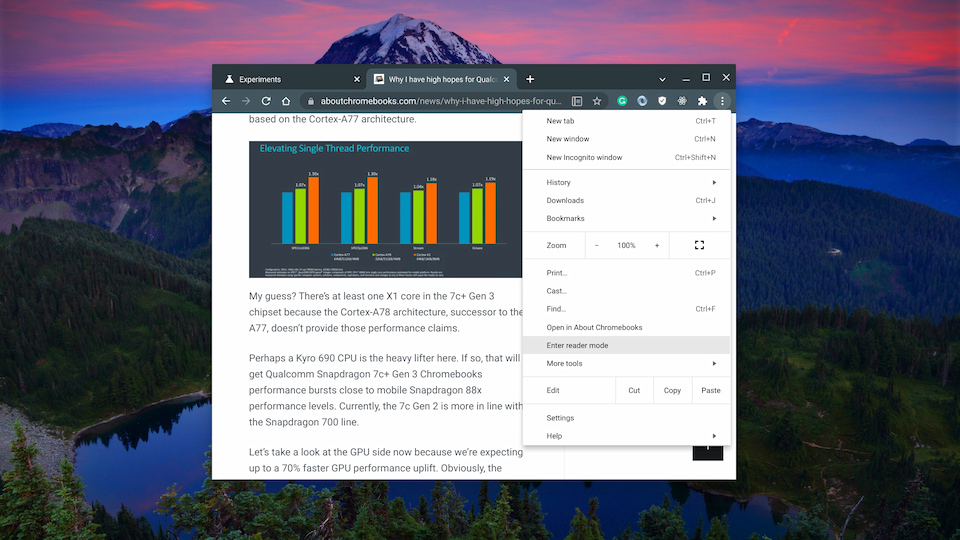
    Chrome OS Reader Mode button and menu option

    Both methods work the same, and here’s an example result to show you the output:
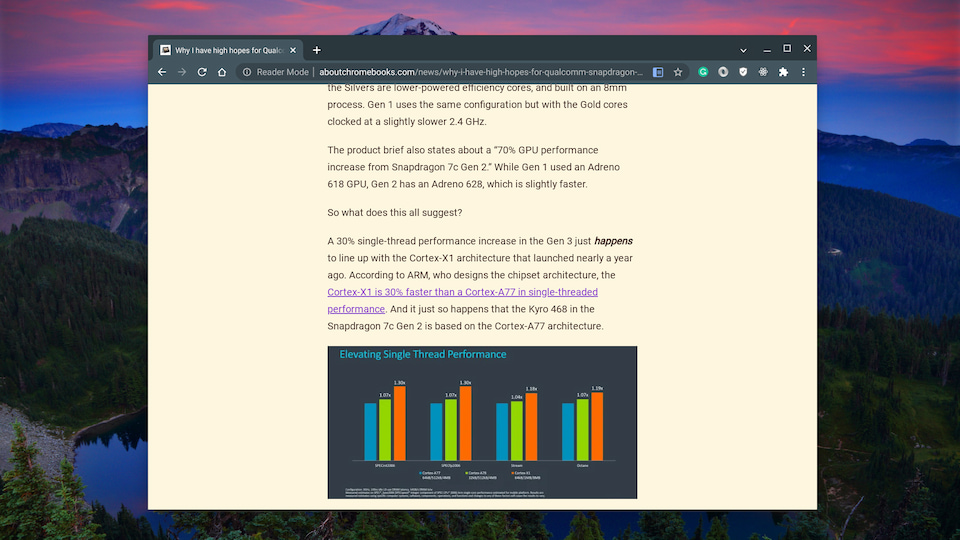
    Chrome OS Reader View mode

    Since Google originally introduced Reader Mode, it added a way to modify the background color, the text font, and the font size. To change those settings, just tap the “A” that appears above and to the right of the web content.
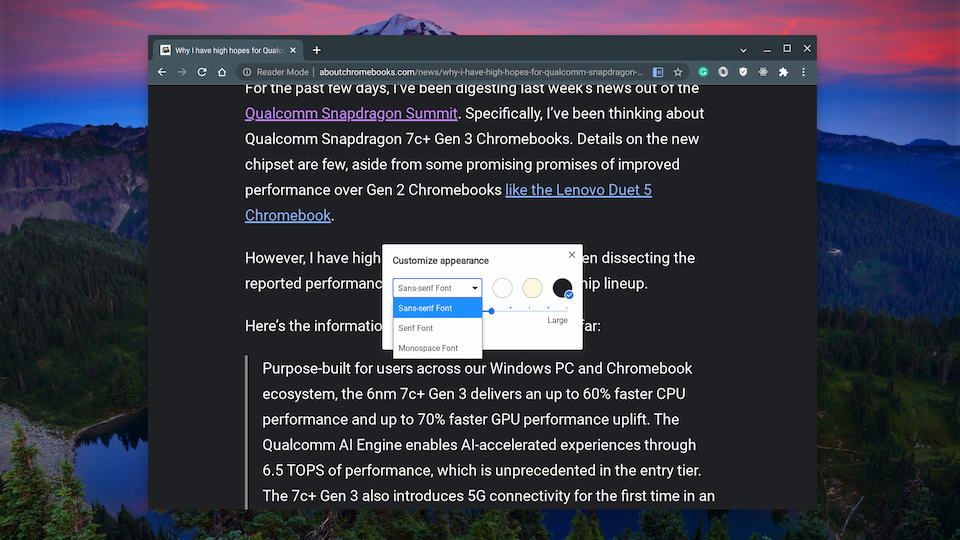
    Hidden Chrome OS feature reader mode options

    These settings come in really handy on the smaller screen of Chrome OS tablets, by the way.

    It’s true that there are third-party services and Chrome extensions that offer the same, if not more functionality. You might be familiar with them already.

    But if you just need a distraction-free web experience to read articles, the Chrome OS Reader Mode feature is up to the task. And it might be getting new functionality as well. I’ve previously covered another hidden Chrome OS feature that brings a Reading List to your Chromebook.

    That’s available now as well but Google is still tweaking it. The last time I checked, articles saved to a Reading List would be integrated into a view with Bookmarks and Reader Mode.

    Either way, this is my most-used, favorite experimental feature in Chrome OS. To be honest, I’m not sure why after all this time, it’s not an available standard setting!

    Chrome browser Chrome OS Chrome OS flags Chromebooks Productivity Reader Mode Reading List
    Share. Facebook Twitter Pinterest LinkedIn Tumblr
    Kevin Tofel
    • Website

    After spending 15 years in IT at Fortune 100 companies, Kevin turned a hobby into a career and began covering mobile technology in 2003. He writes daily on the industry and has co-hosted the weekly MobileTechRoundup podcast since 2006. His writing has appeared in print (The New York Times, PC Magazine and PC World) and he has been featured on NBC News in Philadelphia.

    Related Posts

    Auto DraftStarbucks Partner Hours: Manual to Managing Work Schedules

    January 26, 2026

    Anon Vault For Private Cloud Storage

    January 23, 2026

    How To Use SFM Compile For Manual Model Conversion

    January 15, 2026

    Comments are closed.

    Best of AI

    Chub AI Statistics And User Trends 2026

    February 5, 2026

    Make-A-Video Statistics 2026

    January 30, 2026

    Stable Video Diffusion User Trends And Statistics 2026

    January 29, 2026

    VALL-E Statistics 2026

    January 28, 2026

    StarCoder Statistics And User Trends 2026

    January 27, 2026
    Trending Stats

    Google Penalty Recovery Statistics 2026

    January 30, 2026

    Search engine operators Statistics 2026

    January 29, 2026

    Most searched keywords on Google

    January 27, 2026

    Ahrefs Search Engine Statistics 2026

    January 19, 2026

    Pay Per Click Advertising Statistics 2026

    January 16, 2026
    • About
    • Write For Us
    • Contact
    • Privacy Policy
    • Sitemap
    © 2026 About Chrome Books. All rights reserved.

    Type above and press Enter to search. Press Esc to cancel.