

Close Menu
    Facebook X (Twitter) Instagram
    • About
    • Privacy Policy
    • Write For Us
    • Newsletter
    • Contact
    Instagram
    About ChromebooksAbout Chromebooks
    • Linux
    • News
      • Stats
      • Reviews
    • AI
    • How to
      • DevOps
      • IP Address
    • Apps
    • Business
    • Q&A
      • Opinion
    • Gaming
      • Google Games
    • Blog
    • Podcast
    • Contact
    About ChromebooksAbout Chromebooks
    News

    Your Chromebook just got a green room to prep audio and video for Meet in Google Workspace

    Kevin TofelBy Kevin TofelFebruary 2, 2021No Comments2 Mins Read

    I’ve been using Google Meet much more on my Chromebook lately, given that Hangouts seems kaput for me. I suppose my transition away from Hangouts to both Meet and Chat are already in flight.

    Folks that have a Google Workspace (formerly known as G Suite) account will see a new Meet feature on their Chromebook. It’s a “green room” to test and troubleshoot before joining a Meet video call.
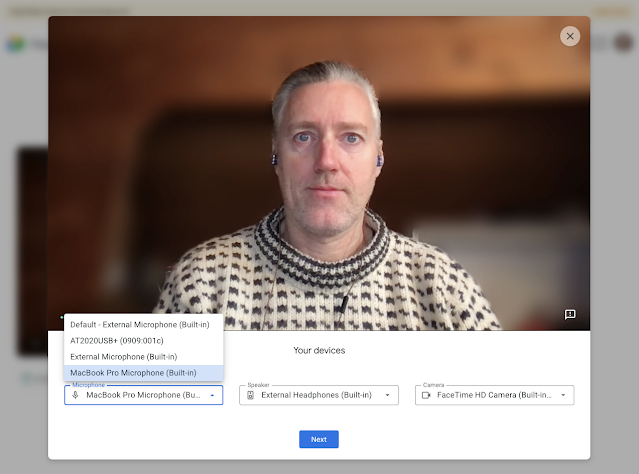
    Announced today with the rollout already starting, this change consolidates audio and video device settings to a single location in Google Meet.

    When you see the “Check your audio and video” button before joining a Meet call, click it to test and/or adjust your microphone, speakers and camera.
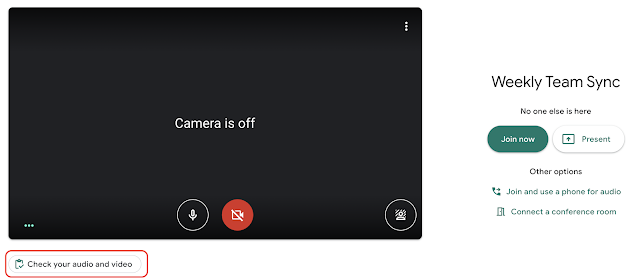
    If you don’t have a paid Google account, you won’t get to enter the “green room”; at least not yet.

    Typically, Workspace subscription accounts see new features like this first and then many of them filter down to the free Gmail accounts. Given that we’re still in a work from home situation around the world, my hope is that the “green room” appears sooner rather than later for Gmail accounts.

    Until then the rollout is specific to the following customers: Google Workspace Essentials, Business Starter, Business Standard, Business Plus, Enterprise Essentials, Enterprise Standard, and Enterprise Plus, as well as G Suite Basic, Business, Education, Enterprise for Education, and Nonprofits customers.

    I’m betting that most consumer Chromebook users just have the free Gmail account with Google. But I’m wondering: do any of you have a G Suite / Workspace account so you can use a custom domain with your email?

    If so, you’re the “admin” of your account, can manage your Chromebook, and typically enable certain features. You don’t have to with this one as it will just appear. Again, just curious!

    Kevin Tofel
    • Website

    After spending 15 years in IT at Fortune 100 companies, Kevin turned a hobby into a career and began covering mobile technology in 2003. He writes daily on the industry and has co-hosted the weekly MobileTechRoundup podcast since 2006. His writing has appeared in print (The New York Times, PC Magazine and PC World) and he has been featured on NBC News in Philadelphia.

    Best of AI

    Imagen AI: The Best Photo Editing AI In 2026

    April 21, 2026

    Alphafold AI from Google Deepmind 2026

    April 21, 2026

    Agentic AI Pindrop Anonybit: The Future of Secure Identity Verification

    April 17, 2026

    Google Bard Statistics And User Data 2026

    April 10, 2026

    Azure OpenAI Explained

    April 10, 2026
    Trending Stats

    Education Sector Chromebook Adoption Statistics 2026

    May 4, 2026

    ChromeOS Data Usage Patterns And Statistics 2026

    May 2, 2026

    Auto Update Expiration (AUE) In Chromebooks Statistics 2026

    May 2, 2026

    Chromebook Vs IPad Adoption In Schools Statistics 2026

    May 1, 2026

    ChromeOS Accessibility Feature Usage Statistics 2026

    April 28, 2026
    • About
    • Tech Guest Post
    • Contact
    • Privacy Policy
    • Sitemap
    © 2026 About Chrome Books. All rights reserved.

    Type above and press Enter to search. Press Esc to cancel.