

Close Menu
    Facebook X (Twitter) Instagram
    • About
    • Privacy Policy
    • Write For Us
    • Newsletter
    • Contact
    Instagram
    About ChromebooksAbout Chromebooks
    • Linux
    • News
      • Stats
      • Reviews
    • AI
    • How to
      • DevOps
      • IP Address
    • Apps
    • Business
    • Q&A
      • Opinion
    • Gaming
      • Google Games
    • Blog
    • Podcast
    • Contact
    About ChromebooksAbout Chromebooks
    News

    Chrome OS 77 to bring Crostini (Linux beta) to Chromebook Pixel 2015, other older devices

    Kevin TofelBy Kevin TofelAugust 20, 2019Updated:September 22, 2025No Comments2 Mins Read

    A few months ago, 9to5 Google reported on “kernelnext” in Chrome OS, with the expectation that it was a way to bring the Linux beta, also known as Project Crostini, to some older Chromebooks. Now, the results of that effort are appearing in early builds of Chrome OS 77, reports 9to5 Google: The Chromebook Pixel 2015 and eight other Chrome OS devices are getting Linux support, thanks to an updated kernel.

    Here’s a full list of the devices that have this special “kernelnext” build:

    • Acer Chromebase 24
    • Acer C670 Chromebook 11
    • Acer Chromebook 15
    • Acer Chromebox CXI2
    • ASUS Chromebox CN62
    • Dell Chromebook 13 7310
    • Google Chromebook Pixel (2015)
    • Lenovo ThinkCenter Chromebox
    • Toshiba Chromebook 2 (2015)

    As Project Crostini was in development, prior to its official release with Chrome OS 69, there was disappointment by many who found out that their Chromebooks and Chromeboxes wouldn’t see the required Linux kernel update for Crostini. It’s taken a long time but at least Linux is finally arriving.
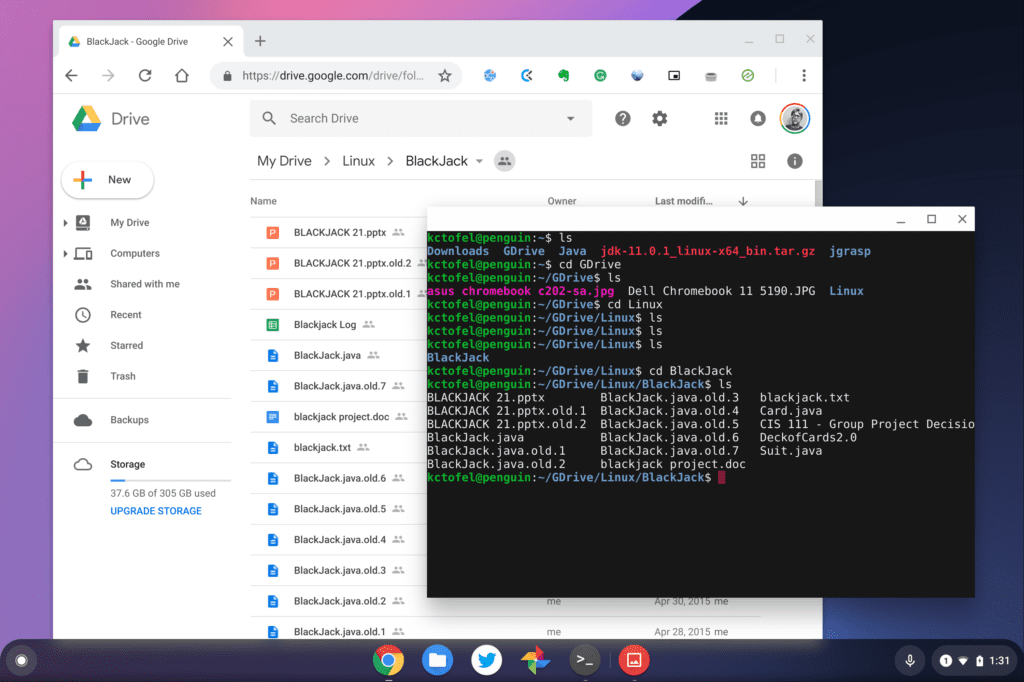
    Google Drive files on web and locally in Linux
    Google Drive files on the web and in Linux

    If you have one of the above-listed devices, you can wait for the Stable Channel release of Chrome OS 77, expected around September 17. Or if you’re feeling adventurous, you can try the Dev or Beta Channel of Chrome OS 77 now and enable the feature at chrome://flags/#enable-experimental-kernel-vm-support.

    Note that you’ll first need to make sure you have the “kernelnext” build before the flag will work. To check this, hit “About Chrome OS” in the Settings of your device and see if the Platform info ends with “kernelnext”. And if you’re new to Linux, take a look at this post to get you started with the command line.

    Kevin Tofel
    • Website

    After spending 15 years in IT at Fortune 100 companies, Kevin turned a hobby into a career and began covering mobile technology in 2003. He writes daily on the industry and has co-hosted the weekly MobileTechRoundup podcast since 2006. His writing has appeared in print (The New York Times, PC Magazine and PC World) and he has been featured on NBC News in Philadelphia.

    Best of AI

    Chub AI Explained

    May 6, 2026

    Stable Diffusion AI: Free Text To Image AI Generator

    May 5, 2026

    Imagen AI: The Best Photo Editing AI In 2026

    April 21, 2026

    Alphafold AI from Google Deepmind 2026

    April 21, 2026

    Agentic AI Pindrop Anonybit: The Future of Secure Identity Verification

    April 17, 2026
    Trending Stats

    Education Sector Chromebook Adoption Statistics 2026

    May 4, 2026

    ChromeOS Data Usage Patterns And Statistics 2026

    May 2, 2026

    Auto Update Expiration (AUE) In Chromebooks Statistics 2026

    May 2, 2026

    Chromebook Vs IPad Adoption In Schools Statistics 2026

    May 1, 2026

    ChromeOS Accessibility Feature Usage Statistics 2026

    April 28, 2026
    • About
    • Tech Guest Post
    • Contact
    • Privacy Policy
    • Sitemap
    © 2026 About Chrome Books. All rights reserved.

    Type above and press Enter to search. Press Esc to cancel.