

Close Menu
    Facebook X (Twitter) Instagram
    • About
    • Privacy Policy
    • Write For Us
    • Newsletter
    • Contact
    Instagram
    About ChromebooksAbout Chromebooks
    • News
      • Stats
    • AI
    • How to
      • DevOps
      • IP Address
    • Apps
    • Business
    • Q&A
      • Opinion
    • Gaming
      • Google Games
    • Blog
    • Podcast
    • Contact
    About ChromebooksAbout Chromebooks
    News

    A new option to code on a Chromebook: VSCode.dev

    Kevin TofelBy Kevin TofelOctober 23, 2021Updated:September 17, 2025No Comments2 Mins Read
    Share
    Facebook Twitter LinkedIn Pinterest

    I know not everyone is a developer but this news is too big not to share. Microsoft this week announced an online version of its popular VS Code integrated development environment (IDE), bringing a new option for people who want to code on a Chromebook.

    By pointing your Chromebook’s browser to https://vscode.dev/, you’ll have an online instance of VS Code that looks no different from the desktop version. That’s the IDE I’ve tended to use on my Chromebook, first for undergraduate Computer Science classes, and currently for a Masters in CS at Georgia Tech.

    Of course, up to now, I’ve had to rely on my Chromebook’s Linux feature to install the full VS Code application to code on a Chromebook. And it works well. This latest Microsoft project, however, doesn’t require an installation of any desktop app. Instead, you just work in the IDE in your browser.
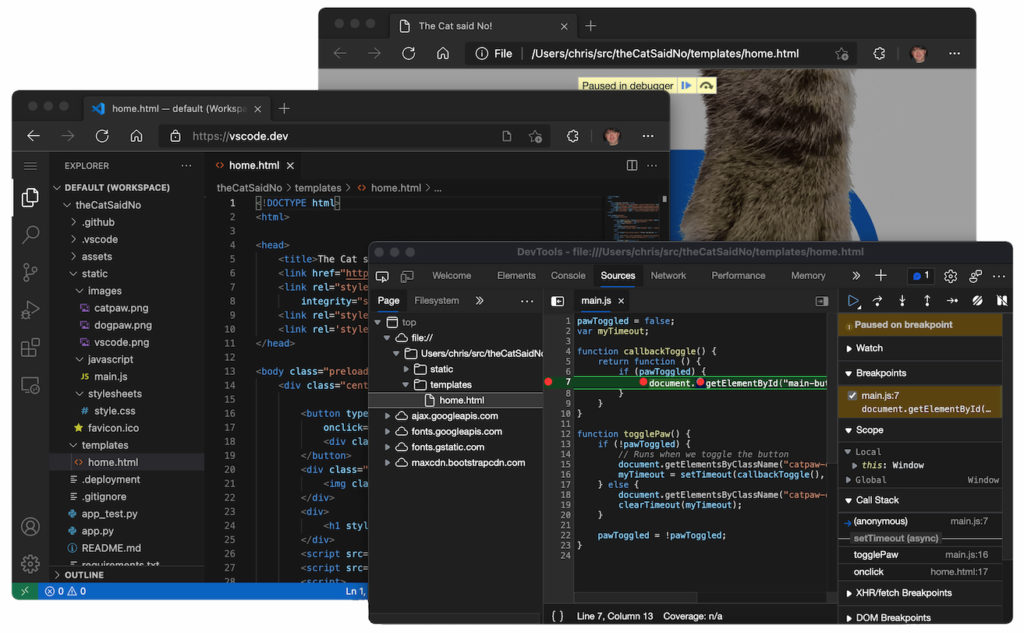
    VS Code on a Chromebook can be run in a browser.

    There is a downside though.

    Using VS Code on the web has some constraints that make it better for coding in certain languages than others. My first stumbling block was noticing that there’s no Terminal support in this implementation.

    Microsoft offers some helpful hints as to what coding experiences will be good and which will be better, based on the constraints and available features:

    Good: For most programming languages, vscode.dev gives you code syntax colorization, text-based completions, and bracket pair colorization. Using a Tree-sitter syntax tree, we’re able to provide additional experiences such as Outline/Go to Symbol and Symbol Search for popular languages such as C/C++, C#, Java, PHP, Rust, and Go.

    Better: The TypeScript, JavaScript, and Python experiences are all powered by language services that run natively in the browser. With these programming languages, you’ll get the “Good” experience plus rich single file completions, semantic highlighting, syntax errors, and more.

    Best: For many “webby” languages, such as JSON, HTML, CSS, and LESS, the coding experience in vscode.dev is nearly identical to the desktop (including Markdown preview!).

    While there are some very big limitations, the online version of VS Code could be handy for some quick development efforts. As long as you’re online, you’ve got another tool in your toolbox to code on a Chromebook!

    Chrome OS Chromebook productivity Chromebooks Computer Science Development Microsoft Programming VS Code
    Share. Facebook Twitter Pinterest LinkedIn Tumblr
    Kevin Tofel
    • Website

    After spending 15 years in IT at Fortune 100 companies, Kevin turned a hobby into a career and began covering mobile technology in 2003. He writes daily on the industry and has co-hosted the weekly MobileTechRoundup podcast since 2006. His writing has appeared in print (The New York Times, PC Magazine and PC World) and he has been featured on NBC News in Philadelphia.

    Related Posts

    Auto DraftStarbucks Partner Hours: Manual to Managing Work Schedules

    January 26, 2026

    Anon Vault For Private Cloud Storage

    January 23, 2026

    GitHub Copilot Statistics [2026]

    January 7, 2026

    Comments are closed.

    Best of AI

    VALL-E Statistics 2026

    January 28, 2026

    StarCoder Statistics And User Trends 2026

    January 27, 2026

    BLIP-2 Statistics 2026

    January 23, 2026

    AI mode Usage Statistics 2026

    January 22, 2026

    Code Llama Statistics 2026

    January 22, 2026
    Trending Stats

    Most searched keywords on Google

    January 27, 2026

    Ahrefs Search Engine Statistics 2026

    January 19, 2026

    Pay Per Click Advertising Statistics 2026

    January 16, 2026

    Google Ads Revenue 2025

    November 29, 2025

    Statistical Analysis Programs for Chromebook 2025

    November 22, 2025
    • About
    • Write For Us
    • Contact
    • Privacy Policy
    • Sitemap
    © 2026 About Chrome Books. All rights reserved.

    Type above and press Enter to search. Press Esc to cancel.