


While most of you are running Chrome OS 103, I’m testing Chrome OS 105 in the Dev Channel. I see a new flag in that version that expands upon a change from way back in version 88. And this tweaked Chrome OS 105 feature could boost Chromebook battery life.
The change has to do with throttling down and waking up JavaScript on web pages in the background. These are the tabs you might have open, for example, but aren’t actively looking at or interacting with. Chrome OS 88 introduced what Google calls an “Intensive throttling of Javascript timer wake ups” function. There are a few conditions on when these wake ups happen that you can read about in the documentation here.
Essentially, there’s a 5-minute window between wake ups for JavaScript code on a web page. The idea is that the more often the code is allowed to run, the more battery life is used by a Chromebook CPU. So limiting, or throttling, the time code can run will reduce overall energy usage.
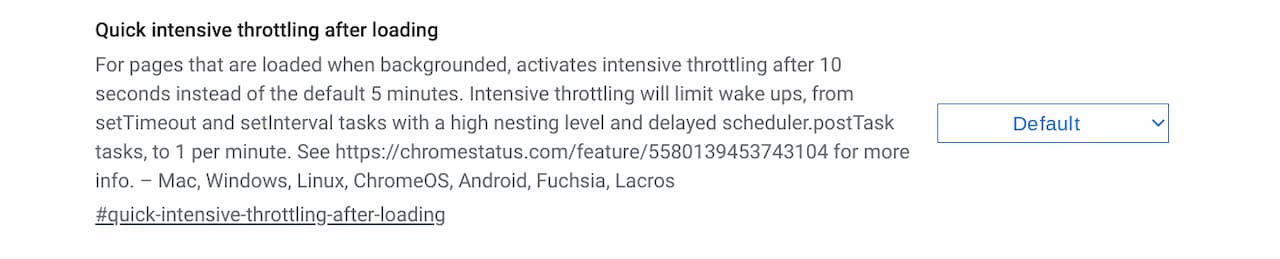
In Chrome OS 105, I see an experimental flag at chrome://flags#quick-intensive-throttling-after-loading. If you’re comfortable tweaking experimental features, enabling Chrome OS Developer Mode can unlock deeper system access and customizations.
It enables a feature called “Quick intensive timer throttling of loaded background pages” and further enhances the JavsScript timer access on background pages. It changes the grace period from the initial feature in Chrome OS 88 from 5 minutes to 10 seconds.
All of the technical bits aside, what does this Chrome OS 105 feature do in a tangible way? According to the Chromium page describing the changes:
This is expected to extend battery life. An experiment on the Canary and Dev channels did not reveal any regression to our guiding metrics and there are significant improvement[s] (~10%) to CPU time when all tabs are hidden and silent.
To be clear, I wouldn’t expect a 10% boost in Chromebook battery life over what you get today.
You have to realize that the efficiencies only affect a particular feature or use case of Chrome OS. The best way to explain this is that JavaScript code will use 10% less energy than before; there are obviously many other aspects of overall battery life.
Even so, the energy savings could be noticeable.
How many people continuously use a Chromebook with only a single browser tab open all the time? I doubt there are many and this feature wouldn’t help them. However, if you have multiple browser tabs open, something I’d bet the vast majority of Chromebook users do, then the efficiency from this Chrome OS 105 feature will kick in.
It would take highly controlled tests for me to determine the battery boost on a Chromebook from this. So I’ll refrain from doing that and let Google handle it. In the meantime, I’ll keep the new flag enabled and see if I notice any general Chromebook battery life boost for now.
