

Close Menu
    Facebook X (Twitter) Instagram
    • About
    • Privacy Policy
    • Write For Us
    • Newsletter
    • Contact
    Instagram
    About ChromebooksAbout Chromebooks
    • News
      • Stats
    • AI
    • How to
      • DevOps
      • IP Address
    • Apps
    • Business
    • Q&A
      • Opinion
    • Gaming
      • Google Games
    • Blog
    • Podcast
    • Contact
    About ChromebooksAbout Chromebooks
    Apps

    Chrome OS 73 Dev Channel adds native PDF annotation support

    Kevin TofelBy Kevin TofelFebruary 8, 2019Updated:September 22, 2025No Comments2 Mins Read
    Share
    Facebook Twitter LinkedIn Pinterest

    The Chrome OS 73 Dev Channel got an update on Wednesday and there’s a nifty useful feature: Native PDF annotation. Opening a PDF still uses the Chrome browser, but new is a pen icon to mark up PDF docs. This functionality was spotted by Reddit user AndrewCToscano and later reported by Android Police.

    Since this is still an experimental feature, it currently requires a flag setting to be changed. I had to enable chrome://flags#pdf-annotations and restart my browser. After that, I loaded up a PDF on a Pixel Slate running the latest Dev Channel to see that Google has the basics down.
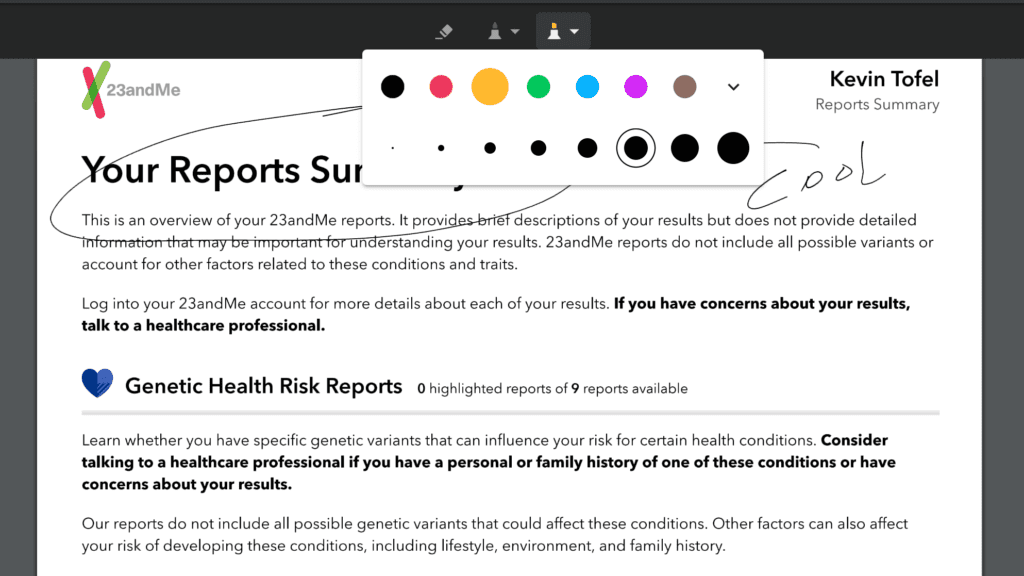
    I could change the pen tip size and color, for example. Not resizable, at least not yet, is the eraser function. Once you’re in eraser mode, touching a stylus or your finger to any markups you’ve made will erase the entire markup object, so don’t expect to remove just a portion of your writing. Closing the marked up PDF didn’t prompt me to save the updated file either, although there is a Save icon at the top right of the interface.

    Although this seems like a small, basic change to Chrome OS, I think it will have a big impact across a wide range of users; particularly those who work in a document-centric world. Yes, there are PDF annotation apps for Android, but a native Chrome OS tool is more seamless, even if it’s not quite as fully featured.

    If you want to sneak an early peek at PDF annotations, it’s easy to change over to the Dev Channel, but remember: You will likely see more bugs than on the Stable Channel. Additionally, if you switch back to a lower numbered version of Chrome OS, all local data on your device will be wiped out.

    Chrome OS Chrome OS 73 Dev Channel PDF Productivity
    Share. Facebook Twitter Pinterest LinkedIn Tumblr
    Kevin Tofel
    • Website

    After spending 15 years in IT at Fortune 100 companies, Kevin turned a hobby into a career and began covering mobile technology in 2003. He writes daily on the industry and has co-hosted the weekly MobileTechRoundup podcast since 2006. His writing has appeared in print (The New York Times, PC Magazine and PC World) and he has been featured on NBC News in Philadelphia.

    Related Posts

    Renvoit.com: Quick File Transfer App

    February 2, 2026

    Auto DraftStarbucks Partner Hours: Manual to Managing Work Schedules

    January 26, 2026

    Anon Vault For Private Cloud Storage

    January 23, 2026

    Comments are closed.

    Best of AI

    Make-A-Video Statistics 2026

    January 30, 2026

    Stable Video Diffusion User Trends And Statistics 2026

    January 29, 2026

    VALL-E Statistics 2026

    January 28, 2026

    StarCoder Statistics And User Trends 2026

    January 27, 2026

    BLIP-2 Statistics 2026

    January 23, 2026
    Trending Stats

    Google Penalty Recovery Statistics 2026

    January 30, 2026

    Search engine operators Statistics 2026

    January 29, 2026

    Most searched keywords on Google

    January 27, 2026

    Ahrefs Search Engine Statistics 2026

    January 19, 2026

    Pay Per Click Advertising Statistics 2026

    January 16, 2026
    • About
    • Write For Us
    • Contact
    • Privacy Policy
    • Sitemap
    © 2026 About Chrome Books. All rights reserved.

    Type above and press Enter to search. Press Esc to cancel.