

Close Menu
    Facebook X (Twitter) Instagram
    • About
    • Privacy Policy
    • Write For Us
    • Newsletter
    • Contact
    Instagram
    About ChromebooksAbout Chromebooks
    • Linux
    • News
      • Stats
      • Reviews
    • AI
    • How to
      • DevOps
      • IP Address
    • Apps
    • Business
    • Q&A
      • Opinion
    • Gaming
      • Google Games
    • Blog
    • Podcast
    • Contact
    About ChromebooksAbout Chromebooks
    News

    Chrome OS 99 integrates Google Calendar events on the new calendar quick view

    Kevin TofelBy Kevin TofelJanuary 13, 2022Updated:September 9, 2025No Comments2 Mins Read

    One of the more interesting new experimental features landing in Chrome OS 97 was the quick view calendar. When enabled, this lets you click the date and time on your Chromebook to show a monthly calendar view. But that’s all you got: a monthly calendar view. The latest Dev Channel version of Chrome OS 99 integrates Google Calendar events in that view.

    I updated my Chromebook to the Chrome OS 99.0.4815.0 Dev Channel this morning, which is the latest available version. I noticed I could hover over dates on the calendar to see how many events a day had.
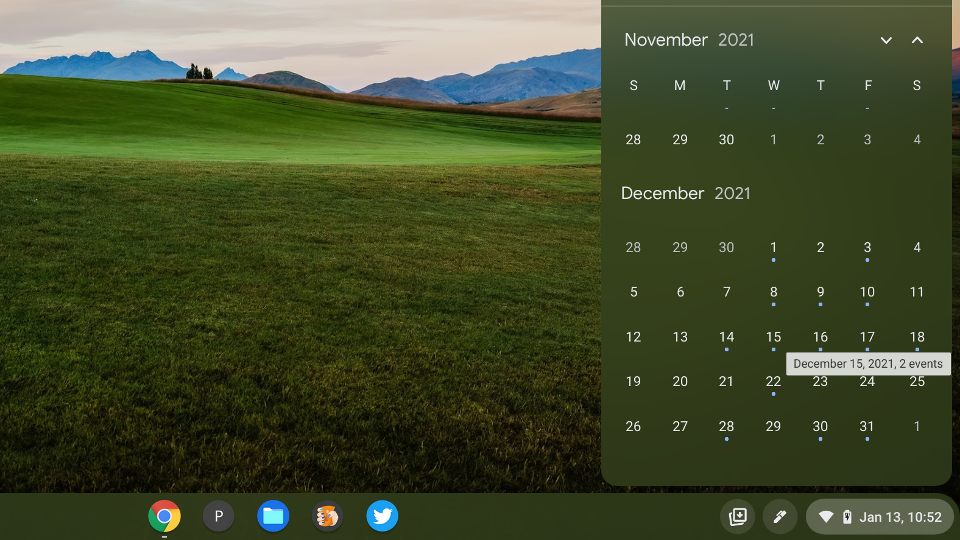
    Chrome OS 99 Google Calendar event integration

    Being the nosy person that I am, I clicked on a date that had two events in my Google Calendar and was able to see both of the event titles:
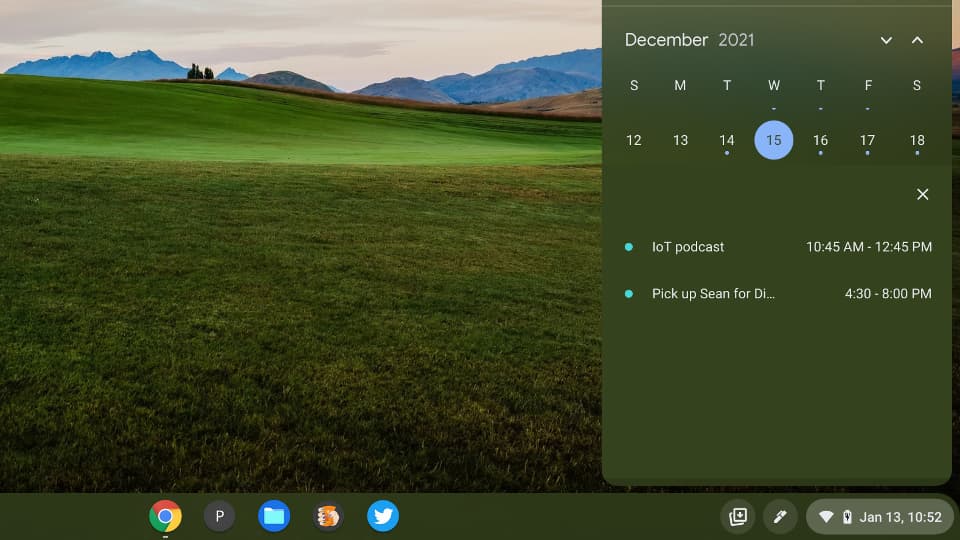
    Chrome OS 99 quick view integration Google Calendar

    There’s no additional calendar functionality at this time with Chrome OS 99, but as I said when this experimental feature appeared, I’m sure there will be more added over time.

    I anticipate that this quick view Calendar in Chrome OS will eventually be more integrated with a Google Calendar. Clicking an event may show additional details or open the event in your Google Calendar, for example. Perhaps we’ll even be able to add new Calendar events from here.

    If you haven’t yet enabled this feature — and remember that it’s experimental — it’s easy to do so. You’ll need to be running at least Chrome OS 97 on your Chromebook for starters. Then, head over to chrome://flags#calendar-view in your browser to enable a full calendar view option. Hit the Restart button and then click specifically on the date in your System Tray.

    Chromebooks on the Stable Channel won’t see the new details that I’m seeing just yet in Chrome OS 99. But as additional functionality is added to the quick view Calendar, you’ll get them with updated versions of Chrome OS with this flag enabled.

    Chrome OS Chrome OS 97 Chrome OS 99 Chrome OS flags Chromebook productivity Dev Channel Google Calendar
    Kevin Tofel
    • Website

    After spending 15 years in IT at Fortune 100 companies, Kevin turned a hobby into a career and began covering mobile technology in 2003. He writes daily on the industry and has co-hosted the weekly MobileTechRoundup podcast since 2006. His writing has appeared in print (The New York Times, PC Magazine and PC World) and he has been featured on NBC News in Philadelphia.

    Comments are closed.

    Best of AI

    Why Healthcare Practices Are Turning to Virtual Assistants to Beat the Admin Crisis in 2026

    March 31, 2026

    Smartest AI In 2026 [Statistics And User Data]

    March 28, 2026

    AI Investment By Country [2026 Statistics]

    March 27, 2026

    Pephop AI Statistics And Trends 2026

    February 26, 2026

    Gramhir AI Statistics 2026

    February 24, 2026
    Trending Stats

    Chrome Lighthouse Statistics 2026

    March 26, 2026

    Chrome Incognito Mode Statistics 2026

    February 10, 2026

    Google Penalty Recovery Statistics 2026

    January 30, 2026

    Search engine operators Statistics 2026

    January 29, 2026

    Most searched keywords on Google

    January 27, 2026
    • About
    • Tech Guest Post
    • Contact
    • Privacy Policy
    • Sitemap
    © 2026 About Chrome Books. All rights reserved.

    Type above and press Enter to search. Press Esc to cancel.