

Close Menu
    Facebook X (Twitter) Instagram
    • About
    • Privacy Policy
    • Write For Us
    • Newsletter
    • Contact
    Instagram
    About ChromebooksAbout Chromebooks
    • Linux
    • News
      • Stats
      • Reviews
    • AI
    • How to
      • DevOps
      • IP Address
    • Apps
    • Business
    • Q&A
      • Opinion
    • Gaming
      • Google Games
    • Blog
    • Podcast
    • Contact
    About ChromebooksAbout Chromebooks
    News

    ChromeOS 111 Shows A Complete Look At Custom Keyboard Shortcuts

    Kevin TofelBy Kevin TofelFebruary 11, 2023Updated:September 10, 2025No Comments2 Mins Read

    The latest ChromeOS 111 Beta Channel has a little surprise in it. I got my first look at custom keyboard shortcuts on a Chromebook after the update. It may have arrived in an earlier version, but this is the first time I noticed it.

    We knew this was coming. Back in October I reported on an updated keyboard shortcuts app for ChromeOS. And at that time, there was a video demo of an early iteration thanks to Chrome Story. With ChromeOS 111, the custom keyboard shortcuts app is fully fleshed out, although when I create custom shortcuts, they don’t actually work yet.

    The new custom keyboard shortcuts app in ChromeOS 111

    Here’s what the new keyboard shortcuts app will eventually look like, pending any changes from this ChromeOS 111 iteration. Accessing it uses the current process of Settings -> Device -> Keyboard -> View Keyboard Shortcuts. Note that I have some experimental flags enabled to see it, which I’ll share in a bit.
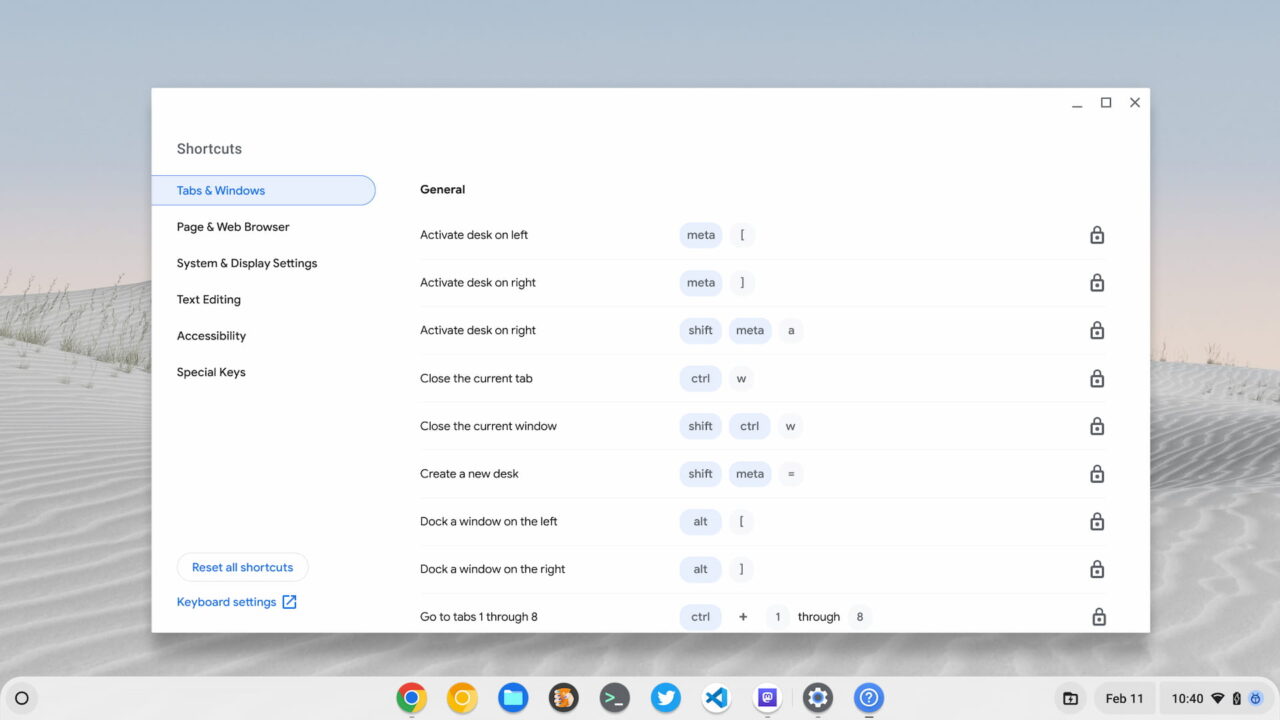
    New Chromebook keyboard shortcuts app

    Each shortcut is pre-mapped to default values here. Interestingly, the Launcher key, er, the Everything key, is listed as a “meta” key here.

    While all of the shortcuts show a lock icon to the right, clicking it opens up the interface to add or modify your own custom keyboard shortcuts. Below, I’m adding the “alt + l” (as in launcher) to dock a window to the left.
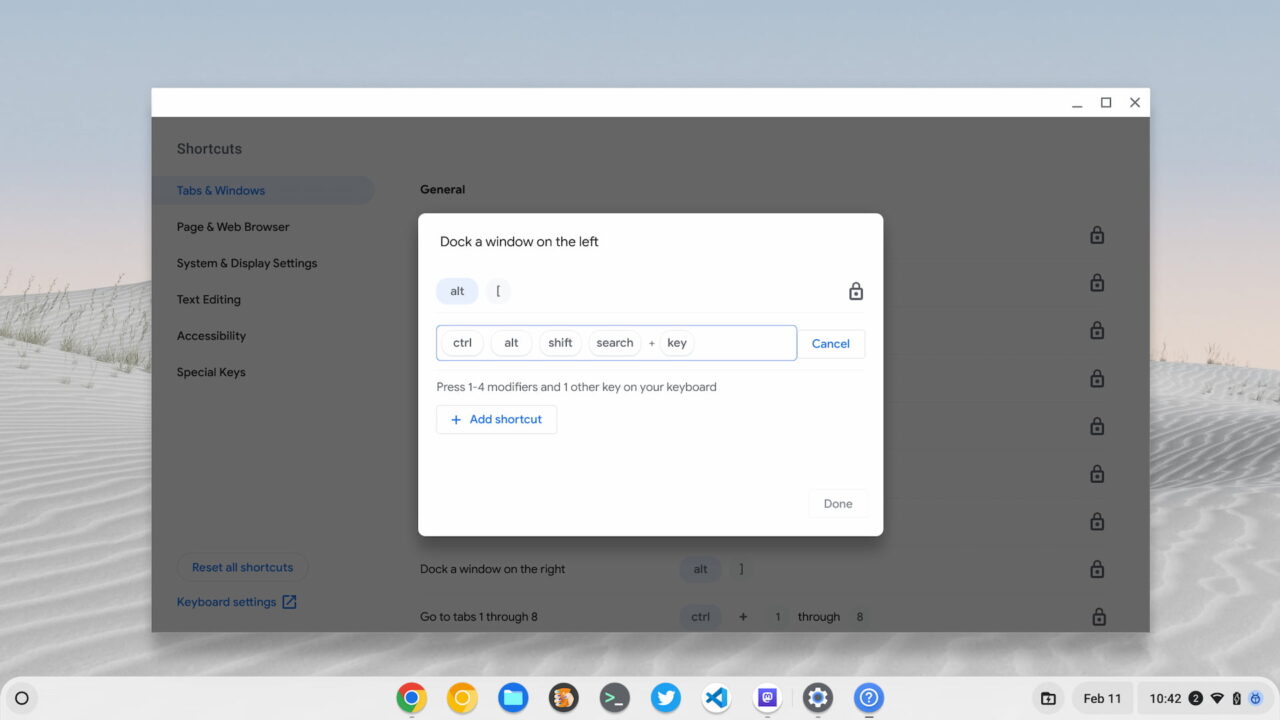
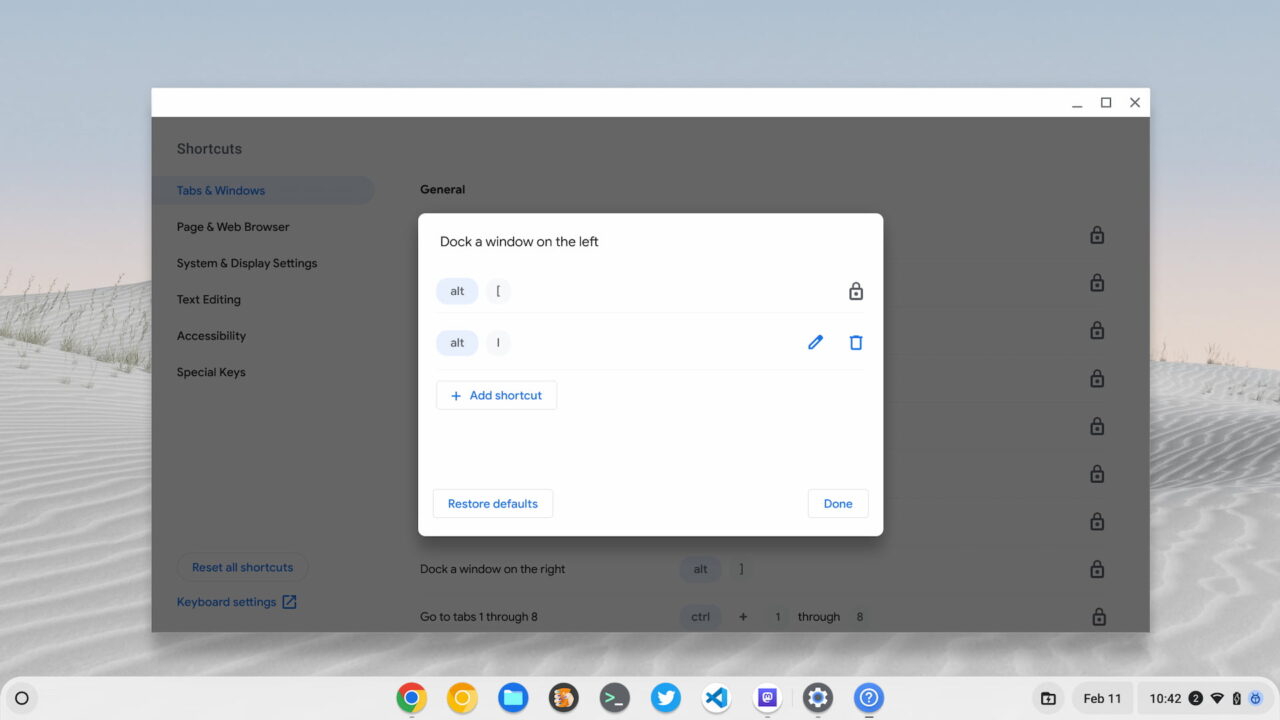
    Creating custom keyboard shortcuts in ChromeOS 111
    New custom keyboard shortcut interface
    Custom keyboard shortcuts in ChromeOS 111 on a Chromebook
    A new shortcut created

    At the moment, I don’t see a way to delete the defaults, although there’s a button to restore them. Presumably then, you will be able to modify or remove a default keyboard shortcut.

    How to enable custom keyboard shortcuts

    Since the new interface doesn’t yet allow usage of new keyboard shortcuts, you might not want to bother with it. However, for those that do, here are the experimental flags that I enabled in the latest ChromeOS 111 Beta Channel.

    • chrome://flags#improved-keyboard-shortcuts
    • chrome://flags#enable-shortcut-customization-app
    • chrome://flags#enable-shortcut-customization

    I’m going to keep these active for now. As ChromeOS 111 gets future software updates, my custom keyboard shortcuts should just start to work at some point. And the more I can get away from trackpad or mouse usage, I find the quicker I can get things done on my Chromebook.

    Chromebook Chromebooks ChromeOS ChromeOS 111 ChromeOS Beta Channel Custom keyboard shortcuts on Chromebook
    Kevin Tofel
    • Website

    After spending 15 years in IT at Fortune 100 companies, Kevin turned a hobby into a career and began covering mobile technology in 2003. He writes daily on the industry and has co-hosted the weekly MobileTechRoundup podcast since 2006. His writing has appeared in print (The New York Times, PC Magazine and PC World) and he has been featured on NBC News in Philadelphia.

    Comments are closed.

    Best of AI

    Why Healthcare Practices Are Turning to Virtual Assistants to Beat the Admin Crisis in 2026

    March 31, 2026

    Smartest AI In 2026 [Statistics And User Data]

    March 28, 2026

    AI Investment By Country [2026 Statistics]

    March 27, 2026

    Pephop AI Statistics And Trends 2026

    February 26, 2026

    Gramhir AI Statistics 2026

    February 24, 2026
    Trending Stats

    Chrome Lighthouse Statistics 2026

    March 26, 2026

    Chrome Incognito Mode Statistics 2026

    February 10, 2026

    Google Penalty Recovery Statistics 2026

    January 30, 2026

    Search engine operators Statistics 2026

    January 29, 2026

    Most searched keywords on Google

    January 27, 2026
    • About
    • Tech Guest Post
    • Contact
    • Privacy Policy
    • Sitemap
    © 2026 About Chrome Books. All rights reserved.

    Type above and press Enter to search. Press Esc to cancel.