

Close Menu
    Facebook X (Twitter) Instagram
    • About
    • Privacy Policy
    • Write For Us
    • Newsletter
    • Contact
    Instagram
    About ChromebooksAbout Chromebooks
    • Linux
    • News
      • Stats
      • Reviews
    • AI
    • How to
      • DevOps
      • IP Address
    • Apps
    • Business
    • Q&A
      • Opinion
    • Gaming
      • Google Games
    • Blog
    • Podcast
    • Contact
    About ChromebooksAbout Chromebooks
    News

    Google is adding Tab Group support to Reading List on Chromebooks

    Kevin TofelBy Kevin TofelMarch 15, 2021Updated:September 9, 2025No Comments2 Mins Read

    Since it arrived in Chrome OS 87, I’ve been making good use of the experimental Reading List function. It allows me to save links to any web page so I can easily find and read them later. When I’m researching something though, I often have several related tabs that I’d like to save. I can do that, page by page. But it would be easier to add them all in one fell swoop to the Reading List. Perhaps that’s why Google is adding Tab Group support to Reading List on Chromebooks.

    The feature is pretty self-explanatory by the flag description of “Reading List Tab Groups Support”, but here’s the full description. When this flag is enabled, alongside the Reading List flag, it will allow users to save tab groups to the reading list.
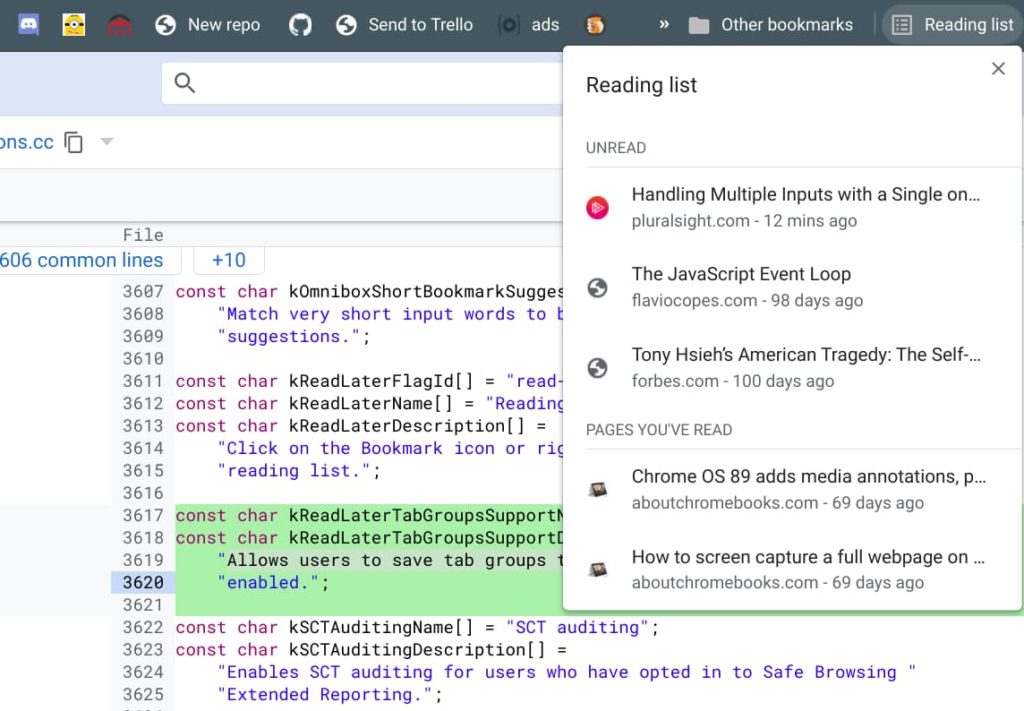
    Current Reading List implementation in Chrome OS 89

    When this code change is merged into Chrome OS, you’ll find the flag at chrome://flags#read-later-tab-groups-support

    I’m not yet sure of how this will look in the Reading List but I suspect each tab in the group won’t appear individually.

    Instead, I’d expect one Reading List item that indicates it has multiple child items. Perhaps, and hopefully, you can expand that list to see or hide the individual tabs in the group. I haven’t yet found any code or screen mocks that illustrate the user interface.

    Even though Google has tried to call attention to Tab Groups in Chrome OS, I’m not convinced many Chromebook users actually know about this useful feature. And of those who do, I wonder how many actually use it.

    I think it’s a powerful tool and the ability to save grouped tabs to the Reading List is something I’d use daily. I’m tired of saving my articles individually when they’re already grouped. Am I in the minority on this one?

    Kevin Tofel
    • Website

    After spending 15 years in IT at Fortune 100 companies, Kevin turned a hobby into a career and began covering mobile technology in 2003. He writes daily on the industry and has co-hosted the weekly MobileTechRoundup podcast since 2006. His writing has appeared in print (The New York Times, PC Magazine and PC World) and he has been featured on NBC News in Philadelphia.

    Best of AI

    AI in Healthcare Adoption Statistics 2026

    July 9, 2026

    Deepfake Incident Statistics 2026

    July 7, 2026

    Best AI Music and Vocal Tools for Chromebook Users in 2026 

    June 24, 2026

    What Does Adobe Firefly AI Do?

    June 16, 2026

    Is Joyland AI Safe For Kids?

    June 12, 2026
    Trending Stats

    Chromebook Peripheral Usage Statistics 2026: Device Connectivity And Usage Data

    June 30, 2026

    ChromeOS Update Size and Installation Statistics 2026: System Performance Reports

    June 27, 2026

    Chromebook vs MacBook and Windows Boot Time Statistics 2026: Performance Benchmark Data

    June 25, 2026

    Chromebook Brand Reliability Scores Statistics 2026: Quality Ratings And User Reports

    June 24, 2026

    Chromebook Performance Degradation Statistics 2026: Long-Term Usage And Reliability Data

    June 23, 2026
    • About
    • Tech Guest Post
    • Contact
    • Privacy Policy
    • Sitemap
    © 2026 About Chrome Books. All rights reserved.

    Type above and press Enter to search. Press Esc to cancel.