

Close Menu
    Facebook X (Twitter) Instagram
    • About
    • Privacy Policy
    • Write For Us
    • Newsletter
    • Contact
    Instagram
    About ChromebooksAbout Chromebooks
    • News
      • Stats
    • AI
    • How to
      • DevOps
      • IP Address
    • Apps
    • Business
    • Q&A
      • Opinion
    • Gaming
      • Google Games
    • Blog
    • Podcast
    • Contact
    About ChromebooksAbout Chromebooks
    News

    How Google will speed up the Lacros browser on Chromebooks

    Kevin TofelBy Kevin TofelJuly 25, 2022Updated:September 22, 2025No Comments3 Mins Read
    Share
    Facebook Twitter LinkedIn Pinterest

    A few months back, I mentioned that I’m using the Lacros browser full-time. Lacos is essentially the Linux version of the Chrome browser and is part of Google’s effort to decouple Chrome from ChromeOS. Today I found code that will eliminate one of my pain points using Lacros. Google intends to speed up the Lacros browser on Chromebooks so it starts quicker.

    Why is this a pain point for me? To understand that, you need to understand how Google is implementing the Linux version of Chrome on Chromebooks.
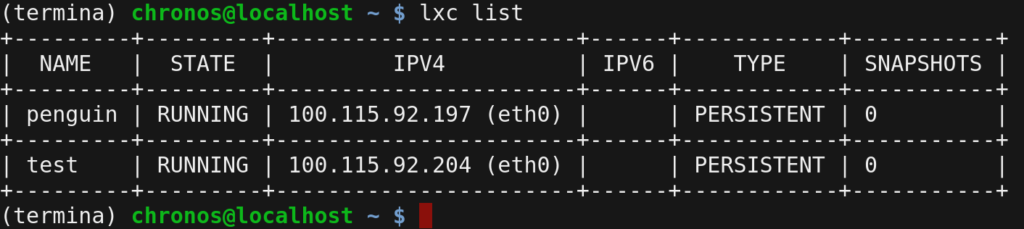
    Linux on Chromebook containers
    Linux containers on a Chromebook

    Unlike the native browser in ChromeOS that we’ve had since the first Chromebooks in 2010. Lacros is, as mentioned, written to run on native Linux. And Google is beefing up the security of this browser by running it in a container, or a separate sandbox, from all other apps. This is the exact same approach Google uses to enable Linux on Chromebooks. And that works quite well.

    Here’s the problem: It takes time for a Chromebook to fire up that container. More so on entry-level hardware than on the wicked fast HP Elite Dragonfly Chromebook with its 12th gen Intel CPU. Even on that device, though, it’s an issue.

    When I open the Lacros browser on my Chromebook, it take a few seconds before I can actually see or use it.
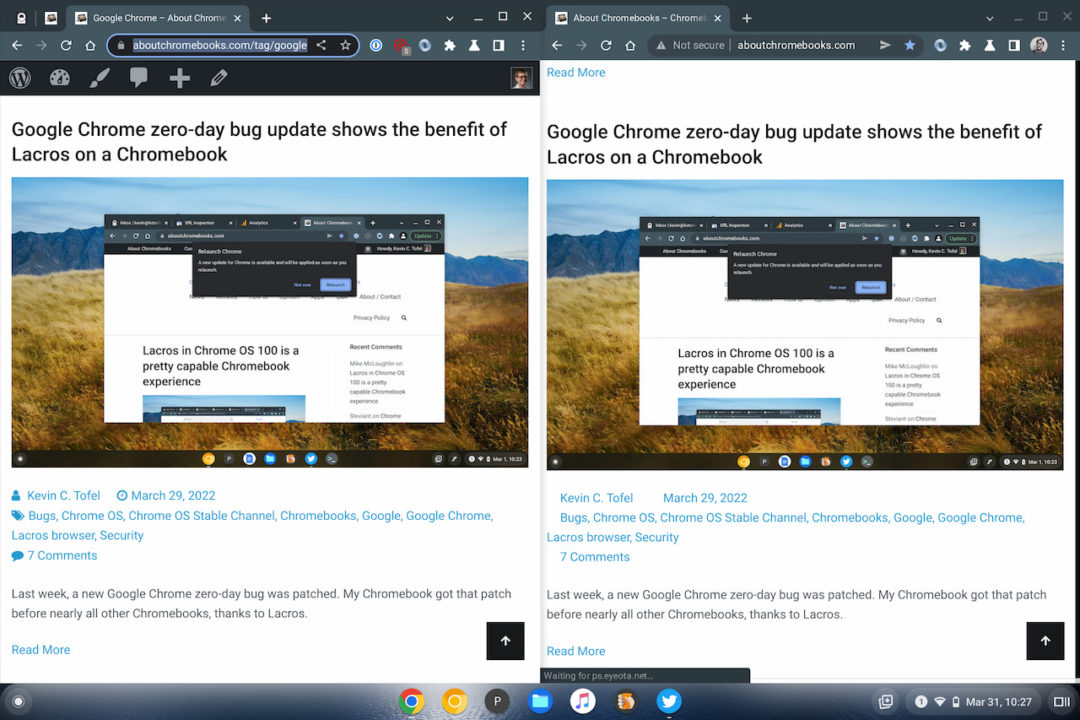
    Lacros vs ChromeOS browser on Chromebooks
    Chrome browser on the left, Lacros browser on the right

    So how is Google going to fix this and speed up Lacros?

    The solution is quite simple, even if the coding to make it happen isn’t. As soon as you boot up your Chromebook and the login screen appears, Google will start the Lacros container in the background. The idea is that in the few seconds it takes you to type your password on PIN, the Lacros startup on Chromebooks will already be happening.

    Of course, there will be a transition from Chromebooks using the Chrome browser to using Lacros. And during that time, if you don’t have Lacros enabled on your device, the container will simply shut down, hopefully before the login process completes. You’d then just click your Chrome browser icon and be none the wiser.
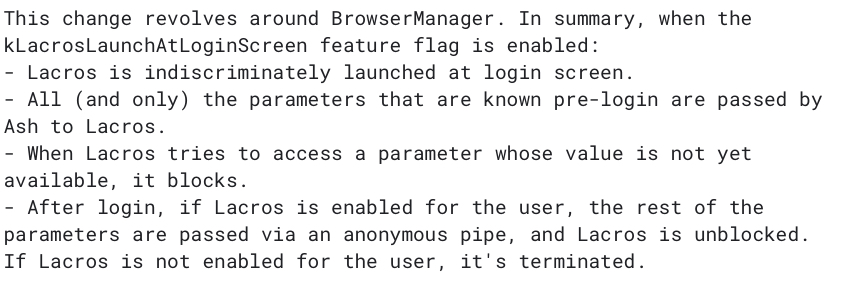
    Lacros startup on Chromebooks

    This approach is actually no different from how Google enables Android apps upon bootup. In fact, that caused some issues for people who don’t use Android apps. Google resolved that by lowering the priority for the Android container startup process unless you actively try to open an Android app.

    I don’t yet see the experimental flag to start Lacros upon bootup on my Chromebook with the ChromeOS 105 Dev Channel. Hopefully, it arrives in the next ChromeOS update so I’m not waiting two or three seconds between opening my browser and actually using my browser.

    Chrome browser Chrome OS Chromebooks ChromeOS Experimental Features Flags Lacros browser
    Share. Facebook Twitter Pinterest LinkedIn Tumblr
    Kevin Tofel
    • Website

    After spending 15 years in IT at Fortune 100 companies, Kevin turned a hobby into a career and began covering mobile technology in 2003. He writes daily on the industry and has co-hosted the weekly MobileTechRoundup podcast since 2006. His writing has appeared in print (The New York Times, PC Magazine and PC World) and he has been featured on NBC News in Philadelphia.

    Related Posts

    Auto DraftStarbucks Partner Hours: Manual to Managing Work Schedules

    January 26, 2026

    Anon Vault For Private Cloud Storage

    January 23, 2026

    GitHub Copilot Statistics [2026]

    January 7, 2026

    Comments are closed.

    Best of AI

    Chub AI Statistics And User Trends 2026

    February 5, 2026

    Make-A-Video Statistics 2026

    January 30, 2026

    Stable Video Diffusion User Trends And Statistics 2026

    January 29, 2026

    VALL-E Statistics 2026

    January 28, 2026

    StarCoder Statistics And User Trends 2026

    January 27, 2026
    Trending Stats

    Google Penalty Recovery Statistics 2026

    January 30, 2026

    Search engine operators Statistics 2026

    January 29, 2026

    Most searched keywords on Google

    January 27, 2026

    Ahrefs Search Engine Statistics 2026

    January 19, 2026

    Pay Per Click Advertising Statistics 2026

    January 16, 2026
    • About
    • Write For Us
    • Contact
    • Privacy Policy
    • Sitemap
    © 2026 About Chrome Books. All rights reserved.

    Type above and press Enter to search. Press Esc to cancel.