

Close Menu
    Facebook X (Twitter) Instagram
    • About
    • Privacy Policy
    • Write For Us
    • Newsletter
    • Contact
    Instagram
    About ChromebooksAbout Chromebooks
    • News
      • Stats
    • AI
    • How to
      • DevOps
      • IP Address
    • Apps
    • Business
    • Q&A
      • Opinion
    • Gaming
      • Google Games
    • Blog
    • Podcast
    • Contact
    About ChromebooksAbout Chromebooks
    News

    Chrome OS 91 will add Recently Closed tabs in Tab Search

    Kevin TofelBy Kevin TofelApril 14, 2021Updated:September 9, 2025No Comments2 Mins Read
    Share
    Facebook Twitter LinkedIn Pinterest

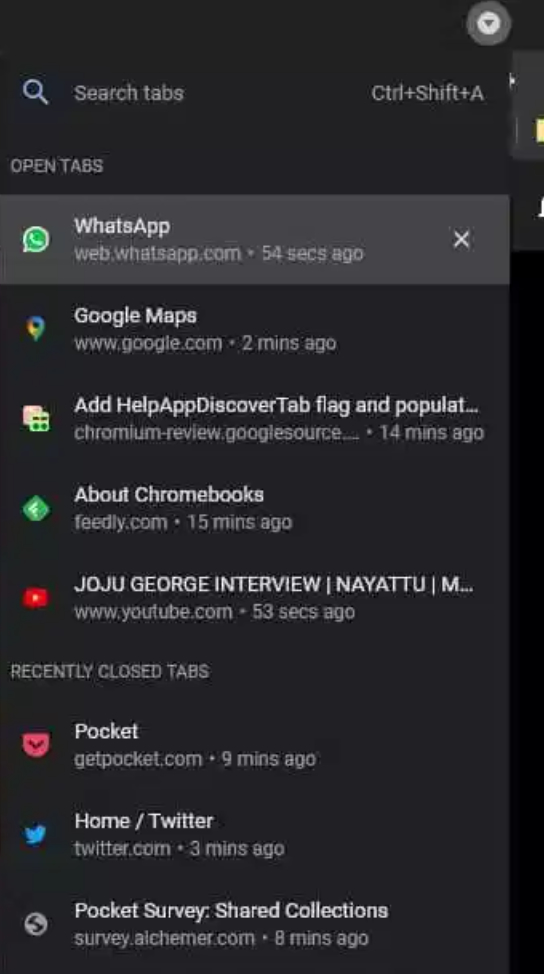
    The new Tab Search feature added in Chrome OS 86 is getting a small but useful upgrade. According to Chrome Story, in the latest Canary Channel release, you can see tabs you might have previously closed. Based on the code commits and this find, it appears Chrome OS 91 will add Recently Closed tabs in Tab Search.

    I don’t yet see this feature enabled on my Chromebook running the Dev Channel of Chrome OS 91, so early adopters might need to be patient.

    And there’s no additional flag to enable it as it’s simply part of Tab Search. If you have Tab Search, you’ll see it show your Recent Tabs in the coming months.

    Here’s what it will look like, much as you’d expect:
    Credit: Chrome Story

    There are several code commits pointing to this update, but there’s not much to glean here.

    Chrome OS will keep an array, or list, of tabs as you close them. When you click the Tab Search drop-down or use the CTRL + SHIFT + A shortcut, you’ll see your currently open tabs along with the list of your most recently closed tabs, along with the relative time you closed them. Just click on one and the tab will be restored.

    I can’t count how many times I’ve had to open up my browser history only to scan for a tab I closed not long ago and need to open again. So this small tweak adds tremendous value to my workflow.

    The better option might be for me to stop closing tabs incessantly, but I doubt that’s going to happen any time soon.

    Am I the only one enjoying Tab Search and looking forward to this useful tweak? Drop a comment below and let me know if you’re a big user of Tab Search. Or if, like me, you just can’t let go of those tabs you closed a wee bit too soon.

    Canary Channel Chrome OS 91 Chromebook productivity Chromebooks Recent Tabs Tab Search
    Share. Facebook Twitter Pinterest LinkedIn Tumblr
    Kevin Tofel
    • Website

    After spending 15 years in IT at Fortune 100 companies, Kevin turned a hobby into a career and began covering mobile technology in 2003. He writes daily on the industry and has co-hosted the weekly MobileTechRoundup podcast since 2006. His writing has appeared in print (The New York Times, PC Magazine and PC World) and he has been featured on NBC News in Philadelphia.

    Related Posts

    Auto DraftStarbucks Partner Hours: Manual to Managing Work Schedules

    January 26, 2026

    Anon Vault For Private Cloud Storage

    January 23, 2026

    GitHub Copilot Statistics [2026]

    January 7, 2026

    Comments are closed.

    Best of AI

    Chub AI Statistics And User Trends 2026

    February 5, 2026

    Make-A-Video Statistics 2026

    January 30, 2026

    Stable Video Diffusion User Trends And Statistics 2026

    January 29, 2026

    VALL-E Statistics 2026

    January 28, 2026

    StarCoder Statistics And User Trends 2026

    January 27, 2026
    Trending Stats

    Google Penalty Recovery Statistics 2026

    January 30, 2026

    Search engine operators Statistics 2026

    January 29, 2026

    Most searched keywords on Google

    January 27, 2026

    Ahrefs Search Engine Statistics 2026

    January 19, 2026

    Pay Per Click Advertising Statistics 2026

    January 16, 2026
    • About
    • Write For Us
    • Contact
    • Privacy Policy
    • Sitemap
    © 2026 About Chrome Books. All rights reserved.

    Type above and press Enter to search. Press Esc to cancel.