

Close Menu
    Facebook X (Twitter) Instagram
    • About
    • Privacy Policy
    • Write For Us
    • Newsletter
    • Contact
    Instagram
    About ChromebooksAbout Chromebooks
    • Linux
    • News
      • Stats
      • Reviews
    • AI
    • How to
      • DevOps
      • IP Address
    • Apps
    • Business
    • Q&A
      • Opinion
    • Gaming
      • Google Games
    • Blog
    • Podcast
    • Contact
    About ChromebooksAbout Chromebooks
    News

    Chromebooks gain native support for 2FA and faster web sign-ins with Chrome OS 88

    Kevin TofelBy Kevin TofelJanuary 28, 2021Updated:September 13, 2025No Comments2 Mins Read

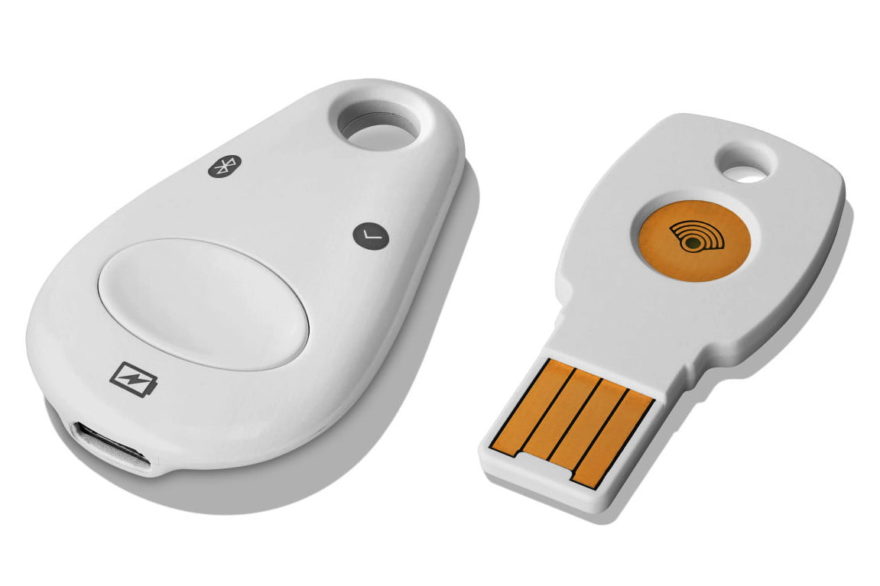
    A few years back, I bought a Google Titan security key to bring the added security of two-factor authentication (2FA) to my Chromebook. I got my money’s worth out of it but I won’t need it much longer. This week, Google announced that Chromebooks are gaining the ability to use your device PIN or fingerprint sensor for 2FA on supported web sites.

    Here’s how it works, according to Google:

    “Now you can securely sign in to websites with the PIN or fingerprint you’ve set up to unlock your Chromebook with our new Web Authentication (WebAuthn) feature. Websites that support WebAuthn will let you use your Chromebook PIN or fingerprint ID—if your Chromebook has a fingerprint reader—instead of the password you’ve set for the website. And if you use 2-Step Verification to sign-in, your Chromebook PIN or fingerprint ID can be used as the second factor, so you no longer need to pull out your security key or phone to authenticate.”

    For now, only a few sites and services support the new WebAuthn feature on a Chromebook. Dropbox, GitHub, and Okta are specifically mentioned, although I’d hope that Google’s own services support it too at launch.

    This is a great step forward for additional security when using a Chromebook. Having a USB or Bluetooth key, which are older methods, certainly works, but they’re also easy to lose.
    And while you can often use an authentication app (or the Google app) from your phone, that can be a small hassle too. What if your phone isn’t handy? Frankly, using the same device for a 2FA code or fingerprint scan is much simpler and faster.

    Google says the new feature will be rolling out with Chrome OS 88, which I anticipate will arrive on Chromebooks soon.

    My advice: Use 2FA for every site or app that supports it. If someone were to get any of your account credentials, they still couldn’t access your accounts without that second factor of authentication. Google just made it easier for you to be protected and harder for hackers to compromise your online servers. Why not take advantage of it?

    2FA Acer Chromebook Spin 13 Authentication Chrome OS Chrome OS 88 Chromebooks Fingerprint reader Security Titan security key
    Kevin Tofel
    • Website

    After spending 15 years in IT at Fortune 100 companies, Kevin turned a hobby into a career and began covering mobile technology in 2003. He writes daily on the industry and has co-hosted the weekly MobileTechRoundup podcast since 2006. His writing has appeared in print (The New York Times, PC Magazine and PC World) and he has been featured on NBC News in Philadelphia.

    Comments are closed.

    Best of AI

    Why Healthcare Practices Are Turning to Virtual Assistants to Beat the Admin Crisis in 2026

    March 31, 2026

    Smartest AI In 2026 [Statistics And User Data]

    March 28, 2026

    AI Investment By Country [2026 Statistics]

    March 27, 2026

    Pephop AI Statistics And Trends 2026

    February 26, 2026

    Gramhir AI Statistics 2026

    February 24, 2026
    Trending Stats

    Chrome Lighthouse Statistics 2026

    March 26, 2026

    Chrome Incognito Mode Statistics 2026

    February 10, 2026

    Google Penalty Recovery Statistics 2026

    January 30, 2026

    Search engine operators Statistics 2026

    January 29, 2026

    Most searched keywords on Google

    January 27, 2026
    • About
    • Tech Guest Post
    • Contact
    • Privacy Policy
    • Sitemap
    © 2026 About Chrome Books. All rights reserved.

    Type above and press Enter to search. Press Esc to cancel.