


We all know the Android app experience on large screen devices isn’t ideal. So too does Google. And that’s the likely reason it’s sharing some data and highlighting helpful tools for developers to adjust Android apps on Chromebooks.
The data is interesting, given that the Android app experience is hit or miss, based on the title.
App engagement on Chromebooks is up 50%
Here’s what Google says:
Whether they’re unleashing their creativity on Concepts, playing games like Crypt of the NecroDancer, or taking notes on Squid, more people are craving their favorite smartphone experiences on large-screen devices, such as Chromebooks, tablets, and foldables. On Chromebooks alone, the number of users engaging with Android apps increased 50% year over year (YOY).
The figures come from Google’s internal metrics, so we can’t verify the claim. But I have no reason to doubt the numbers. When I worked at Google, I know such proclamations were based on actual figures, even if those were internal only.
I have to say, I’m a bit surprised though. Even though Google Play is pre-installed by default on a Chromebook, I would have pegged the data at a lower number. Especially with education being such a large market for Chromebooks, where Android apps can be disabled through device management.
For many, Android apps are a very secondary experience, not the primary reason people buy a Chrome OS device. Then again, this metric measures “users engaging with Android apps”. That means it counts whether someone uses Android software every day on their Chromebook, or just once.
Still, it’s promising for Chromebooks as a whole and particularly for makers of Android apps. While Google itself can’t address every Android app experience on a Chromebook, it can provide help.
Some of that help is also highlighted in Google’s blog post.
Android 11 does some of the heavy lifting
The Android 11 update for Chromebooks is part of that story as developers will have new APIs to use for their Android apps. It also brings improved support for application resizing, which is very welcome. And there’s something that Google did for developers with no code changes required from them:
Android 11-enabled Chromebooks on Chrome OS 93 or higher now automatically run made-for-mobile apps in a window locked to phone or tablet orientations. Depending on which layout they prefer, users can disable the window management feature by clicking the “Resizable” option. Best of all, these updates are available by default across most apps in the Play Store without any developer intervention.
Anytime the app experience can be improved — even a little — with no code changes, that’s a win.
Android Studio changes for Android apps on Chromebooks
Of course, to fully optimize an Android app for the larger screens of Chromebooks, some work on the developer’s part is required. To make this simpler, Google has steadily been adding functionality in Android Studio to assist.
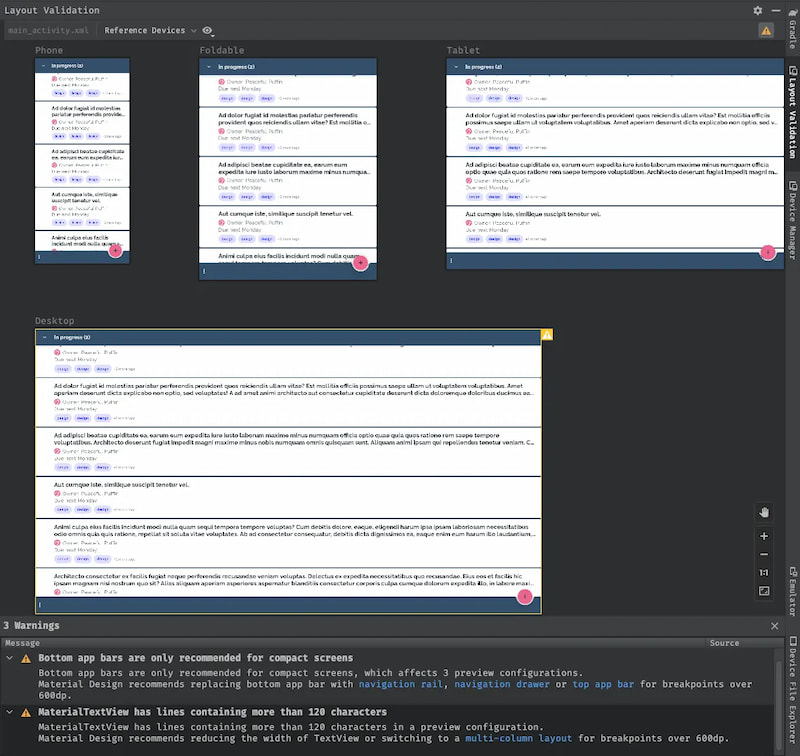
The latest version has a resizable emulator as well as a Layout Validation tool. The latter shows developers what their app looks like on displays with various screen sizes and aspect ratios.
There’s still work to be done but this is promising
Clearly, a few new tools and incentives for more users to boost app engagement alone won’t address the Android app experience on Chromebooks. But this is a good start. Or maybe I should say another good start since this story surfaces every year or two.
Remember that Android apps arrived on Chromebooks way back in 2015. I know because I wrote the official Google announcement in my role. And all new Chromebooks since 2019 come with Android app support pre-installed. So this has been a long road.
Between Android 12L, which has features specific to different (and multiple) screens, and Google’s latest tools, perhaps the end of the road is near?
