

Close Menu
    Facebook X (Twitter) Instagram
    • About
    • Privacy Policy
    • Write For Us
    • Newsletter
    • Contact
    Instagram
    About ChromebooksAbout Chromebooks
    • Linux
    • News
      • Stats
      • Reviews
    • AI
    • How to
      • DevOps
      • IP Address
    • Apps
    • Business
    • Q&A
      • Opinion
    • Gaming
      • Google Games
    • Blog
    • Podcast
    • Contact
    About ChromebooksAbout Chromebooks
    News

    Did Google drop a hint when Project Crostini and Linux apps on Chromebooks will get GPU acceleration?

    Kevin TofelBy Kevin TofelNovember 7, 2018Updated:September 22, 2025No Comments2 Mins Read

    One of the remaining key features not yet working in Project Crostini is GPU acceleration. We already know how Google plans to add it — this video covers the technical approach in great detail — but we still don’t know when to expect it. There’s no official announcement but today at its Android Developers Conference, Google provided us a big hint: Early 2019.

    Why do I say that? Because of Google did announce today, namely: Official support for Android Studio on Chromebooks.

    Android Studio 3.3 launches beta 3 today. In coming releases expect to see a strong focus on quality and fundamentals: reducing the number of crashes and hangs, optimizing memory usage, and fixing user-impacting bugs. We also announced today that we’re making Android Studio an officially supported IDE on Chrome OS early next year; learn more here.

    Yes, you can already run the Linux version of Android Studio on any Chrome OS device that works with Project Crostini. What doesn’t work is the Android Emulator though: It requires GPU hardware acceleration.

    Putting all of that together: If full, official Android Support on Chromebooks for developers is coming in early 2019, it follows that GPU hardware acceleration in Crostini has to arrive in tandem. I say that because as far as I can tell, the Android Virtual Device (AVD) emulator requires hardware acceleration:
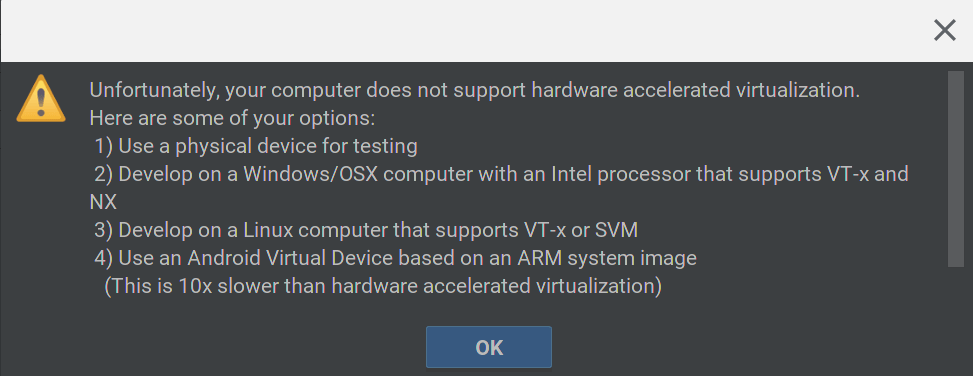
    Assuming I’m correct — please chime in if I’m not since I tend to code in Java for school — I can’t see how Google will officially support Android Studio on Chromebooks for devs without supporting the AVD. Yes, you can run your Android app within Android Studio or on a local Android device connected to your computer — well, you could if USB support was working; it’s not but looks to be coming soon.

    Again, this is conjecture on my part since a release date hardware acceleration for Crostini on Chromebooks hasn’t been specifically announced. Early 2019 is sounding like a good bet, though.


    Kevin Tofel
    • Website

    After spending 15 years in IT at Fortune 100 companies, Kevin turned a hobby into a career and began covering mobile technology in 2003. He writes daily on the industry and has co-hosted the weekly MobileTechRoundup podcast since 2006. His writing has appeared in print (The New York Times, PC Magazine and PC World) and he has been featured on NBC News in Philadelphia.

    Best of AI

    What Does Adobe Firefly AI Do?

    June 16, 2026

    Is Joyland AI Safe For Kids?

    June 12, 2026

    LMArena AI: Chatbot Ranking Platform 2026

    May 27, 2026

    Will AI Take Over the World

    May 25, 2026

    AI21 Jurassic Statistics 2026: Model Size, Usage and AI Performance Trends

    May 19, 2026
    Trending Stats

    Conversational AI Market Statistics 2026: Chatbot Usage And Enterprise Deployment

    June 17, 2026

    Chromebook Gaming Usage Statistics 2026: Player Engagement And Usage Reports

    June 17, 2026

    Chromebook Battery Degradation Statistics 2026: Lifecycle Performance Testing Data

    June 15, 2026

    Chromebook Touchscreen vs Non-Touchscreen Usage Statistics 2026: Device Interaction and Form Factor Data

    June 11, 2026

    Chromebook Performance Across Price Segments Statistics 2026: Benchmark Comparison Data

    June 10, 2026
    • About
    • Tech Guest Post
    • Contact
    • Privacy Policy
    • Sitemap
    © 2026 About Chrome Books. All rights reserved.

    Type above and press Enter to search. Press Esc to cancel.