


Watermarks are essential for brand protection. They mark ownership. Sometimes, though, they become a huge problem. You may have a legally acquired stock video. It might have an unwanted logo. Maybe you need to remove watermarks for old footage. The goal is simple. You need a clean, professional file.

The quality of video watermark remover tools has exploded. Most now use advanced AI technology. This lets them erase marks without blurring the spot.
They achieve flawless pixel reconstruction. Choosing the best online tool is now about speed and about precision. Here are the top 10 video watermark remover tools for 2025.
1. Vmake: The AI Suite for Seamless Video Cleanup
Vmake is more than just a video watermark remover. It is a full video editing suite and is built for quality and fast asset creation.
Vmake excels at overall video cleanup. It handles all the small details that ruin professional output. This is the best tool to remove watermark from videos to get rid of watermarks in an instant.

- Best For: Creators needing advanced quality correction. Users require multiple online video tools in one place. Anyone focused on high-level content repurposing.
- Key Features: Watermark and Text Remover uses smart inpainting. It not only cleans logos but also perfectly remove background from video. It also offers a Video and Image Enhancer to boost the resolution up to 4K. You can correct bad lighting and clean up audio and video distractions using its Noise Reducer.
- Format: Online/Subscription-based.
- Pros: Exceptional quality correction. Strong AI technology. Integrated video editing suite. Good for batch processing.
- Cons: Full feature access requires a paid plan.
2. SoftOrbits Online Watermark Remover: High-Quality Editing
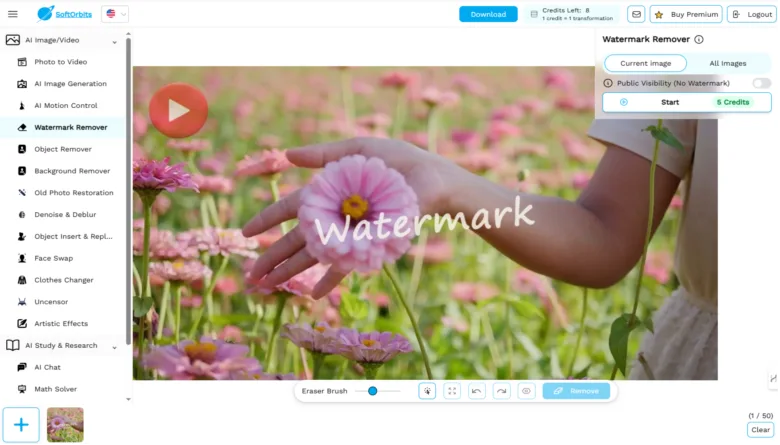
SoftOrbits Online Watermark Remover will begin the removal process automatically. It intelligently analyzes background textures to seamlessly remove complex elements like transparent logos and hard-coded date stamps from both photos and videos. In some rare cases where the automatic method might not remove the watermark perfectly, you can switch to manual mode.
Best For:
- Removing difficult watermarks from videos and images.
- Anyone requiring both desktop power and quick online tools.
Key Features:
- Advanced texture analysis for seamless pixel reconstruction.
- Removes complex transparent logos and date stamps.
- Offers a powerful desktop tool for batches and an Online AI Watermark Remover for instant results.
Format: Desktop Software / Online Tool.
Pros:
- Excellent for batch processing.
- High-quality results on difficult watermarks.
- Versatile for both video and photo formats.
Cons:
- Price
3. Media.io Watermark Remover: The Versatile Online Hub
Media.io is a powerhouse of online video tools. It includes a highly rated video watermark remover and is known for its versatility. It works on almost any device. Plus has a clean, easy interface.

- Best For: All-around users. People who need other converters and editors. Anyone who wants a browser-based solution.
- Key Features: Easy three-step removal process. Supports many video formats. Offers batch watermark removal. It is powered by AI technology for better results.
- Format: Freemium.
- Pros: Intuitive and feature-rich. Works on many platforms. Excellent for quick removal.
- Cons: The best features require a paid subscription.
4. AniEraser (by Remove.ai): High-Precision AI
AniEraser is a powerful video watermark remover. It focuses on high-precision object removal and uses advanced AI technology.

- Best for: Users prioritizing precision over speed. Anyone removing complex or moving watermarks.
- Key Features: Uses advanced AI algorithms for seamless removal. Supports both images and videos. Simple drag-and-drop feature. Preserves original quality well through smart pixel reconstruction.
- Format: Freemium.
- Pros: High degree of precision. Simple user interface. Maintains good file quality.
- Cons: Advanced features or large files need a premium subscription. Processing speed can vary.
5. Apowersoft Online Watermark Remover: Simple & Effective
Apowersoft is a well-established name in media tools. Their online video watermark remover is very effective. It is great for fast fixes and handles all types of watermarks.

- Best For: Quick, non-technical online removal. Users who might need the companion desktop software.
- Key Features: Erases all types of marks. It works instantly. It also allows you to add a new watermark. It has a clean user interface.
- Format: Online-only tool. Paid access.
- Pros: Fast and highly effective removal. Supports adding watermarks too.
- Cons: It is not a free service. No live customer support is available.
6. Unwatermark AI: Automatic Detection
Unwatermark AI is focused on automation. It is a smart logo remover. The system automatically detects and removes the watermark. It requires almost no manual input. This tool maintains high quality.

- Best For: Efficiency and batch processing. Users who want minimal manual editing.
- Key Features: Automatic detection and location of the watermark. Removes logos, text, and other objects. Offers a manual brush for tough watermarks. Ensures high quality through pixel reconstruction.
- Format: Freemium.
- Pros: Extremely fast and automated workflow. Supports both images and videos. High-quality output.
- Cons: Free access may be limited.
7. WatermarkRemover.io: Bulk Removal Power
WatermarkRemover.io is often known for image processing. Its video version is very strong. It specializes in batch processing. This tool is great for high-volume content repurposing and is trusted by many businesses.

- Best For: Enterprise users. Creators with large video libraries need batch processing.
- Key Features: Fully AI technology powered. Automatic detection; no manual selection needed. Fast results in seconds. Provides enterprise-level support.
- Format: Freemium/Subscription (for batch).
- Pros: Excellent for high volume. Very fast due to full automation. Maintains privacy standards.
- Cons: Batch processing is restricted to premium plans.
8. AirBrush Video Watermark Remover: Clean & Professional
AirBrush focuses on delivering a clean look. Their video watermark remover uses advanced algorithms. It removes logos without leaving a blur and is a great logo remover.

- Best For: Social media managers. Creators needing pristine, blur-free video cleanup.
- Key Features: AI technology ensures clean removal without blurring. Preserves original clarity. Browser-based. Offers other editing tools like video enhancement.
- Format: Online/Freemium.
- Pros: No installation required. High-quality, professional results. Great for enhancing repurposed content.
- Cons: Full feature access requires a subscription.
9. BeeCut Online Watermark Remover: Simple & Convenient
BeeCut offers a straightforward online video tools solution. Its video watermark remover is easy to use. It requires no technical skills and works well for simple removal tasks.

- Best For: Users who need a quick, no-fuss online solution. Beginners needing basic removal.
- Key Features: One-click removal process. Supports many video formats. Removes logos, text, and objects. Files are deleted from the server for privacy.
- Format: Online/Freemium.
- Pros: Very easy interface. No computer skills are needed. Good file security.
- Cons: Might lack the pixel reconstruction power of dedicated AI tools.
10. DeWatermark: Browser-Based Simplicity
DeWatermark is a user-friendly, browser-based video watermark remover. It also uses AI technology. The process is seamless. It is best suited for simple watermarks.

- Best For: Users who only deal with simple, static watermarks. Quick social media content.
- Key Features: Simple, single-click removal. You can use it on any device with a browser. It’s simple and easy to handle. Anyone can get the hang of it fast.
- Format: Paid software.
- Pros: Extremely easy to use. Quick for simple removal tasks.
- Cons: It requires a paid subscription. Only allows short video uploads. Processing times can be long.
11. Ezremove AI: Precision Brush Control
Ezremove AI is a robust online platform. It offers both AI-powered and manual control. This video watermark remover allows for precise brushing. It is great for controlling the removal area.

- Best For: Users who want manual control over the removal area. Precision video cleanup.
- Key Features: AI-powered and manual brush control. Detects edges precisely. Preserves HD quality. Works on brand logos, timestamps, and other elements.
- Format: Online/Freemium.
- Pros: Offers manual fine-tuning. Fast processing speed. Great for both logo remover and text marks.
- Cons: Requires manual brushing for best results on complex marks.
Final Thoughts
The best video watermark remover really depends on what you need. If your priority is overall quality and integrated video cleanup, Vmake is a standout video editing suite.
Its advanced AI technology for pixel reconstruction and features like removing background from video make it a comprehensive tool. Try Vmake today!
