


Do you experience PostgreSQL performance tuning and syncing schemas as a fight against the clock? The manual queries, EXPLAIN plans, and schema drift problems remain constant. Senior software engineers understand how challenging it can be.
But no longer will you have to waste time on all that mess. With the power of artificial intelligence and visual tools, it is easier now than ever before to find the solution when there was guesswork. Your queries will be optimized with index awareness. All your schemas will align in all environments.
From wasting hours to saving them… From firefighting to focusing… This is where dbForge Studio for PostgreSQL 2026.1 comes into play.
Why PostgreSQL Teams Still Lose Time on Query Writing, Tuning, and Schema Changes?
As an experienced PostgreSQL developer, you surely know how inefficient writing your SQL queries manually can be. Although it feels like you are being very thorough in joining your tables and filtering data by hand, the more tables you join, the more time you spend on those queries.
When working with a large schema and multi-table joins, you need to put in even more effort. Without any help from visual tools, you need more time checking for table relationships, maybe issuing more commands.
Tuning your queries is another difficult task, as we have limited context concerning indices and schema. You may keep on guessing and adjusting until you achieve better performance. Although you could use EXPLAIN, the output might be confusing, and you may miss important details. The common loop: EXPLAIN query, modify index, test, and hope for some cooperation from the optimizer.
Schema drift across environments causes yet another issue. If the table or column names differ from what’s in the front-end code, the deployment fails. Have you manually synchronized schemas across environments?
Having many disconnected tools available does not help us either. More tools, more context switching.
That is why even experienced teams still face these difficulties.
What Changed in dbForge Studio for PostgreSQL 2026.1?
With this release, dbForge Studio for PostgreSQL takes care of all the pain points described above. Below, we’ll take each of those points separately and demonstrate how this PostgreSQL IDE makes the transition from problem to solution.
AI-Assisted Query Optimization with Introduced Index Awareness
With this release, dbForge AI Assistant reads database indexes used and applies that context knowledge when suggesting query optimization or index DDL changes. Recommendations will mention existing column names and index types instead of generic advice.
This means that now it’s possible to get index DDL suggestions along with an explanation of expected performance gains. This way, time-consuming and repetitive query analysis and tuning become much easier and quicker.
Before: Write queries -> run EXPLAIN (ANALYZE) -> parse results -> guess index -> rewrite query -> repeat.
After: Identify issues using AI Assistant -> AI highlights the missing index and suggests creating it, including the reasons why.
Visual Query Builder for Faster SQL Composition
dbForge Studio for PostgreSQL now has a Query Builder where queries can be assembled visually. You can drag tables onto the canvas, drop them into place, set up joins, apply filters and aggregation, then switch to the code view to refine.
Before: Type multi-table joins -> verify relationships manually -> test and manually debug.
After: Do visual querying -> generate SQL -> fine-tune.
Better Schema Compare and Synchronization for PostgreSQL
Manual schema syncing is messy. Schema Compare allows comparing two schemas, applying Schema Mapping, Table Mapping, and comparing indexes, then synchronizing detected changes accordingly.
The tool includes wizards to set up whether to reseed objects, exclude comments, synchronize in one transaction, etc.
Before: Manual diff and risky deployment.
After: Guided compare process with schema mapping and synchronization -> safe deployment.
Visual Table Editor for Table Design and Maintenance
It was a little let down when dbForge Studio for SQL Server, MySQL, and Oracle has a visual Table Editor, and dbForge Studio for PostgreSQL does not.
But that ends in this new release. dbForge Studio for PostgreSQL now offers a Table Editor and a Schema Editor, enabling you to design them visually. Indexes are identified automatically with an appropriate icon shown in Quick Info, and you get auto-completion of the index name.
Before: Write CREATE TABLE / ALTER TABLE statements and other DDL statements manually and risk typo.
After: Edit visually -> preview created SQL DDL.
Before / After Summary Table
Let me give you a summary of what used to be done by senior developers and the new way of doing it in dbForge Studio for PostgreSQL 2026.1.
| Feature | Before | After |
| Query tuning | Manual EXPLAIN parsing, index adjusting | AI suggests index DDL |
| SQL composition | Hand-typed joins | Drag-drop Query Builder |
| Schema sync | Manual scripts to sync | Advanced visual Schema Compare |
| Table design | Edit SQL DDL by hand | Visual Table Editor |
For more details on this release, check our release notes here. If you haven’t used dbForge Studio for PostgreSQL before, visit the product page for what it can do for you.
Let me show you how it is done in a real database in the next sections. I’ll be using a real PostgreSQL database hosted in Supabase.
How AI Can Help Improve PostgreSQL Query Performance?
Unlike manual query tuning, you can simply ask AI to find bottlenecks in the query and suggest improvements. That’s what I did in dbForge AI Assistant. It gave me the recommended indexes for my tables, and it even explained why.
Our PostgreSQL Test Case
But before I tell you more about it, check out my PostgreSQL database in Supabase below in both the Database Explorer and the diagram in the Query window:
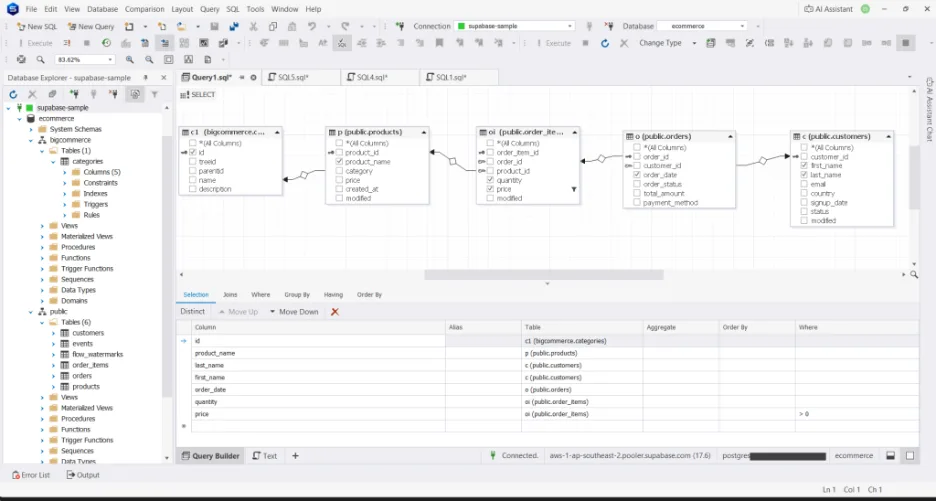
I have 6 working tables in this sample:
- products
- customers
- events
- orders
- order_items
- categories
Of all the tables above, the events table will be used for schema sync only, not in the sample query.
I am trying to display orders of customers with the corresponding category ID that were copied from my BigCommerce account for the month of March 2026. And below is my query:
SELECT
 c1.id,
 p.product_name,
 c.last_name,
 c.first_name,
 o.order_date,
 oi.quantity,
 oi.price
FROM orders o
INNER JOIN customers c
   ON o.customer_id = c.customer_id
INNER JOIN order_items oi
   ON o.order_id = oi.order_id
INNER JOIN products p
   ON oi.product_id = p.product_id
INNER JOIN bigcommerce.categories c1
   ON p.category = c1.name
WHERE o.order_date BETWEEN '2026-03-01'
  AND '2026-03-31'
  AND oi.price > 0;
Manual PostgreSQL Performance Tuning vs. Using dbForge AI Assistant
PostgreSQL performance tuning typically starts with EXPLAIN. Using the query earlier, I used EXPLAIN ANALYZE VERBOSE with it, and below is the output:
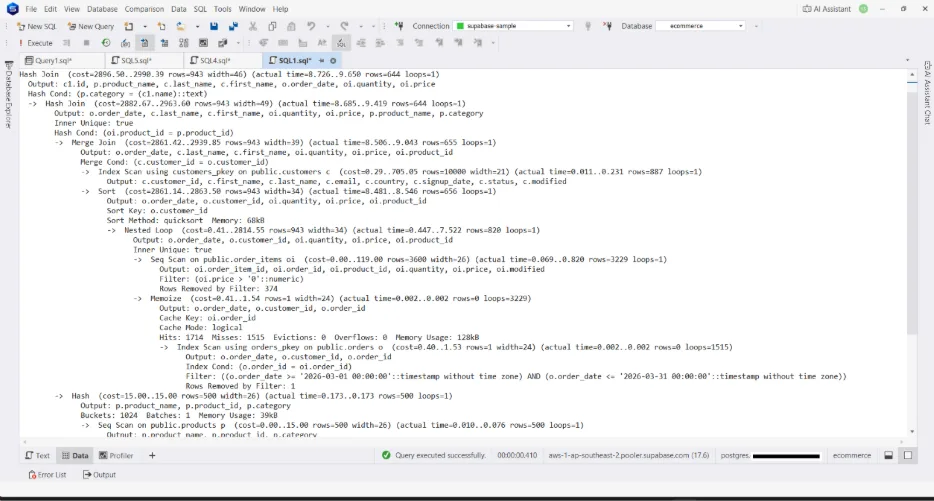
It’s quite overwhelming if you’re new to this, isn’t it? Then, line by line, I’ll have to interpret it and make indexes out of my own analysis. I have to know the meaning of the terms: what Buckets are, Merge Join, cost, and more, to make a good analysis of this. I may miss something important with all the visual clutter.
But with AI, I just asked:
Analyze potential performance bottlenecks and recommend indexes. Do not recommend existing indexes.
Then, it gave me the problems and the recommendations:
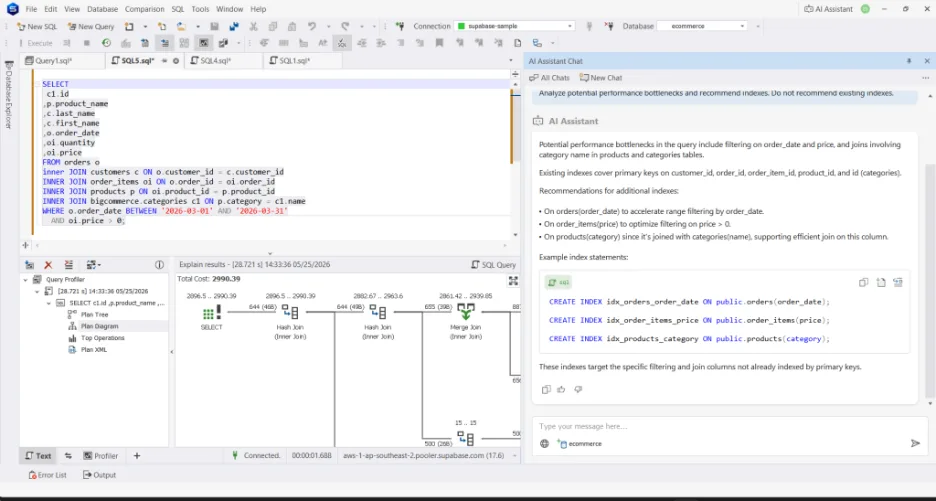
It recommended 3 indexes to boost the query performance.
As a senior developer, I already know the problems with this query and what indexes are lacking. I intentionally left the table without those indexes, and the AI Assistant got it right. Every index that should be there.
The AI Assistant knows my schema and existing indexes, so it gave a better analysis and recommendations.
What I could have done in several minutes with interpreting EXPLAIN, I did in less than a minute with AI. That’s a big win to save time if you ask me.
Why a Visual Query Builder Still Matters in AI-era PostgreSQL Workflows?
Visual query builders still matter even in the AI era because they make query creation faster for many everyday tasks.
Instead of describing your request to an AI assistant step by step, you can simply drag and drop tables onto a diagram, and the query builder automatically creates relationships and joins for you.
This allows you to build, review, and execute queries much faster, while AI assistants can complement the workflow for more complex logic and query optimization.
This could be useful to analysts and junior developers. It is also a helpful visual for team discussion.
Here’s the workflow:
- Use the Visual Query Builder to build the joins, filters, sorting, and more.
- If necessary, adjust the generated SQL code to meet your needs (e. g., adding CASE WHEN, running totals, etc.)
- Do PostgreSQL performance tuning by letting AI explain and optimize your query.
The SELECT query I showed you earlier was not typed manually. I used the above workflow until I arrived at a properly tuned SELECT statement. Check out some of the actions I did to visually create the query:
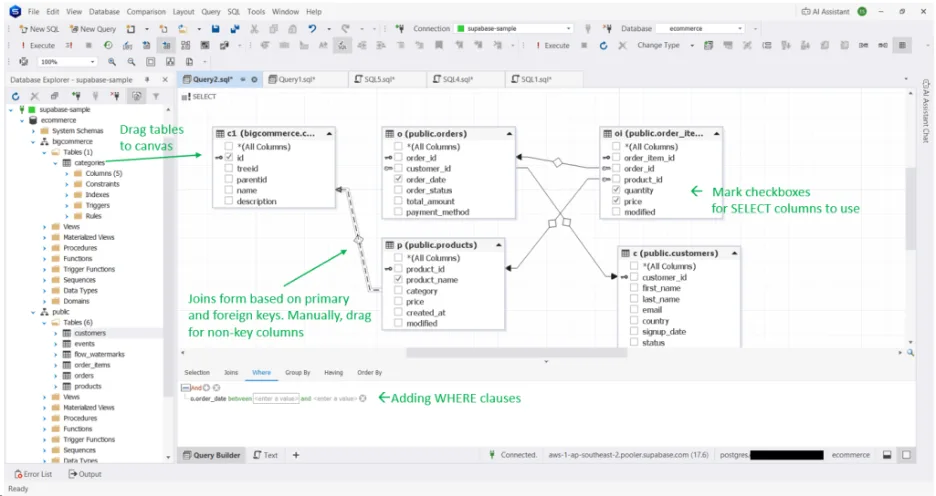
Of course, dbForge Studio for PostgreSQL has smart coding assistance. And you’re going to use that when you need to refine the generated code further.
So, it didn’t phase out control from developers; it just made crafting queries faster. It also gave you more options to cover various development scenarios.
Managing PostgreSQL Schema Changes with Less Drift and Fewer Manual Scripts
dbForge Studio for PostgreSQL’s Schema Compare can visually compare two databases and show you the differences. Then, you can safely sync the two databases. This avoids schema drift caused by manually created scripts to deploy database changes.
Let me show you a real comparison. I’ll compare the Supabase database I used here to a local copy on my laptop. I intentionally removed and changed columns and did not include the BigCommerce copy. Notice the schema comparison below:
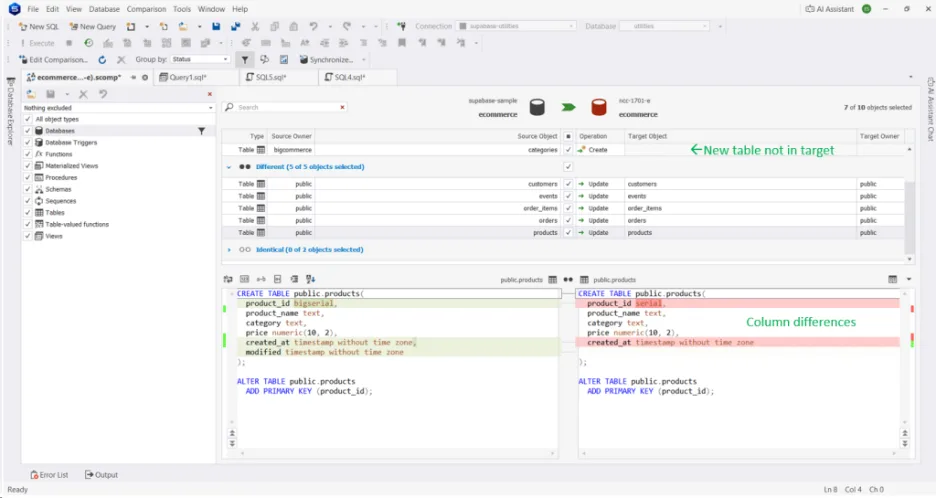
The Schema Compare pinpointed the differences I intentionally made. The products table is just one of them.
Once I triggered the sync, I can still change some options, like the one below:
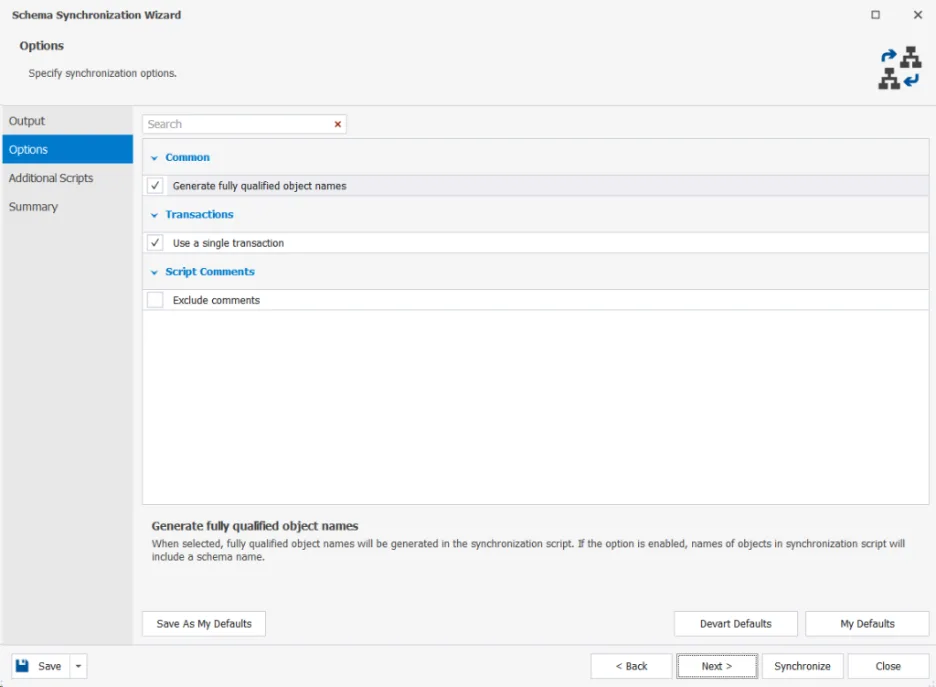
The Generate fully qualified object names is particularly important here because I have 2 schemas (public and bigcommerce). Unchecking this option will still make the sync run without errors, but they are not exactly synced. Every table will go to the public schema.
I can also review the summary of the actions to be made in the sync script:
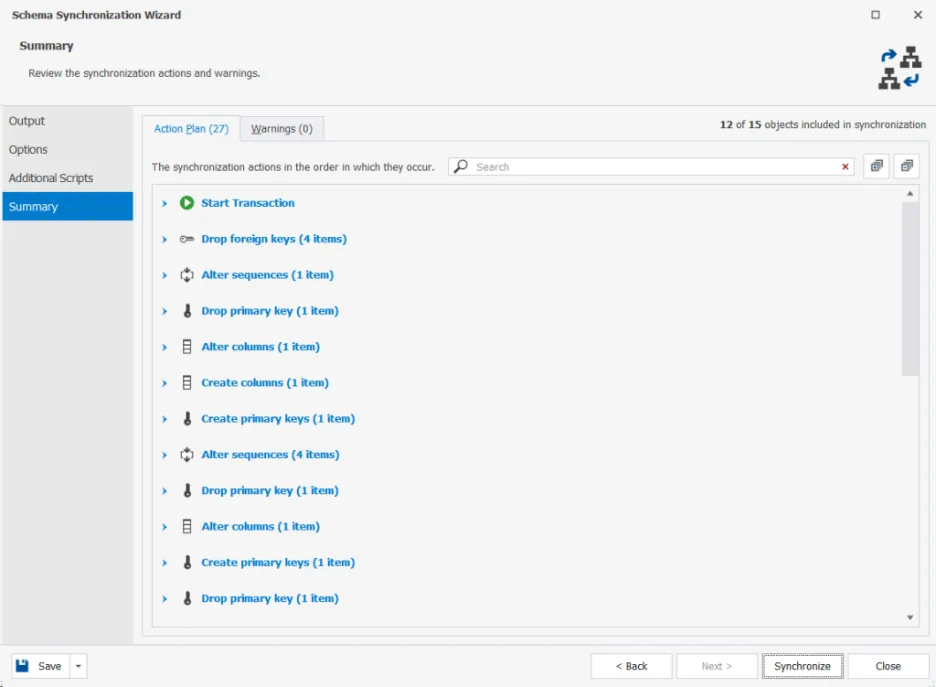
Once I hit Synchronize, the output is a script I can review and change before running it.
The final result is what I have expected in the target.
When dbForge Studio for PostgreSQL and dbForge AI Assistant Make the Biggest Impact?
I don’t want guesswork in query optimization. It can’t be because the optimizer doesn’t guess. Fortunately, dbForge AI Assistant can help you and me. It understands our schema, analyzes our indexes, and suggests useful modifications, not generic advice. In the end, we don’t spend time figuring out why EXPLAIN shows that we use a nested loop.
When it comes to ad-hoc analysis, we can do quick queries to solve tasks, test visually, and trust the results. We don’t need to pray and hope they’ll run. dbForge Studio for PostgreSQL allows us to do just that and meet our deadlines faster.
Large schemas and multi-join queries? Thanks to dbForge Studio for PostgreSQL with its Visual Query Builder feature, one only needs to drag and drop items.
Finally, manual schema syncing is quite dangerous. Using Compare and Sync tools from dbForge Studio for PostgreSQL enables developers and administrators to compare schema differences easily, preview changes in both environments, and synchronize them.
As for the daily stuff we do, dbForge Studio for PostgreSQL helps us with quick wins. There’s the Table Editor for editing tables without typos. Then, there’s intelligent code completion. It’s a big relief for every quick win.
Final Takeaway
It is not merely about new features. This is a completely different approach to working with PostgreSQL. From query creation and PostgreSQL performance tuning to schema comparison and environment synchronization – all of it is being performed at light speed with dbForge Studio for PostgreSQL 2026.1.
Who hasn’t spent hours on writing joins, analyzing EXPLAIN plans, and resolving differences in schemas? With AI and visualization in play, such issues no longer cause major discomfort. Instead, the routine becomes much easier and more enjoyable.
And that is the essence of this version update. It allows you to avoid routine activities and makes you feel confident. The workflow becomes more productive and more efficient.
Is there any other way to handle those issues? Try dbForge Studio for PostgreSQL and find out! This product won’t replace your craft in any way; it will give you hours you’ve been missing.
Why not give it a try? See how it changes your day. You might just find that the hardest parts of PostgreSQL development aren’t so hard anymore.
