

Close Menu
    Facebook X (Twitter) Instagram
    • About
    • Privacy Policy
    • Write For Us
    • Newsletter
    • Contact
    Instagram
    About ChromebooksAbout Chromebooks
    • News
      • Stats
    • AI
    • How to
      • DevOps
      • IP Address
    • Apps
    • Business
    • Q&A
      • Opinion
    • Gaming
      • Google Games
    • Blog
    • Podcast
    • Contact
    About ChromebooksAbout Chromebooks
    News

    Chrome OS 80 planned for Debian 10 Buster Linux support

    Kevin TofelBy Kevin TofelNovember 1, 2019Updated:September 17, 2025No Comments2 Mins Read
    Share
    Facebook Twitter LinkedIn Pinterest

    Back in July when Debian Linux was officially updated from version 9, called Stretch, to Buster, version 10, I noted that Chromebooks weren’t ready for this upgrade in their Crostini container. Sure you can manually update the Linux distro on your Chromebook, but you run the risk of certain Chrome OS-specific integrations breaking.

    Since then, the Chromium team has made great progress in preparing Chrome OS for an upgrade to Buster. And the current plan is to support that upgrade in Chrome OS 80, currently scheduled for release in February.
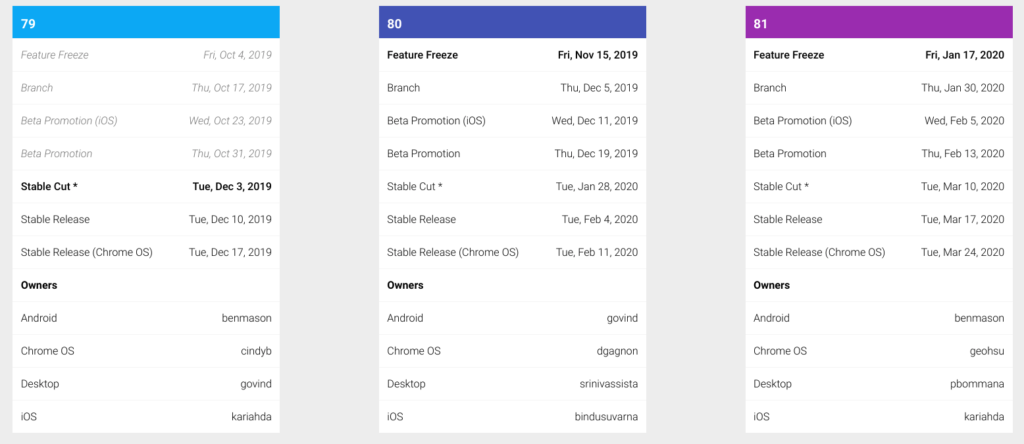
    Aside from scores of code commits to ensure a smooth upgrade in the Linux container, a new experimental flag to test the upgrade over the coming months was added just this week. When it arrives, you’ll be able to enable the chrome://flags/#crostini-use-buster-image setting to have your container use Buster.

    Also, completed this week was work on Tremplin. If you’re not familiar with Tremplin, it’s pretty integral to the Crostini implementation for Linux containers on Chromebooks. From the official Chrome OS documentation:

    Tremplin is the “springboard” daemon that runs in the Termina VM and exposes a gRPC interface for managing LXD containers.

    I’m still sorting through all of the code commits here, and I’m sure there will be many more for this feature request, but near as I can tell right now, the Buster upgrade will be just that: An upgrade if you already have Stretch installed.

    My initial concern when I first saw this request was that current Stretch users might have to do some type of import/export of data after the upgrade. So far that doesn’t appear to be the case. And frankly, that shouldn’t be the case since the system and user files are separate.

    I’ll keep reading the commits and following the forthcoming progress so I can tell you when the new flag is available.

    Buster Chrome OS Chrome OS 80 Crostini Debian Linux Project Crostini Stretch
    Share. Facebook Twitter Pinterest LinkedIn Tumblr
    Kevin Tofel
    • Website

    After spending 15 years in IT at Fortune 100 companies, Kevin turned a hobby into a career and began covering mobile technology in 2003. He writes daily on the industry and has co-hosted the weekly MobileTechRoundup podcast since 2006. His writing has appeared in print (The New York Times, PC Magazine and PC World) and he has been featured on NBC News in Philadelphia.

    Related Posts

    Auto DraftStarbucks Partner Hours: Manual to Managing Work Schedules

    January 26, 2026

    Anon Vault For Private Cloud Storage

    January 23, 2026

    GitHub Copilot Statistics [2026]

    January 7, 2026

    Comments are closed.

    Best of AI

    VALL-E Statistics 2026

    January 28, 2026

    StarCoder Statistics And User Trends 2026

    January 27, 2026

    BLIP-2 Statistics 2026

    January 23, 2026

    AI mode Usage Statistics 2026

    January 22, 2026

    Code Llama Statistics 2026

    January 22, 2026
    Trending Stats

    Most searched keywords on Google

    January 27, 2026

    Ahrefs Search Engine Statistics 2026

    January 19, 2026

    Pay Per Click Advertising Statistics 2026

    January 16, 2026

    Google Ads Revenue 2025

    November 29, 2025

    Statistical Analysis Programs for Chromebook 2025

    November 22, 2025
    • About
    • Write For Us
    • Contact
    • Privacy Policy
    • Sitemap
    © 2026 About Chrome Books. All rights reserved.

    Type above and press Enter to search. Press Esc to cancel.