


Whether you accidentally formatted your SD card or formatted it to make space on the card, all your important information or data stored in it will be gone in a minute. Moreover, if you haven’t backed up your SD card files, this is a catastrophe.
Now, the question arises: Is there a way to recover data from a formatted SD card?
You may still be able to recover data from formatted SD cards. This blog provides a step-by-step guide to recovering media files from formatted SD cards.
Can You Recover Photos from a Formatted SD Card?
Yes, photos, videos, and other files can be recovered from a formatted SD card. However, the success of SD card recovery depends on whether the card has been overwritten.
When you format an SD card, the data stored in it isn’t permanently erased instantly; instead, the file system just marks the space where the data was saved as ‘available’ for new data. If no new data is written on the SD card, your previously lost files are likely to be intact.
However, storing new files on your SD card will overwrite the previously lost data still present on the card. Therefore, stop using the formatted SD card until you have recovered your files.
Things to Keep in Mind Before You Begin SD Card Recovery
- Stop using the SD card immediately to avoid overwriting.
- Don’t reformat the SD card again, as it minimizes the chances of successful recovery.
How do you recover photos from a formatted SD card?
Let’s explore various methods to get your photos and videos back from a formatted SD Card.
-
Recover Media Files from the Backup
Most people back up their SD card on another device or cloud storage services like Google Photos, Microsoft OneDrive, etc. If you also regularly back up your SD card, you can recover the lost photos directly from those backups.
-
Recover Formatted SD Card Data with Stellar Photo Recovery
One of the easiest ways to recover photos, videos, and other media files from a formatted SD card in the absence of a backup is by using reliable photo recovery software. Stellar Photo Recovery is the best tool for efficiently recovering data from a formatted SD card with its original name and date timestamp.
This photo recovery tool can recover lost or deleted media files from formatted, corrupted, damaged, inaccessible SD cards, compact flash, and other storage devices. Moreover, it can restore photos, videos, and audio files of popular formats, including JPG/JPEG, MPVE, MP4, RAW, etc.
Here’s how to recover photos from a formatted SD card
- Download and install Stellar Photo Recovery on your Mac or Windows system.
- Insert the formatted memory card into your system via a card reader.
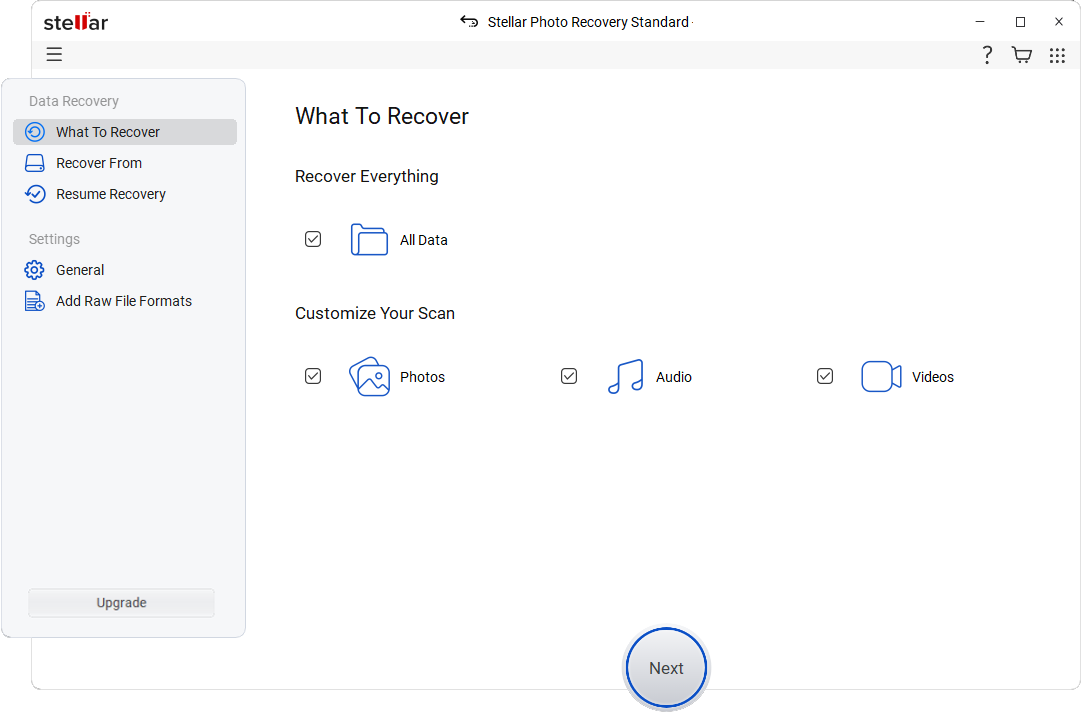
- Open Stellar Photo Recovery and select Photos from the ‘What to Recover’ screen. Click Next.
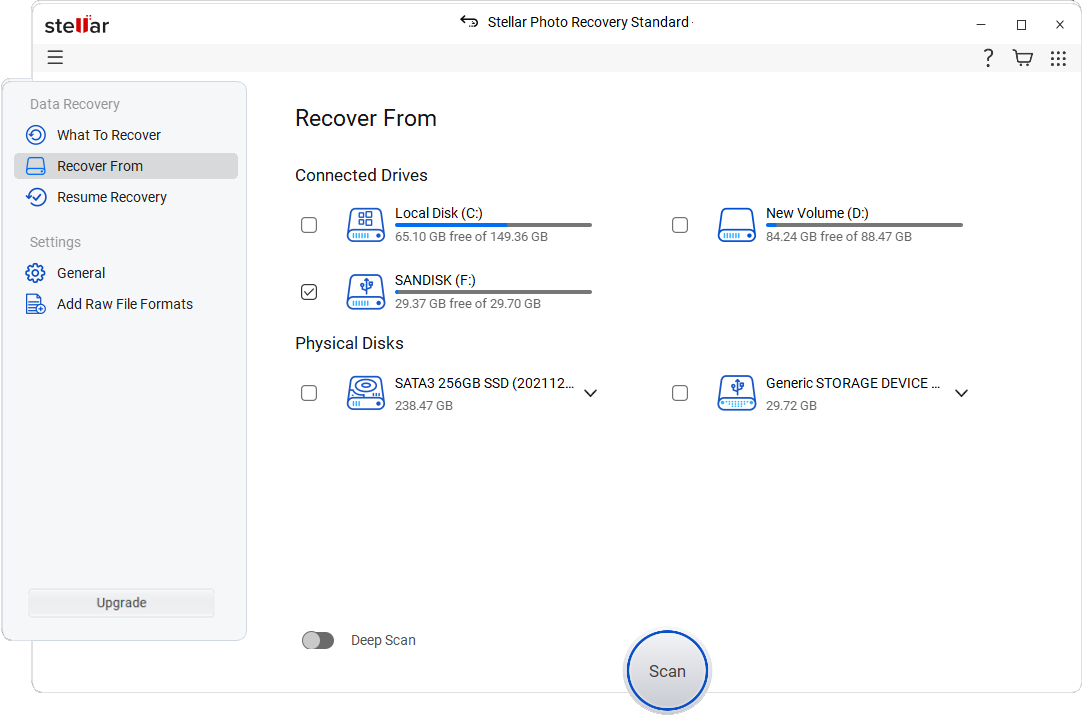
- From the ‘Recover From’ screen, select the memory card from which you want to recover the lost photos. Click Scan.
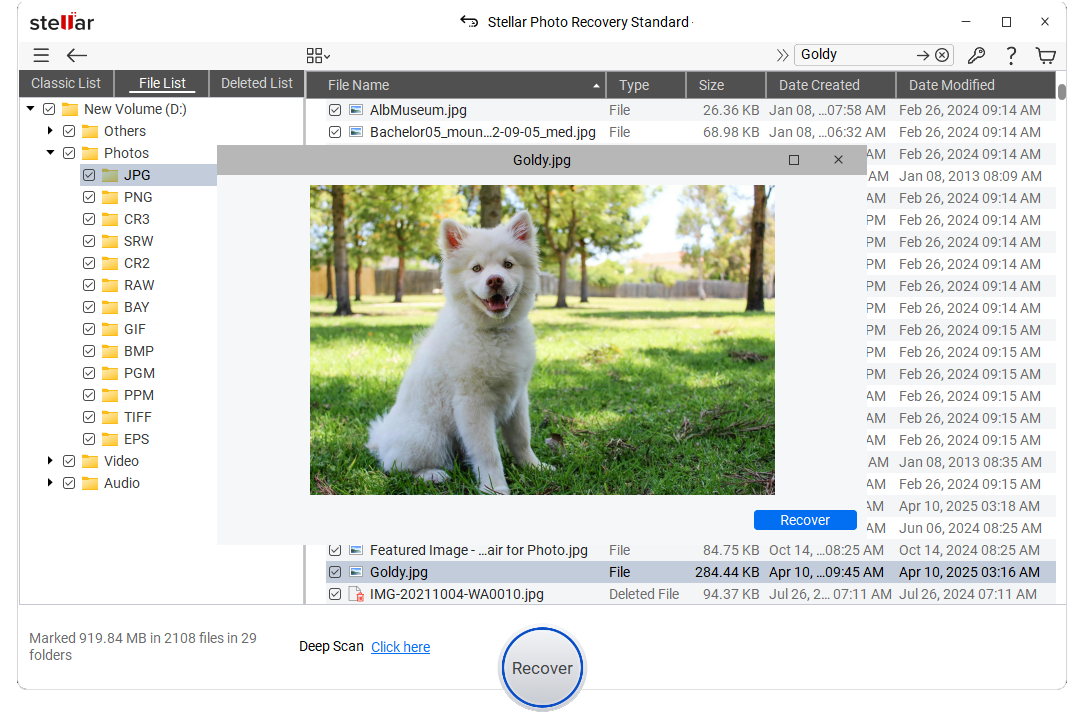
- The software will start scanning your device, which will take some time to complete. Once the scan completes, click OK to preview the recovered files. To recover a particular file, right-click on it and select Recover.
- Browse the location where you want to save the recovered file on the local disk. Click Save.
Best Practices to Prevent Future Photo Loss from SD Cards
- Take regular backups of your data saved on the SD card.
- Don’t eject the SD card while it is in use.
- Use only reputable brands’ SD cards.
- Don’t use the same SD cards on multiple devices.
- Format the SD card periodically after each use.
- Use reliable antivirus software to scan your system for malware-related issues.
Conclusion
Recovering data from a formatted SD card with the right tools and methods is possible. Remember, the first thing to do is look for a cloud or manual backup.
If you do not have the backup of the formatted SD card, you should try to recover the lost photos using a specialized photo recovery software like Stellar Photo Recovery and try recovering your data from a formatted SD card.
