

Close Menu
    Facebook X (Twitter) Instagram
    • About
    • Privacy Policy
    • Write For Us
    • Newsletter
    • Contact
    Instagram
    About ChromebooksAbout Chromebooks
    • News
      • Stats
    • AI
    • How to
      • DevOps
      • IP Address
    • Apps
    • Business
    • Q&A
      • Opinion
    • Gaming
      • Google Games
    • Blog
    • Podcast
    • Contact
    About ChromebooksAbout Chromebooks
    News

    Chromebooks will be able to install Debian apps (packages) through native Files app

    Kevin TofelBy Kevin TofelJuly 19, 2018Updated:May 10, 2025No Comments2 Mins Read
    Share
    Facebook Twitter LinkedIn Pinterest

    Last month, XDA-Developers reported that Google’s Project Crostini would support a simple installation of Linux apps. Currently, all Linux packages are installed directly in the Linux container through the command line interface, which can be clunky for those new to Linux using Project Crostini. Google is simplifying this process directly through the native Files app in Chrome OS.
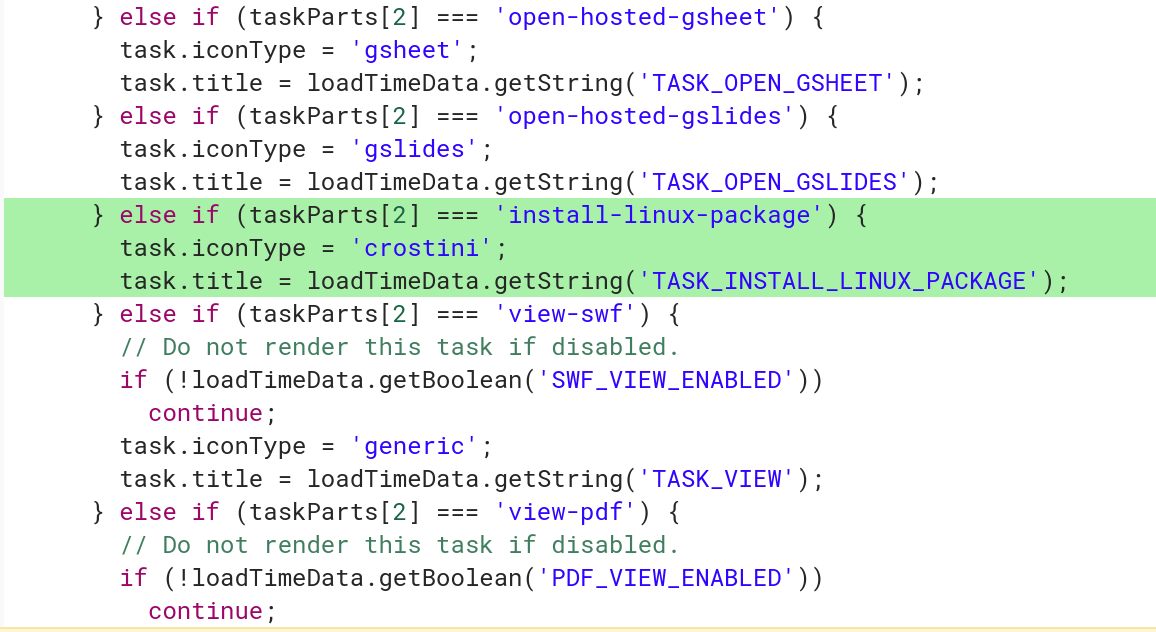
    task install linux package

    Recent code changes show that Google is adding a file handler for Debian packages so that if a user downloads an app package within Chrome OS — where they would appear in the Files app with a .deb extension — the user can then choose to have the package installed in the Linux container.

    As I understand it, right-clicking on a .deb package in the Files app will show a “Install with Linux (Beta)” option. Additionally, all information for the application install will appear as system notifications in Chrome OS.

    The functionality is welcome, but a bit basic. In the change description, developers say that they plan to retrieve and show information about the package, such as the name, version and description of package, similar to how a modern package manager in Linux works today. And when this feature arrives, you won’t be able multi-select several .deb packages for installation; the first implementation will only support a single install at a time.

    Even so, this is another step towards a pure user experience integration between Chrome OS and native Linux apps, without adding the confusion of having a full graphical Linux desktop environment: That would likely bring more confusion to the Chrome OS experience, which Google tries to keep as simple as possible.

    Chrome OS Crostini Files app Linux Linux Apps Productivity Project Crostini
    Share. Facebook Twitter Pinterest LinkedIn Tumblr
    Kevin Tofel
    • Website

    After spending 15 years in IT at Fortune 100 companies, Kevin turned a hobby into a career and began covering mobile technology in 2003. He writes daily on the industry and has co-hosted the weekly MobileTechRoundup podcast since 2006. His writing has appeared in print (The New York Times, PC Magazine and PC World) and he has been featured on NBC News in Philadelphia.

    Related Posts

    Auto DraftStarbucks Partner Hours: Manual to Managing Work Schedules

    January 26, 2026

    Anon Vault For Private Cloud Storage

    January 23, 2026

    GitHub Copilot Statistics [2026]

    January 7, 2026

    Comments are closed.

    Best of AI

    Make-A-Video Statistics 2026

    January 30, 2026

    Stable Video Diffusion User Trends And Statistics 2026

    January 29, 2026

    VALL-E Statistics 2026

    January 28, 2026

    StarCoder Statistics And User Trends 2026

    January 27, 2026

    BLIP-2 Statistics 2026

    January 23, 2026
    Trending Stats

    Google Penalty Recovery Statistics 2026

    January 30, 2026

    Search engine operators Statistics 2026

    January 29, 2026

    Most searched keywords on Google

    January 27, 2026

    Ahrefs Search Engine Statistics 2026

    January 19, 2026

    Pay Per Click Advertising Statistics 2026

    January 16, 2026
    • About
    • Write For Us
    • Contact
    • Privacy Policy
    • Sitemap
    © 2026 About Chrome Books. All rights reserved.

    Type above and press Enter to search. Press Esc to cancel.