

Close Menu
    Facebook X (Twitter) Instagram
    • About
    • Privacy Policy
    • Write For Us
    • Newsletter
    • Contact
    Instagram
    About ChromebooksAbout Chromebooks
    • Linux
    • News
      • Stats
      • Reviews
    • AI
    • How to
      • DevOps
      • IP Address
    • Apps
    • Business
    • Q&A
      • Opinion
    • Gaming
      • Google Games
    • Blog
    • Podcast
    • Contact
    About ChromebooksAbout Chromebooks
    News

    Chromebooks will be able to install Debian apps (packages) through native Files app

    Kevin TofelBy Kevin TofelJuly 19, 2018Updated:May 11, 2026No Comments2 Mins Read

    Last month, XDA-Developers reported that Google’s Project Crostini would support a simple installation of Linux apps. Currently, all Linux packages are installed directly in the Linux container through the command line interface, which can be clunky for those new to Linux using Project Crostini. Google is simplifying this process directly through the native Files app in Chrome OS.
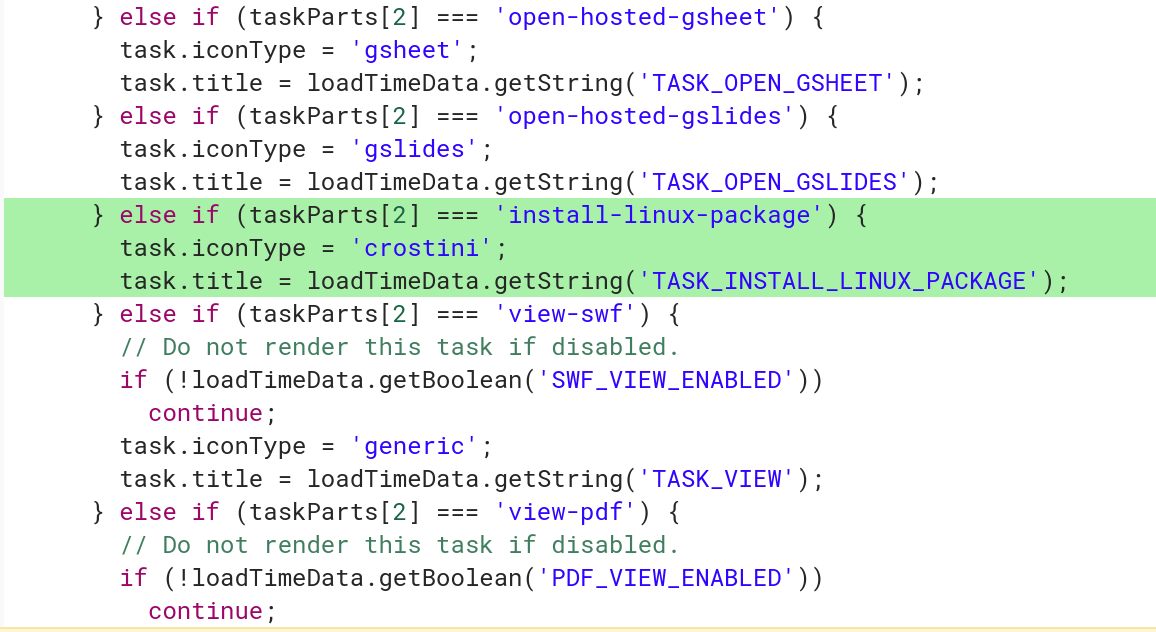
    task install linux package

    Recent code changes show that Google is adding a file handler for Debian packages so that if a user downloads an app package within Chrome OS — where they would appear in the Files app with a .deb extension — the user can then choose to have the package installed in the Linux container.

    As I understand it, right-clicking on a .deb package in the Files app will show a “Install with Linux (Beta)” option. Additionally, all information for the application install will appear as system notifications in Chrome OS.

    The functionality is welcome, but a bit basic. In the change description, developers say that they plan to retrieve and show information about the package, such as the name, version and description of package, similar to how a modern package manager in Linux works today. And when this feature arrives, you won’t be able multi-select several .deb packages for installation; the first implementation will only support a single install at a time.

    Even so, this is another step towards a pure user experience integration between Chrome OS and native Linux apps, without adding the confusion of having a full graphical Linux desktop environment: That would likely bring more confusion to the Chrome OS experience, which Google tries to keep as simple as possible.

    Kevin Tofel
    • Website

    After spending 15 years in IT at Fortune 100 companies, Kevin turned a hobby into a career and began covering mobile technology in 2003. He writes daily on the industry and has co-hosted the weekly MobileTechRoundup podcast since 2006. His writing has appeared in print (The New York Times, PC Magazine and PC World) and he has been featured on NBC News in Philadelphia.

    Best of AI

    Runway ML Statistics 2026

    September 8, 2026

    AI Training Data Licensing Lawsuit Statistics 2026

    September 7, 2026

    Meta AI Usage Statistics 2026: Monthly Users, App Downloads and Growth Data

    August 24, 2026

    DeepSeek Statistics 2026: Users, Token Share, Pricing and Benchmark Data

    August 15, 2026

    Cursor AI Statistics 2026

    August 14, 2026
    Trending Stats

    AI-Generated Content on Social Media Statistics 2026

    September 3, 2026

    Docker vs Podman Usage Statistics 2026 [Adoption, Growth and Ecosystem Data]

    September 1, 2026

    Safari Browser Statistics 2026 [Market Share by Device, Demographics And Revenue]

    August 28, 2026

    WSL (Windows Subsystem for Linux) Usage Statistics 2026

    August 26, 2026

    Chromebook Average Selling Price Statistics 2026: US Retail Averages And Launch Prices

    August 21, 2026
    • About
    • Tech Guest Post
    • Contact
    • Privacy Policy
    • Sitemap
    © 2026 About Chrome Books. All rights reserved.

    Type above and press Enter to search. Press Esc to cancel.