

Close Menu
    Facebook X (Twitter) Instagram
    • About
    • Privacy Policy
    • Write For Us
    • Newsletter
    • Contact
    Instagram
    About ChromebooksAbout Chromebooks
    • Linux
    • News
      • Stats
      • Reviews
    • AI
    • How to
      • DevOps
      • IP Address
    • Apps
    • Business
    • Q&A
      • Opinion
    • Gaming
      • Google Games
    • Blog
    • Podcast
    • Contact
    About ChromebooksAbout Chromebooks
    News

    GPU acceleration command for Linux coming soon to Project Crostini

    Kevin TofelBy Kevin TofelDecember 26, 2018Updated:September 8, 2025No Comments2 Mins Read

    One of the key missing components when running Linux on a Chromebook is support for GPU hardware acceleration. That’s why many high-framerate games and the Android emulator in Android Studio don’t yet work, or if they do, they don’t work well. 9to5Google spotted a code commit that will allow you to test GPU acceleration support, likely soon in the Canary, Dev and Beta channels of Chrome OS.
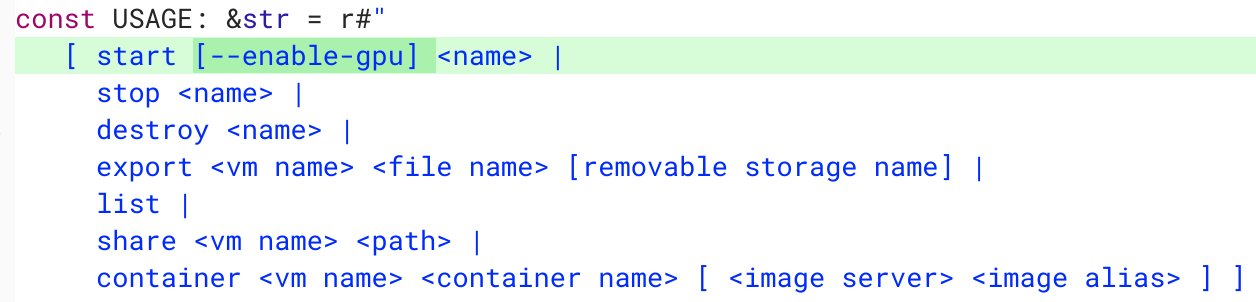
    You can see in the code snippet above how this will work for testing purposes. Rather than click the Terminal application to start the Linux container, you’ll manually start the container from the crosh app (ctrl + alt + T) using an lxc the vmc start command; similar to the way we started Linux in the early days of Project Crostini. Using a new –enable-gpu parameter with the manual startup command will implement the hardware acceleration for graphics.

    Obviously, there’s far more involved than to type this parameter to get GPU hardware acceleration working. But the Chromium team has been working on those bits of plumbing quite a bit over the past few weeks.

    As of now, I don’t see a target release for GPU support in Project Crostini. However, it does show as Priority 2 initiative, which Priority 1 being the highest priority, on the Crostini Platform Hotlist.

    Additionally, back in November, Google said full Android Studio support would be coming to Crostini in early 2019, leading me to think that’s the target date for GPU acceleration support on Linux for Chromebooks. I could be wrong, but I’d think that’s the main reason Google wants to get this working. Sure, GPU support Linux games will be welcome too; I just don’t think that’s the impetus for adding the feature.

    More to follow when the new –enable-gpu parameter starts working since I tested it on the Chrome OS 72 Dev Channel without any success. I’m sure it will arrive in the Canary Channel first, but I generally stick with the Dev Channel for my testing and usage.

    Kevin Tofel
    • Website

    After spending 15 years in IT at Fortune 100 companies, Kevin turned a hobby into a career and began covering mobile technology in 2003. He writes daily on the industry and has co-hosted the weekly MobileTechRoundup podcast since 2006. His writing has appeared in print (The New York Times, PC Magazine and PC World) and he has been featured on NBC News in Philadelphia.

    Best of AI

    LMArena AI: Chatbot Ranking Platform 2026

    May 27, 2026

    Will AI Take Over the World

    May 25, 2026

    AI21 Jurassic Statistics 2026: Model Size, Usage and AI Performance Trends

    May 19, 2026

    Chub AI Explained

    May 6, 2026

    Stable Diffusion AI: Free Text To Image AI Generator

    May 5, 2026
    Trending Stats

    Chromebook Browser Usage Statistics 2026: User Behavior Data And Reports

    June 3, 2026

    ChromeOS vs Windows Power Consumption Statistics 2026: Battery Life, Wattage, and Energy Cost Data

    June 2, 2026

    Chromebook Price vs Performance Statistics 2026: Value And Hardware Trends

    May 27, 2026

    Chromebook Failure Rates vs Windows Laptops Statistics 2026: Reliability, Repairs And Performance Comparison

    May 26, 2026

    ChromeOS Update Failure Rates Statistics 2026: Stability, Security And System Reliability Trends

    May 25, 2026
    • About
    • Tech Guest Post
    • Contact
    • Privacy Policy
    • Sitemap
    © 2026 About Chrome Books. All rights reserved.

    Type above and press Enter to search. Press Esc to cancel.