

Close Menu
    Facebook X (Twitter) Instagram
    • About
    • Privacy Policy
    • Write For Us
    • Newsletter
    • Contact
    Instagram
    About ChromebooksAbout Chromebooks
    • Linux
    • News
      • Stats
      • Reviews
    • AI
    • How to
      • DevOps
      • IP Address
    • Apps
    • Business
    • Q&A
      • Opinion
    • Gaming
      • Google Games
    • Blog
    • Podcast
    • Contact
    About ChromebooksAbout Chromebooks
    News

    Project Crostini getting simple Linux app uninstall function from launcher icons

    Kevin TofelBy Kevin TofelOctober 4, 2018Updated:September 13, 2025No Comments2 Mins Read

    Google is clearly trying to make the Project Crostini experience on Chromebooks easy for folks not necessarily familiar with Linux. In August, Chrome OS gained the ability to install Debian packages directly in the native Files app on a Chromebook. A few weeks ago, work began to show the package information during the install process. Now, the Chromium team is building functionality to remove Linux apps with a simple click.

    There are three parts to this process since Project Crostini has several functional layers.

    First is the addition of an uninstall option for Crostini apps: Desktop icons for the Linux apps will show an “Uninstall” choice when right clicked.

    Next is the uninstall command tasking Garcon, the code name for what’s essentially a”go-between” from Chrome OS to the Crostini container.
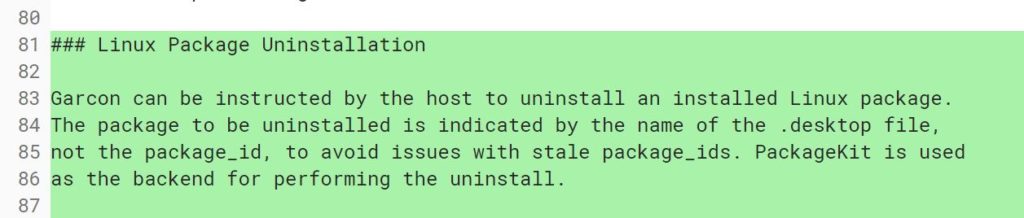
    And finally is Cicerone, which accepts messages from Garcon and communicates directly with Crostini containers. Here’s the supporting change to Cicerone:

    vm_tools: Pass uninstall messages through cicerone

    Pass the uninstall messages to and from garcon. Also update
    cicerone_client to support uninstalling.

    Keep in mind that the uninstall functionality within Chrome OS will only be supported by Linux apps that have icons in the Chrome launcher. That should be most of them, but I know I have a few missing launcher icons; perhaps that’s from testing on the Dev Channel for months.

    And of course, for people familiar with the Linux Command Line Interface (CLI) or have a package manager installed in the Linux container, those options are still available. The idea here — at least as I see it — is for folks that might want to tinker with some Linux apps or install just a few key ones such as Skype, Libre Office or another popular desktop application.

    Kevin Tofel
    • Website

    After spending 15 years in IT at Fortune 100 companies, Kevin turned a hobby into a career and began covering mobile technology in 2003. He writes daily on the industry and has co-hosted the weekly MobileTechRoundup podcast since 2006. His writing has appeared in print (The New York Times, PC Magazine and PC World) and he has been featured on NBC News in Philadelphia.

    Best of AI

    Imagen AI: The Best Photo Editing AI In 2026

    April 21, 2026

    Alphafold AI from Google Deepmind 2026

    April 21, 2026

    Agentic AI Pindrop Anonybit: The Future of Secure Identity Verification

    April 17, 2026

    Google Bard Statistics And User Data 2026

    April 10, 2026

    Azure OpenAI Explained

    April 10, 2026
    Trending Stats

    ChromeOS App Ecosystem Growth Statistics 2026

    April 25, 2026

    Chromebook vs Tablet Usage In Education Statistics 2026

    April 23, 2026

    ChromeOS Update Frequency Statistics 2026

    April 22, 2026

    Chromebook Wi-Fi Performance Statistics 2026

    April 18, 2026

    Chromebook Crash Rates Statistics 2026

    April 17, 2026
    • About
    • Tech Guest Post
    • Contact
    • Privacy Policy
    • Sitemap
    © 2026 About Chrome Books. All rights reserved.

    Type above and press Enter to search. Press Esc to cancel.