

Close Menu
    Facebook X (Twitter) Instagram
    • About
    • Privacy Policy
    • Write For Us
    • Newsletter
    • Contact
    Instagram
    About ChromebooksAbout Chromebooks
    • News
      • Stats
    • AI
    • How to
      • DevOps
      • IP Address
    • Apps
    • Business
    • Q&A
      • Opinion
    • Gaming
      • Google Games
    • Blog
    • Podcast
    • Contact
    About ChromebooksAbout Chromebooks
    News

    Chrome OS 69 Dev Channel updates Files app, adds “Better Together” setup option and more

    Kevin TofelBy Kevin TofelJune 20, 2018Updated:September 10, 2025No Comments3 Mins Read
    Share
    Facebook Twitter LinkedIn Pinterest

    I was busy tinkering with the Acer Chromebook Tab 10 review unit last night, so I didn’t get a chance to write up the latest Chrome OS news: The Dev Channel 69 update is out and there appears to be quite a few new features.

    I’m still nosing around, but for starters, the system tray that brings an Android-like look is a little cleaner and smoother. And the notifications above it are working better as well, although they don’t reflect the “dark mode” theme that I’m using for the tray. Here’s a quick peek at the tray, minus any notifications.

    https://twitter.com/KevinCTofel/status/1009250353978793984

    Also new to Chrome 69 is the beginnings of the “Better Together” setup process that will bring multidevice functionality between Chrome OS and connected devices, such as your Android phone.

    Better together setup

    Unfortunately, the Set up button doesn’t do anything yet. And the Learn more link takes you to a page that’s not yet written, so we’ll have to wait on another update to actually use this.

    The Files app gets an update too, but its not quite where we’re expecting to be. We know that Google plans to move Google Drive down the list and lump Play, Linux and Downloads under “My Files. That hasn’t happened yet. And you only have access to the Movies, Pictures and Music folders from the Android container now.
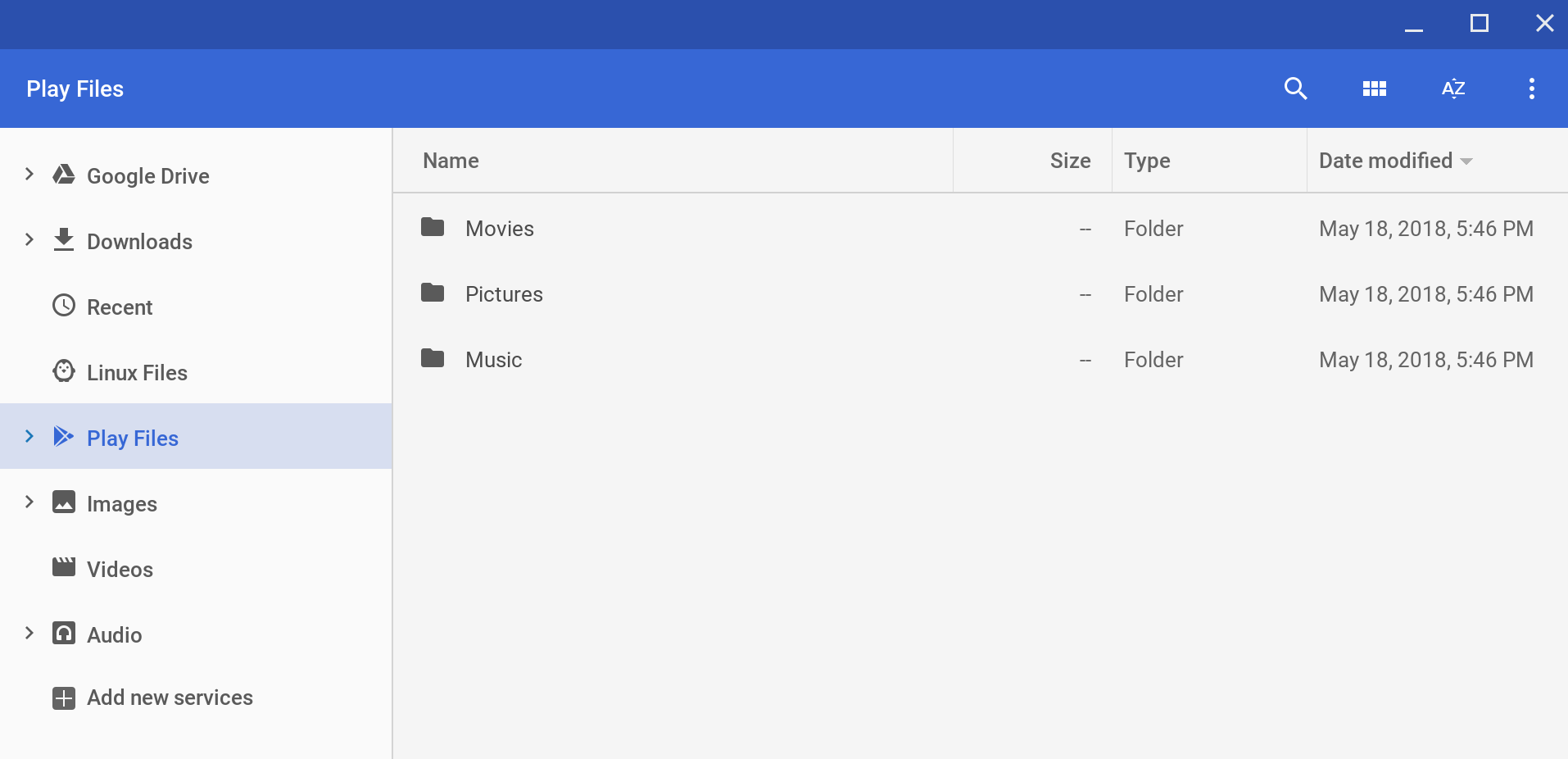
    Files app Chrome 69

    Folks running Project Crostini for Linux apps get a small, but needed, bonus in Chrome OS 69. Until now, when you opened a Linux app from the App Menu, you didn’t see any indicator showing that something was actually happening. You’d just wait for five or so seconds and then you’d see your Linux app. That’s because the Linux container has to start up if it wasn’t already running. Now a spinner icon appears in the shelf to indicate that something is happening. And once the app opens, its icon appears on the shelf in place of the spinner.

    Picture-in-picture mode is enabled by default but not yet working (at least not for me). However, that new Wallpaper picker that I like still works.

    Note that many people who have upgraded to Dev Channel 69 are experiencing a multitude of issues, including browser stability and other problems. For some reason, I’m in the minority here because I’m not seeing any major issues save for one: A touchpad firmware driver update appears upon every boot up. I suspect Google will quickly get an update out for the Dev Channel to address some of the reported problems.

    Chrome OS Chromebooks Chromeboxes Dev Channel Project Crostini
    Share. Facebook Twitter Pinterest LinkedIn Tumblr
    Kevin Tofel
    • Website

    After spending 15 years in IT at Fortune 100 companies, Kevin turned a hobby into a career and began covering mobile technology in 2003. He writes daily on the industry and has co-hosted the weekly MobileTechRoundup podcast since 2006. His writing has appeared in print (The New York Times, PC Magazine and PC World) and he has been featured on NBC News in Philadelphia.

    Related Posts

    Auto DraftStarbucks Partner Hours: Manual to Managing Work Schedules

    January 26, 2026

    Anon Vault For Private Cloud Storage

    January 23, 2026

    GitHub Copilot Statistics [2026]

    January 7, 2026

    Comments are closed.

    Best of AI

    Chub AI Statistics And User Trends 2026

    February 5, 2026

    Make-A-Video Statistics 2026

    January 30, 2026

    Stable Video Diffusion User Trends And Statistics 2026

    January 29, 2026

    VALL-E Statistics 2026

    January 28, 2026

    StarCoder Statistics And User Trends 2026

    January 27, 2026
    Trending Stats

    Google Penalty Recovery Statistics 2026

    January 30, 2026

    Search engine operators Statistics 2026

    January 29, 2026

    Most searched keywords on Google

    January 27, 2026

    Ahrefs Search Engine Statistics 2026

    January 19, 2026

    Pay Per Click Advertising Statistics 2026

    January 16, 2026
    • About
    • Write For Us
    • Contact
    • Privacy Policy
    • Sitemap
    © 2026 About Chrome Books. All rights reserved.

    Type above and press Enter to search. Press Esc to cancel.