

Close Menu
    Facebook X (Twitter) Instagram
    • About
    • Privacy Policy
    • Write For Us
    • Newsletter
    • Contact
    Instagram
    About ChromebooksAbout Chromebooks
    • Linux
    • News
      • Stats
      • Reviews
    • AI
    • How to
      • DevOps
      • IP Address
    • Apps
    • Business
    • Q&A
      • Opinion
    • Gaming
      • Google Games
    • Blog
    • Podcast
    • Contact
    About ChromebooksAbout Chromebooks
    News

    This is the ChromeOS version tracker that Google should have made

    Kevin TofelBy Kevin TofelAugust 23, 2022Updated:September 18, 2025No Comments2 Mins Read

    Recently, I pointed out a new ChromeOS version tracker published by Google. The idea is that you can look up your Chromebook and see what versions of ChromeOS are available for it. The updated Chromium Dash site is much nicer looking than the old tracker but it’s not easy to find your device in the list.
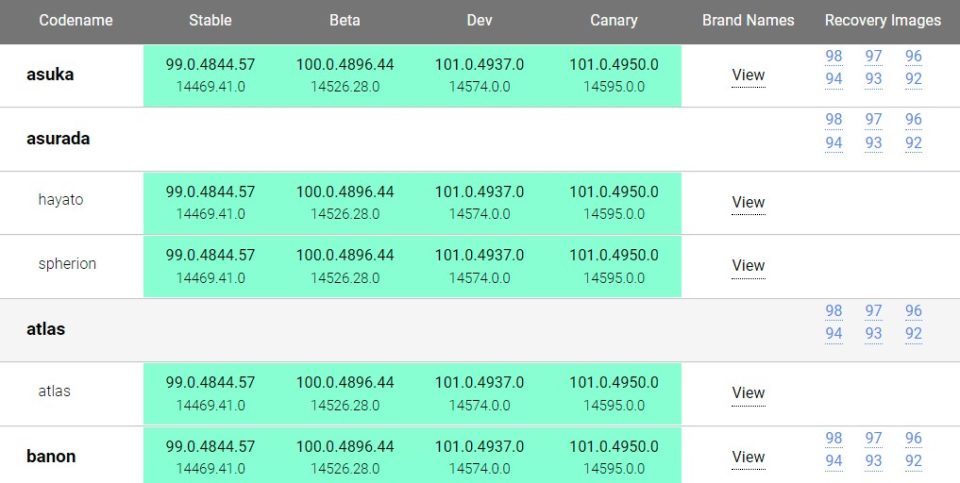
    Chromium Dash Chrome OS version tracker
    Chromium Dash version tracker

    An independent developer created his own ChromeOS version tracker, found here, that addresses that challenge.

    At first glance, it appears there’s a lot going on here. And there is. That’s because it provides everything you’d want to know about ChromeOS versions for every device and on every channel:
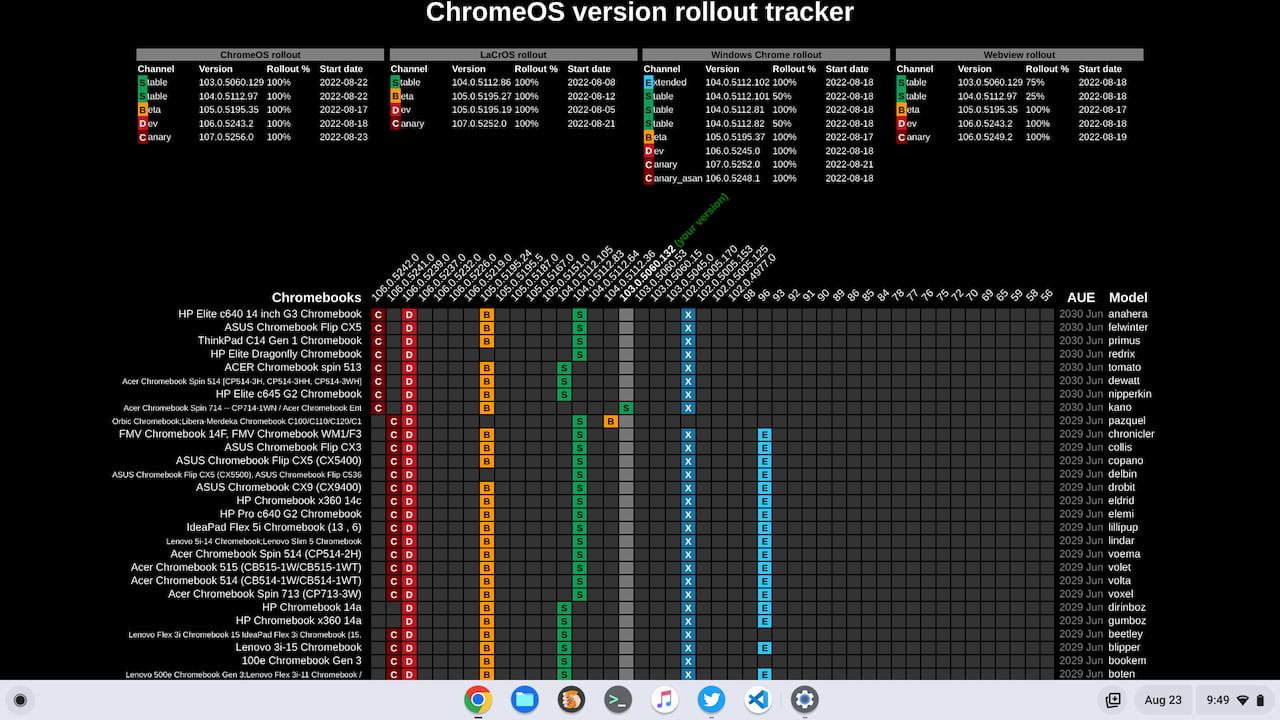
    Chrome OS version tracker

    The top section includes both versions and rollout completion status for ChromeOS, Lacros (the Linux version of Chrome that’s coming to Chromebooks), Windows, and Chrome Webview. On the right side, you get the Automatic Update Expiration date as well as the device model or family name.

    Below are supported Chromebooks and other ChromeOS devices. There’s no need to look up the board name to find your machine, although that information is there if you need it. And can I say I just love the fact that this ChromeOS version tracker identifies the version on your device?

    With that information, it’s easier to scan through the many different Chromebooks and see if your ChromeOS version is up to date. Here you can see the feature applied to the Acer Chromebook Spin 714 that I recently bought. There’s a green signifier of “your version” above ChromeOS 103.0.0560.132. The Spin 714 is so new that it’s behind on the Stable Channel right now.
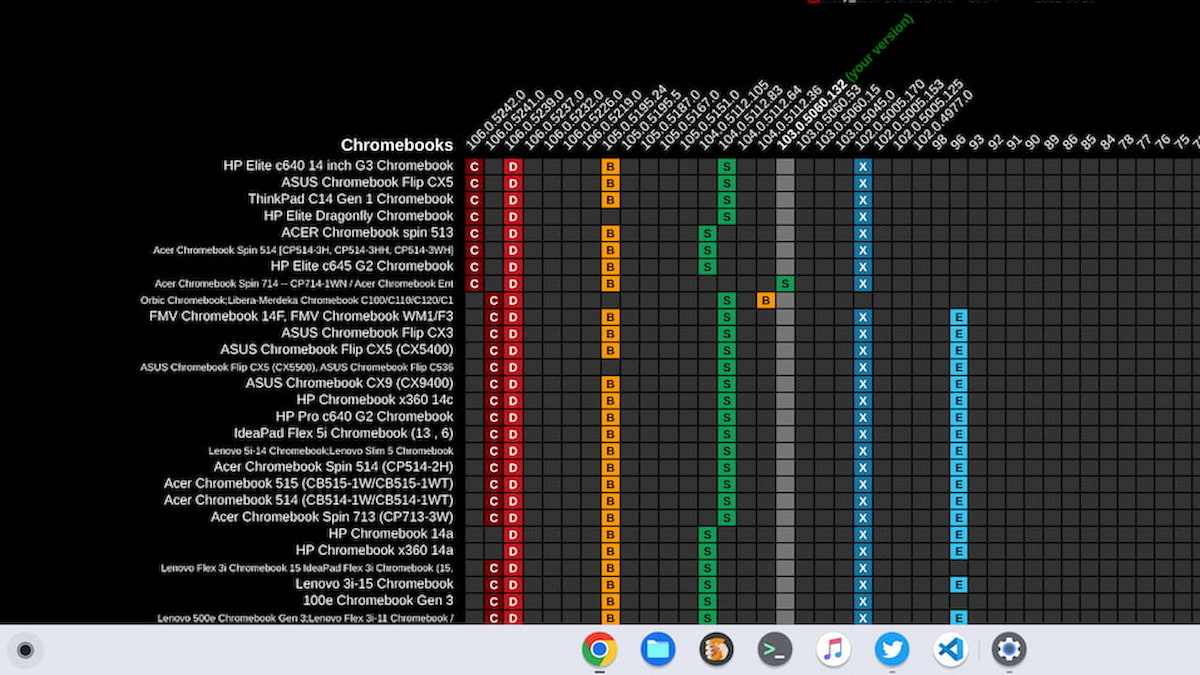
    Granted, the majority of consumers using a Chromebook don’t pay attention to the ChromeOS version on their device. They simply let Google handle software updates in the background, restart their Chromebook and then have the new version.

    For managing fleets of Chromebooks in an enterprise or school situation though? This ChromeOS version tracker is ideal and a more efficient resource than Google’s solution.

    Kevin Tofel
    • Website

    After spending 15 years in IT at Fortune 100 companies, Kevin turned a hobby into a career and began covering mobile technology in 2003. He writes daily on the industry and has co-hosted the weekly MobileTechRoundup podcast since 2006. His writing has appeared in print (The New York Times, PC Magazine and PC World) and he has been featured on NBC News in Philadelphia.

    Comments are closed.

    Best of AI

    Google Bard Statistics And User Data 2026

    April 10, 2026

    Llama 2 Ai Model

    April 10, 2026

    Azure OpenAI Explained

    April 10, 2026

    Whisper AI Review 2026

    April 9, 2026

    Openai Codex -The AI Code Editor

    April 9, 2026
    Trending Stats

    Chrome Lighthouse Statistics 2026

    March 26, 2026

    Chrome Incognito Mode Statistics 2026

    February 10, 2026

    Google Penalty Recovery Statistics 2026

    January 30, 2026

    Search engine operators Statistics 2026

    January 29, 2026

    Most searched keywords on Google

    January 27, 2026
    • About
    • Tech Guest Post
    • Contact
    • Privacy Policy
    • Sitemap
    © 2026 About Chrome Books. All rights reserved.

    Type above and press Enter to search. Press Esc to cancel.