

Close Menu
    Facebook X (Twitter) Instagram
    • About
    • Privacy Policy
    • Write For Us
    • Newsletter
    • Contact
    Instagram
    About ChromebooksAbout Chromebooks
    • News
      • Stats
    • AI
    • How to
      • DevOps
      • IP Address
    • Apps
    • Business
    • Q&A
      • Opinion
    • Gaming
      • Google Games
    • Blog
    • Podcast
    • Contact
    About ChromebooksAbout Chromebooks
    How to

    How to maximize and minimize windows with Chromebook keyboard shortcuts

    Kevin TofelBy Kevin TofelOctober 4, 2022Updated:August 28, 2025No Comments2 Mins Read
    Share
    Facebook Twitter LinkedIn Pinterest

    Need to give your hand a break from the trackpad or mouse connected to your Chromebook? These two simple shortcuts let you maximize and minimize windows with Chromebook keyboard shortcuts.

    The two keyboard shortcuts you want to know are the ALT plus = (or ALT plus +, which is how I like to remember it) and ALT plus – (Alt plus the minus key). These maximize and minimize Chromebook windows, respectively.

    I use these in combination with the ALT plus TAB shortcut, which shows between all open Chromebook windows or apps. Pressing it repeatedly cycles through the open apps, making for a quick switch from window to window. Note that you can find all current Chromebook keyboard shortcuts on Google’s official support page.

    You can see in a short video showing how quickly these work; bear in mind that I filmed this with an entry-level device so the window movement may appear slow. However, that’s not a function of the keyboard shortcuts.

    You’ll notice I used three different types of Chromebook windows here. One is the Chrome browser, one is a Progressive Web App (PWA) and one is an Android app. I did that because these Chromebook keyboard shortcuts work across all windows, even Linux apps, even though I didn’t show that here.

    I also didn’t show it but you can still use these Chromebook keyboard shortcuts in tandem with the upcoming partial split window feature. That’s still in the works but when it arrives on all devices, you’ll be able to tile your Chromebook windows in several different views. Currently, that feature does require using your trackpad or a mouse because you have to hover over the multitasking button for the different views.
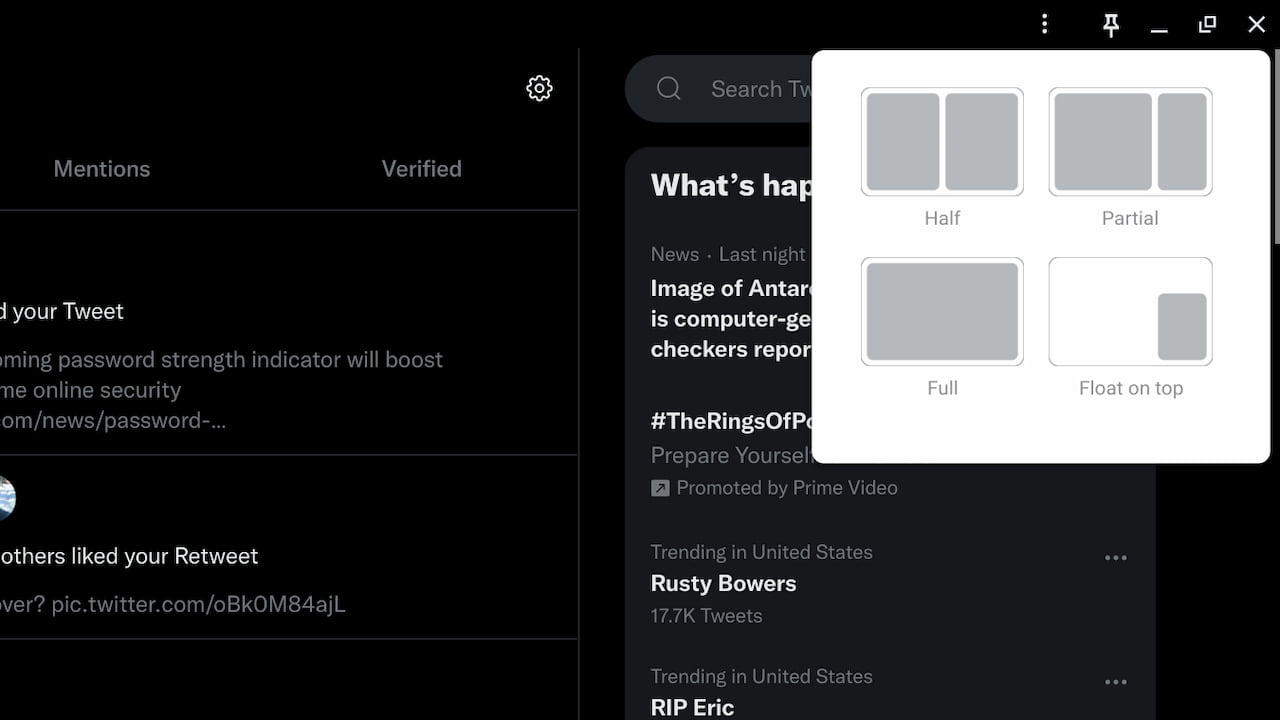
    partial split windows ChromeOS 105
    ChromeOS Partial Split window management

    Obviously, using a trackpad or a mouse to resize, maximize or minimize windows works. And it works well.

    However, after training my hands with the muscle memory to use these Chromebook keyboard shortcuts, it’s much faster for me. I don’t have to move one hand away from the keyboard, for example, just to change window or app sizes. Give these a try for a few days and see if it speeds up your Chromebook workflow!

    Chrome OS Chromebook Chromebook productivity Chromebooks ChromeOS Keyboard shortcuts
    Share. Facebook Twitter Pinterest LinkedIn Tumblr
    Kevin Tofel
    • Website

    After spending 15 years in IT at Fortune 100 companies, Kevin turned a hobby into a career and began covering mobile technology in 2003. He writes daily on the industry and has co-hosted the weekly MobileTechRoundup podcast since 2006. His writing has appeared in print (The New York Times, PC Magazine and PC World) and he has been featured on NBC News in Philadelphia.

    Related Posts

    How To Use SFM Compile For Manual Model Conversion

    January 15, 2026

    How To Fix Winobit3.4 Software Error

    January 14, 2026

    How To Fix Codes Error RCSDASSK

    January 12, 2026

    Comments are closed.

    Best of AI

    Chub AI Statistics And User Trends 2026

    February 5, 2026

    Make-A-Video Statistics 2026

    January 30, 2026

    Stable Video Diffusion User Trends And Statistics 2026

    January 29, 2026

    VALL-E Statistics 2026

    January 28, 2026

    StarCoder Statistics And User Trends 2026

    January 27, 2026
    Trending Stats

    Google Penalty Recovery Statistics 2026

    January 30, 2026

    Search engine operators Statistics 2026

    January 29, 2026

    Most searched keywords on Google

    January 27, 2026

    Ahrefs Search Engine Statistics 2026

    January 19, 2026

    Pay Per Click Advertising Statistics 2026

    January 16, 2026
    • About
    • Write For Us
    • Contact
    • Privacy Policy
    • Sitemap
    © 2026 About Chrome Books. All rights reserved.

    Type above and press Enter to search. Press Esc to cancel.