

Close Menu
    Facebook X (Twitter) Instagram
    • About
    • Privacy Policy
    • Write For Us
    • Newsletter
    • Contact
    Instagram
    About ChromebooksAbout Chromebooks
    • News
      • Stats
    • AI
    • How to
      • DevOps
      • IP Address
    • Apps
    • Business
    • Q&A
      • Opinion
    • Gaming
      • Google Games
    • Blog
    • Podcast
    • Contact
    About ChromebooksAbout Chromebooks
    News

    ChromeOS 109 adds SFTP to the Terminal on Chromebooks

    Kevin TofelBy Kevin TofelDecember 13, 2022Updated:September 13, 2025No Comments3 Mins Read
    Share
    Facebook Twitter LinkedIn Pinterest

    There’s a useful new feature in the ChromeOS 109 Beta Channel for folks that move files to and from servers. The latest update of ChromeOS 109 adds SFTP to the Terminal on Chromebooks. For most mainstream users, this may mean little to nothing. For folks like me that manage a server, this is a handy tool.

    Although I typically scour through the latest experimental flags in ChromeOS, this is one I missed. Rev. Kellyn Delgado shared this find, along with a use case that non-system admins might want to try:

    I’m currently using it to download #FLAC files I’ve bought to my #Chromebook and then upload them to my #Plex #server! Before I had to use an alternate file manager to do this. Love it!
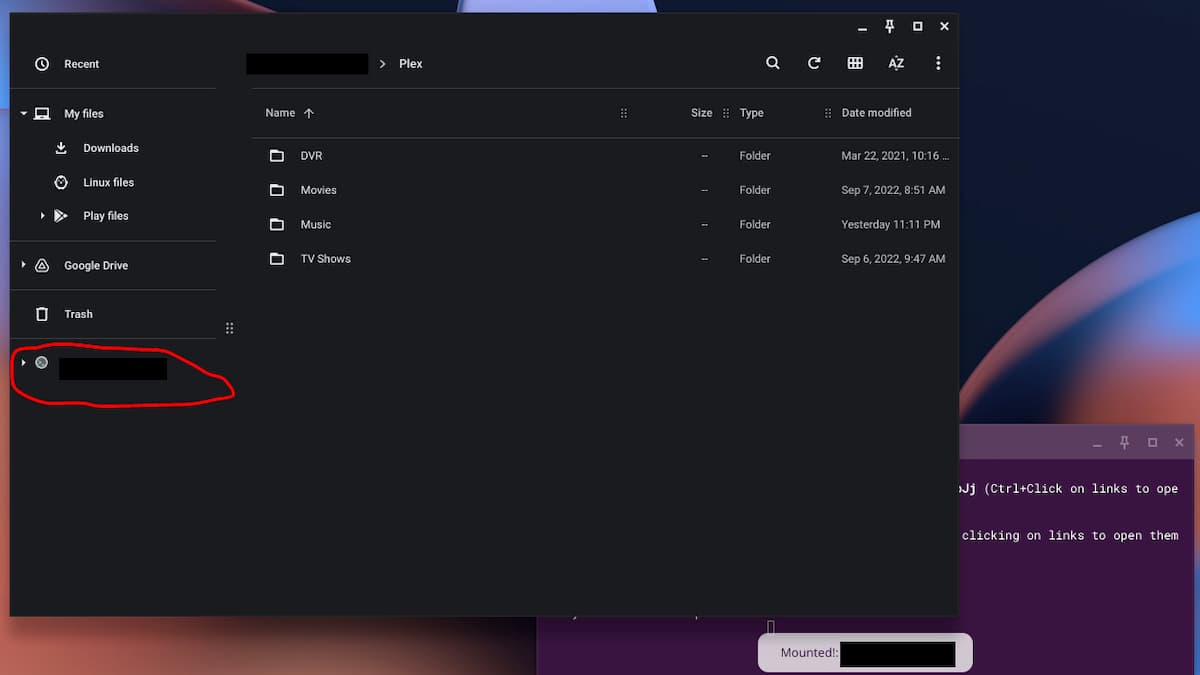
    ChromeOS 109 adds SFTP

    Above, you can see how his Chromebook shows a new remote mount, or server disk, in the Files app. (He’s hiding the IP addresses for security purposes.) Right in the Files app, he can access the media on his Plex server where he stores, music, movies, and TV shows. This allows him to securely access those files on his Chromebook.

    To enable the feature, you’ll need to be on the Beta Channel of ChromeOS 109 and enable it at chrome://flags#terminal-sftp. For those that don’t know SFTP stands for secure file transfer protocol.
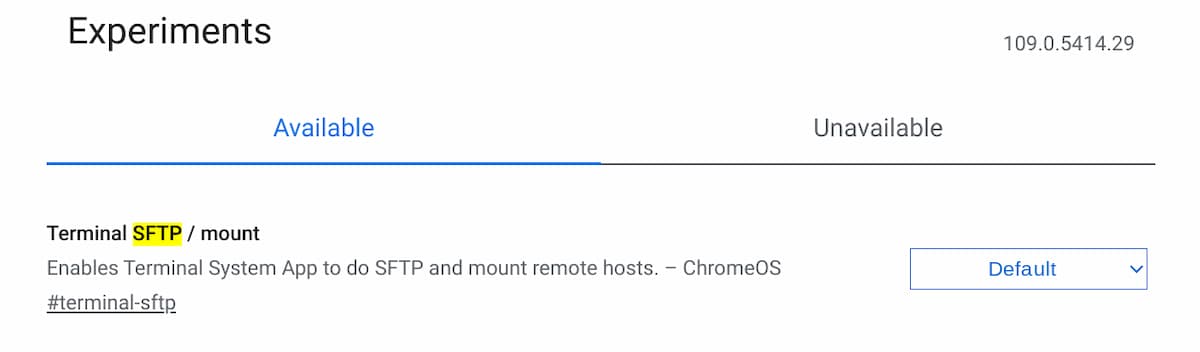
    Terminal SFTP mount on ChromeOS 109

    I enabled it on one of my devices and was able to remotely connect to the server where I host this site. You’ll need to enable SFTP access on a server and configure credentials to use this tool; something I did when I set up the server.
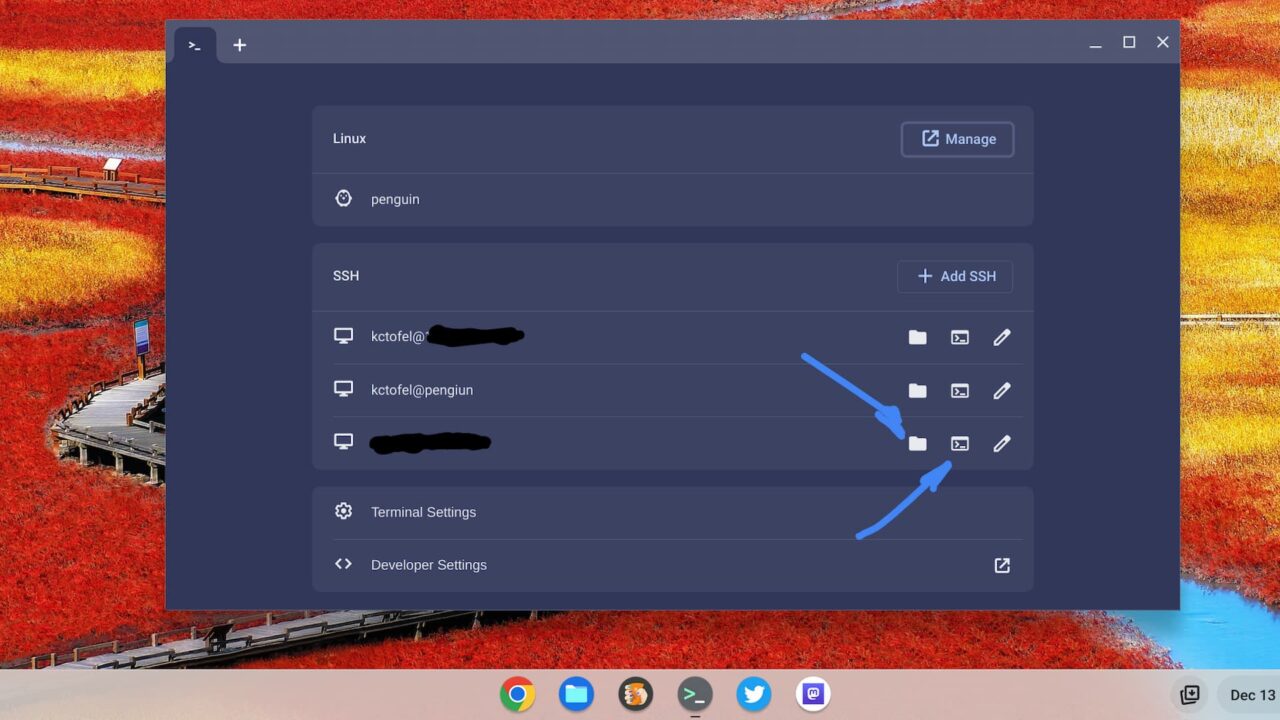
    ChromeOS SFTP in the Terminal

    Once I enabled the SFTP mount feature, I had two additional options in the Terminal on my Chromebook.

    The folder option mounts, or connects, to the server by adding it to your Files app. The second icon opens up a secure session to the server in the Terminal for any file transfers done with a command line.

    Below, I chose the first option and signed in with my server credentials on the Chromebook. That added access to the server files in my Files app.
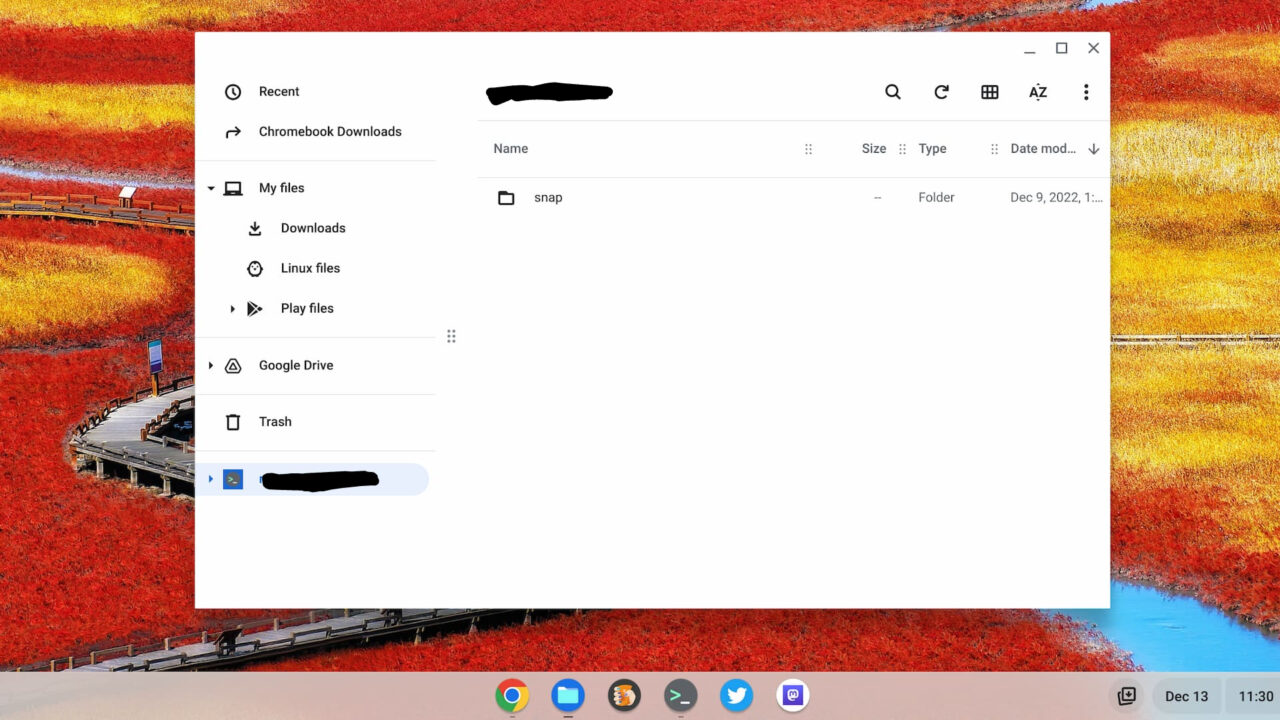
    ChromeOS 109 files app with a remote mount via SFTP

    Now, I can download or upload any files from or to the server using the Files app.

    Occasionally, I do have to perform those activities. And until now, I was using the Filezilla app in Linux. I still may need to do that for some things. However, to just grab or place a file on my server, this new SFTP in the ChromeOS Terminal on my Chromebook is a much quicker option.

    Chromebooks ChromeOS ChromeOS 109 ChromeOS Terminal SFTP in Terminal on Chromebooks
    Share. Facebook Twitter Pinterest LinkedIn Tumblr
    Kevin Tofel
    • Website

    After spending 15 years in IT at Fortune 100 companies, Kevin turned a hobby into a career and began covering mobile technology in 2003. He writes daily on the industry and has co-hosted the weekly MobileTechRoundup podcast since 2006. His writing has appeared in print (The New York Times, PC Magazine and PC World) and he has been featured on NBC News in Philadelphia.

    Related Posts

    Auto DraftStarbucks Partner Hours: Manual to Managing Work Schedules

    January 26, 2026

    Anon Vault For Private Cloud Storage

    January 23, 2026

    GitHub Copilot Statistics [2026]

    January 7, 2026

    Comments are closed.

    Best of AI

    Chub AI Statistics And User Trends 2026

    February 5, 2026

    Make-A-Video Statistics 2026

    January 30, 2026

    Stable Video Diffusion User Trends And Statistics 2026

    January 29, 2026

    VALL-E Statistics 2026

    January 28, 2026

    StarCoder Statistics And User Trends 2026

    January 27, 2026
    Trending Stats

    Google Penalty Recovery Statistics 2026

    January 30, 2026

    Search engine operators Statistics 2026

    January 29, 2026

    Most searched keywords on Google

    January 27, 2026

    Ahrefs Search Engine Statistics 2026

    January 19, 2026

    Pay Per Click Advertising Statistics 2026

    January 16, 2026
    • About
    • Write For Us
    • Contact
    • Privacy Policy
    • Sitemap
    © 2026 About Chrome Books. All rights reserved.

    Type above and press Enter to search. Press Esc to cancel.