


As a content creator who depends on a Chromebook for nearly all activities, including recording vocals, editing content etc., I’ve tested many browser-based AI music and vocal tools that run smoothly. In the year 2026, these platforms have become a vital part of song creation and generating realistic vocals.
In this article, I will be revealing the top AI music and vocal tools for Chromebooks.
My testing process
The assessment of each platform was based on its core features:
- Browser compatibility — Can users run it directly from Chrome without needing to install anything?
- AI quality — To what extent are the vocals, music, or audio outputs generated believable, accurate, and ready for use?
- Cloud processing — Does the software offload its intensive operations to its servers, that is, to the cloud, so that Chromebooks get a chance to handle their work efficiently?
- Ease of use — Can even a complete novice and non-technical person manage to make something in no time?
- Pricing — How generous is the free tier, and does the paid one offer enough features to be worth the price?
Tool #1: Lalals.com — Best All-in-One AI Vocal & Music Platform ⭐ Editor’s Pick
Lalals is ranked #1 here because it merges AI music creation, AI singing, voice alteration, stem separation, and sound polishing tools all together on a single web-based platform. When I tested it, it worked perfectly on a Chromebook without the need to download anything or setup.
Because all the processing is done in the cloud, even very inexpensive Chromebooks can make songs, do AI covers, and edit audio without any slowdowns.
Pros
- 1,000+ AI voices for covers and voice changing
- Full AI music generation from text prompts and lyrics
- Stem separation and vocal isolation built in
- 100% browser-based with cloud processing
- Commercial rights available on paid plans
Cons
- Free tiers have limited exports
- Advanced features require a paid plan
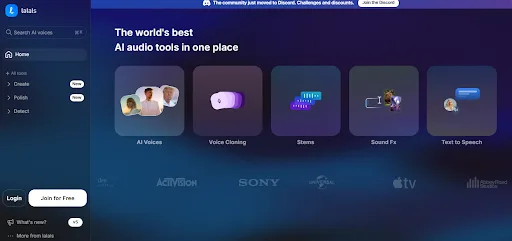
Key Features
AI voices (more than 1000 models)
Lalals offers more than 1,000 AI voices to which users can have access. Changing vocal styles when singing, creating different character voices, or producing lifelike speech for music and content creation can be done almost instantly.
Voice cloning
Make your own AI voice model by submitting recordings for training. After the voice clone is accomplished, it may be employed for covers, converting text to speech, and generating music, thereby providing content creators with a tool for forging a stable vocal persona.
Stem separation
Lalals can separate the tracks into 20+ stems giving creators the ability to remix, sample, karaoke or perform professional editing workflows with great depth of control.
Text-to-speech (TTS)
Transform writing into spoken voice in a natural way that is also expressive in many languages.
Audio enhancement tools
Enhance the recording quality of your voice by using AI-powered internal filters like de-noise, de-echo, and de-reverb.
Music production tools
Besides AI music creation, Lalals comes with a set of complementary tools such as BPM and key detection, AI lyric writing, automated mastering, transcription, and sound effect generation.
AI song covers
Change the voices in songs with AI voices and make new versions of the songs. This package also has the capability of generating complete songs or instrumentals from simple prompts.
Step-by-step: How to create an AI song cover on Lalals.com
Step 1: Go to Lalals.com and sign up or log in to your account.
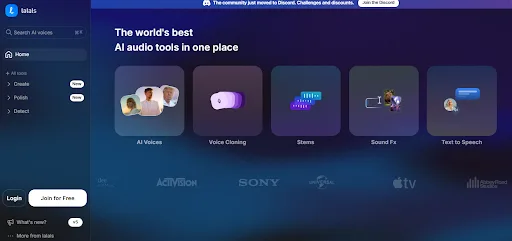
Step 2: Open AI Voices, select a voice (e.g., Billie Eilish style), then choose AI Cover and upload your audio file or paste a YouTube link.
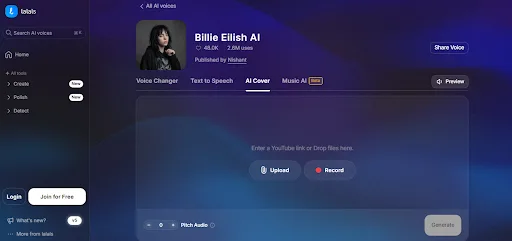
Step 3: Adjust the available settings if needed and click Generate to create your AI cover.
Personal Experience
I created a song cover on my Chromebook using Lalals, and it took only a few minutes to get the final output with pretty good vocal quality considering that it is a browser-based tool.
Tool #2: BandLab — Best Free Browser DAW
BandLab is a cloud-based digital audio workstation (DAW) that operates via the Chrome browser, which makes it an excellent option for Chromebook users who are interested in music production without installation.
Pros
- Completely free to use
- Enormous library of 160,000+ royalty-free loops and samples
- Runs directly from the browser (no installation necessary)
Cons
- Needs a stable internet connection
- Some advanced features depend on ecosystem tools
Key features
- Free multitrack DAW option with unlimited cloud projects
- 160,000+ royalty-free samples from top labels
- Real-time collaboration (up to 50 users per project)
- Free online audio mastering and effects tools
Personal experience
I took advantage of BandLab on my Chromebook for a simple track, and this online tool is amazing. The sample library was so huge that I could create songs without even liking external downloads.
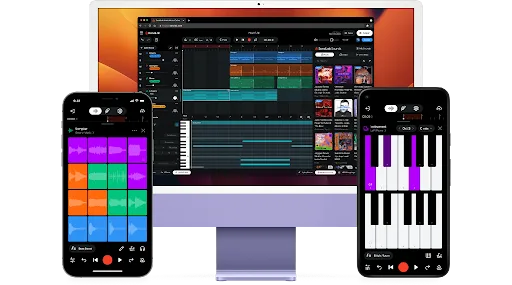
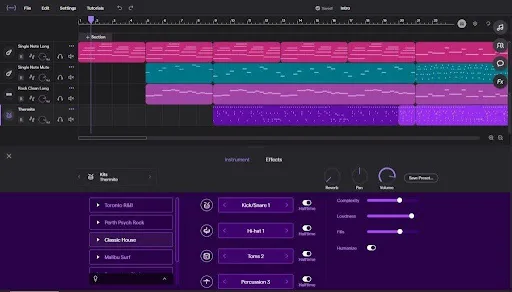
Tool #3: Soundtrap — Best for Students & Educators
Soundtrap is a web-based music studio that helps users collaborate and learn in an enjoyable way. It is perfect for Chromebook users in classrooms and for group projects. It offers an entire online workspace for recording, producing, and mixing music that requires no installation.
Pros
- Does everything in the browser
- Powerful collaboration features for team assignments
- Very simple interface for beginners
- Educational resources and integration
Cons
- Needs a stable internet connection
- The more sophisticated tools require subscription
Key features
- Vocal production & mixing tools among them EQ, reverb, delay, compressor, distortion, and more
- Digital instruments such as Beatmaker, sampler, software synths, drum kits
- Collaborative studio with real-time chat, video, and project comments
- MIDI editor and automation tools for detailed music composition
Personal experience
My first experience using Soundtrap was for a group project. When connected to the internet, the device-agnostic collaboration feature was very effective and straightforward.
Tool #4: Soundation — Best for Beatmakers & Electronic Music
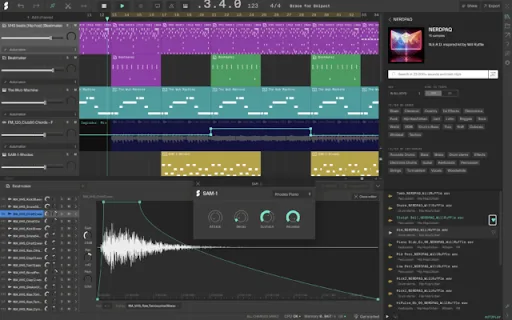
Soundation is an online music studio focused on beat making and electronic music production. It provides a quick, modern, and intuitive workflow right in the Chrome browser.
Pros
- Works completely in the browser, so there’s no need for installation.
- Designed as a fast-paced workflow for beatmaking.
- Huge collection of loops and samples to choose from.
- Ability to collaborate and share projects in real-time.
Cons
- Need to have a good and stable internet connection.
- Advanced tools might be a bit restricted/restraining for pro-level mixing.
Key features
- An online studio that works on a browser and has a beat-focused interface.
- A collection of 20,000+ loops and zero royalty samples in different genres.
- Beatmaker to create beats using patterns and kits.
- Integrated synths, effects, and a drag-and-drop workflow.
Personal experience
I was using Soundation for making a beat on my Chromebook, and it felt that the workflow was very quick and fluid in a browser.
Tool #5: AudioTool — Best Free Option for Beginners
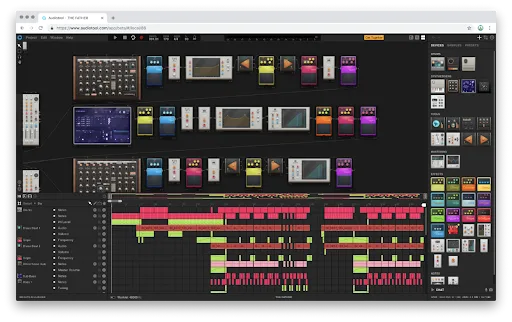
AudioTool is a 100% browser-based music production software that enables new users to start making, recording, and playing with music in the most direct way possible online.
Pros
- Absolutely free to use
- Works 100% in the browser (no need to install)
- Very active community for sharing and collaboration
- Highly capable synths and sound design features
Cons
- The interface might look too tangled for first-time users
- Need a reliable internet connection
- Lagging behind the latest DAWs in terms of the user’s experience and the interface
Key Features
- Browser-based synths, drum machines, and effects
- Sound design using a modular setup with custom signal routing
- Complete recording, mixing, and MIDI capabilities
- Integrated sound library and sonic browsing tools
- Real-time collaboration and sharing within the community
Personal experience
I played around with AudioTool on my Chromebook, and while I realized the platform was pretty powerful, I also found it a bit difficult compared to other browser music-making apps.
Comparison Table
| Tool | Best for | Works on Chromebook (Browser) | Key strength | Free plan |
| Lalals | AI vocals, covers, voice tools | Yes (fully cloud-based) | AI voices + song covers + voice changing | Limited |
| BandLab | Free full music production | Yes (browser DAW) | Free DAW + huge sample library + collaboration | Yes |
| Soundtrap | Students & education | Yes (browser studio) | Collaboration + education tools + Auto-Tune support | Limited |
| Soundation | Beatmaking & electronic music | Yes (browser-based DAW) | Fast beat workflow + loops + AI sample generation | Limited |
| AudioTool | Beginners & experimental creators | Yes (web-based platform) | Modular synths + deep sound design + free access | Yes |
Conclusion
Overall, all the tools that I tested allow you to make music on your Chromebook without having to install anything. Having said that, each tool is suitable for a different case. I personally think that ones like Lalals are great for AI-generated vocals and covers, whereas BandLab, Soundtrap, Soundation, and AudioTool are better for different types of music production in a browser.
FAQs
Can you make music on a Chromebook without installing anything?
Yes, you can use browser-based tools like BandLab, Soundtrap, Soundation, AudioTool, and Lalals directly in Chrome without any installation.
What is the best AI tool for creating song covers on Chromebook?
Lalals is one of the best options for AI song covers on Chromebook because it runs fully in the browser and focuses on AI voice and cover generation.
Does Lalals.com work on Chromebook?
Yes, Lalals.com works smoothly on Chromebook since it is fully cloud-based and runs directly in the Chrome browser.
