


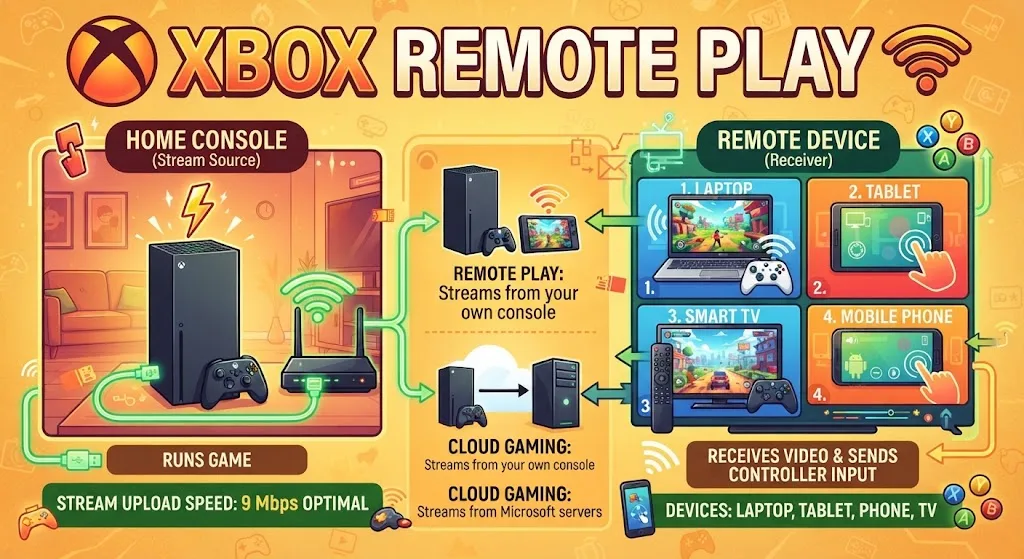
Microsoft built Xbox Remote Play so a console can throw its picture to another screen. The game runs on the box under your TV. You sit somewhere else with a laptop, phone, tablet, or panel on the wall, watching the stream and pressing buttons. Only video and inputs move between the two ends.
What Xbox Remote Play Streams From Your Console
Anything sitting on the console drive can travel across the connection. Titles pulled down through Xbox Game Pass count too.
The game file itself never leaves the console. Your device receives video and sends back controller input, which is why a cheap laptop handles the job as well as an expensive one.
Devices That Support Xbox Remote Play
Support splits into two camps. A few televisions and one headset line run their own app. Everything else joins through a browser.
- LG smart TVs and Samsung smart TVs
- Amazon Fire TV hardware
- Meta Quest headsets
- Desktops and laptops with a supported browser
- Phones and tablets with a supported browser
That browser route matters. A laptop that never touches Windows still pulls the stream, which is why ChromeOS owners keep asking. This walkthrough of using the Xbox app on a Chromebook shows how the web version behaves on ChromeOS.
Xbox Remote Play Requirements Before You Start
Six things have to line up. Miss one and the stream will not open.
- Console: an Xbox Series X, Series S, or Xbox One
- Console setting: remote features switched on inside settings
- Viewing device: a phone, tablet, computer, TV, or VR headset from the supported list
- Sign-in: a Microsoft account carrying an Xbox profile
- Connection: a live internet link on both ends
- Bandwidth: a 5GHz wireless band or cellular data, pulling 10Mbps or better downstream
Most households already clear that bar. The wireless band trips people up, since a 2.4GHz connection struggles even when a speed test reads fine.
Internet Speed Xbox Remote Play Needs
Xbox Support publishes two upstream figures for the console side. The lower number keeps a session alive. The higher one is what Microsoft calls optimal.
Upload speed on the console end does the heavy lifting here. Your phone or laptop only needs enough downstream capacity to receive the picture.
Wire the console to the router where you can. A cable removes the variable that causes most stuttering complaints, and it costs nothing beyond the cable.
Software Versions Xbox Remote Play Expects
Your phone or computer has to sit at a recent enough build. Older releases get shut out.
- Android 6.0 and above
- iOS 15.1 and above
- Windows 10 or 11 running 22H2 or newer
ChromeOS sidesteps the version table because the browser handles everything. Anyone shopping for a portable screen can compare current models in this roundup of Chromebooks built for gaming, then read up on what ChromeOS gaming actually involves.
How to Start an Xbox Remote Play Session
The last step is short. Pick up a pad the service recognises and hold it near the screen you plan to use.
No pad within reach? Phones and tablets draw a control layout straight onto the glass, so a touch-only setup still plays. Point a browser at xbox.com/remoteplay and pick a title.
That address is the whole entry point. Browser hardware needs no separate install, and the sign-in carries your library across on its own.
Xbox Remote Play vs Xbox Cloud Gaming
The two get mixed up constantly. Remote Play streams from the console you own. Cloud Gaming streams from Microsoft servers and requires a Game Pass Ultimate subscription.
Picture quality on Remote Play tracks your home upload speed. Cloud Gaming depends on your distance from a Microsoft data centre instead. Microsoft’s move to newer streaming tech in the Xbox web app lifted the cloud side to 1080p.
Xbox Remote Play on School and Work Chromebooks
Managed laptops behave differently from personal ones. Admin policies block extensions, sites, and sometimes controller pairing.
This guide to Xbox streaming on a school Chromebook covers those restrictions. If gaming on that class of machine is new territory, start with basic ChromeOS gaming setup and a list of titles that run well on the hardware.
FAQs
Is Xbox Remote Play free?
Yes. Remote Play is built into Xbox Series X, Series S, and Xbox One consoles at no cost. No subscription is required to stream games you already own to another screen.
Can you use Xbox Remote Play away from home?
Yes. Set console power mode to Instant-on so the console wakes remotely, then connect over any internet link. Same-network sessions run smoother, but a remote connection works fine.
Does Xbox Remote Play work on a Chromebook?
Yes. ChromeOS connects through the browser at xbox.com/remoteplay. No app install is needed, and the sign-in loads your console library automatically once the account matches.
Does Xbox Remote Play need a controller?
Not always. Phones and tablets show an on-screen touch layout instead. Computers and TVs need a supported controller paired over Bluetooth or connected by USB.
Why is Xbox Remote Play not connecting?
Common causes: remote features switched off in console settings, mismatched Microsoft accounts, a pending console update, or a 2.4GHz wireless band. Check each before retrying the session.
