


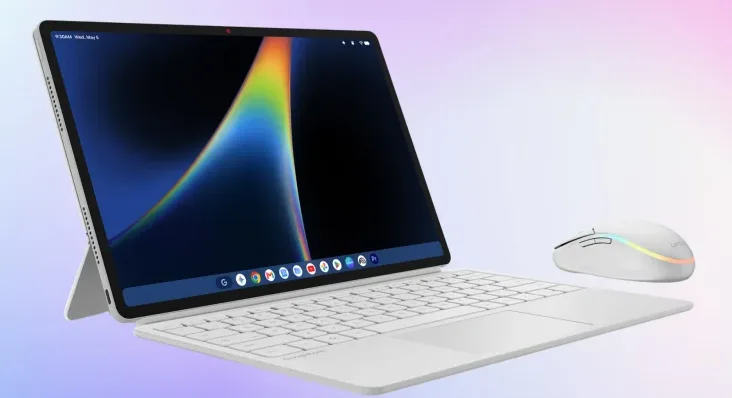
Googlebook OS still has rough spots in tablet mode, the touch-first layout a Googlebook switches to when you fold its screen back or take off its keyboard. Google’s own help pages confirm the home screen stays in landscape, and Chrome Unboxed reports trouble with split screen and with devices getting stuck between modes. Lenovo’s first detachable Googlebook, the Duet 13, is expected in January, which leaves Google little time.
What’s been reported
The rotation limit is documented. Google’s help page on tablet and full screen mode says portrait orientation works only when an app is in full screen, while floating windows, the home screen, the app tray and Overview (the view of open apps you get by swiping up and holding) all stay in landscape. Chrome Unboxed adds that swiping up to go home from a portrait app forces the screen back to landscape, and Digital Trends separately notes that the home screen and app drawer only work in landscape. Holding the device upright works for one app at a time. Everything around it stays sideways.
The other two problems come from Chrome Unboxed alone, which describes them in a post counting down to CES. It reports that you can’t drag an app from the multitasking view into split screen, where two apps share the display side by side. It also says devices often get stuck in tablet mode or in desktop mode, the normal laptop layout with windows and a taskbar, and sometimes don’t turn the keyboard back on. Google hasn’t commented on either.
Google’s November update, which started rolling out on November 5, did include one related fix: better keyboard and touchpad response on the Acer Googlebook 14 after folding it back into laptop mode. Nothing in the notes touched rotation, split screen or Overview, and Chrome Unboxed’s report came after it. Software complaints have followed Googlebook OS since launch, including in Android Central’s review of the Lenovo Googlebook 15.
If you own the Acer Googlebook 14
The Acer is the only convertible among the first five Googlebooks, so its owners are the ones using tablet mode today. To use an app in portrait, follow Google’s steps:
- Open the app and press the Full screen key or F4.
- Fold the screen all the way back.
- Turn the device upright.
- If the app doesn’t rotate, tap the floating Rotate button or turn on Auto-rotate in Quick Settings.
Auto-rotate is also at Settings > Device & accessories > Display > Auto-rotate screen.
If you’re waiting for the Duet 13
Neither Lenovo nor Google has announced the Duet 13. Renders posted by leaker Evan Blass point to a January launch for Lenovo’s 13-inch detachable. CES runs January 6 to 9, 2027 in Las Vegas, and a reveal there is possible but unconfirmed.
A detachable puts far more weight on tablet mode. On a convertible like the Acer, the keyboard folds behind the screen but stays attached, and Chrome Unboxed points out that many owners simply leave it in laptop mode, which hides these problems. A detachable’s screen comes off the keyboard completely. After that, the home screen, Overview and split screen are what you touch most.
Google hasn’t said whether fixes for rotation, split screen or mode switching will arrive before the Duet 13 ships. They would come through a Googlebook OS update, which ships separately from browser fixes like the one in Chrome 157 for broken web app installs. Until then, reviews that test the Duet 13 without its keyboard will show whether tablet mode is ready.
