

Close Menu
    Facebook X (Twitter) Instagram
    • About
    • Privacy Policy
    • Write For Us
    • Newsletter
    • Contact
    Instagram
    About ChromebooksAbout Chromebooks
    • News
      • Stats
    • AI
    • How to
      • DevOps
      • IP Address
    • Apps
    • Business
    • Q&A
      • Opinion
    • Gaming
      • Google Games
    • Blog
    • Podcast
    • Contact
    About ChromebooksAbout Chromebooks
    News

    Chrome OS 75 for enterprise brings Linux container VPN, PIN code for printing and more

    Kevin TofelBy Kevin TofelJune 11, 2019Updated:September 8, 2025No Comments2 Mins Read
    Share
    Facebook Twitter LinkedIn Pinterest

    While consumers await Chrome OS 75 to drop this week, enterprises got an early look as the platform has already been updated. There aren’t a large number of enterprise-centric features or improvements, but the ones that did make the cut are useful for work environments, such as expanded VPN support.
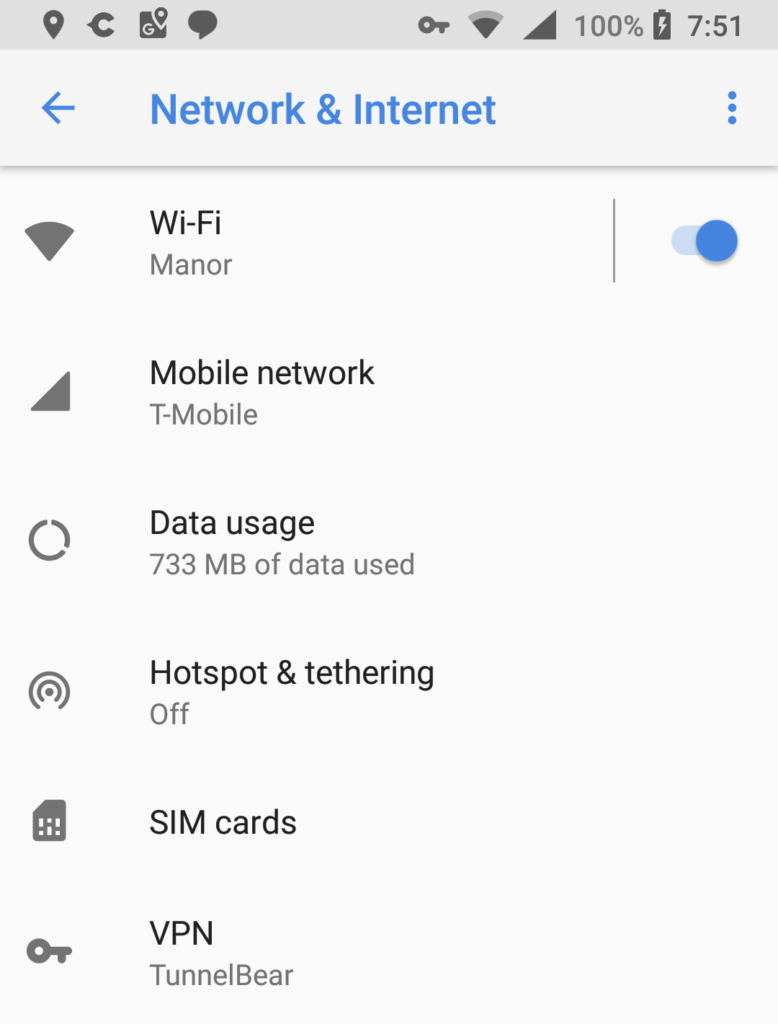
    Android VPN settings
    Android VPN option in Network & Internet settings

    Among the more notable changes from the official release notes are:

    • VPN connections in Linux: Users with either an Android or Chrome OS VPN installed now have that same network protection for Linux apps in a Crostini container.
    • PIN code support for native printing: End users might not be thrilled about this one but now businesses can require a personal or departmental PIN code before any printing is done. I wouldn’t be printing any more Final Four brackets at work; at least not with my own PIN code.
    • Third-party cloud storage provider expansion in Files: Any cloud or document provider that enables the DocumentsProvider API will now appear as a root drive in the native Files app.
    • DRM content on second monitors: I guess if you want to host a Netflix party at work on the big screen, you can do this now. Then again, I’m sure there’s some kind of business reason for this feature addition; help me out, readers!
    • Android device support over USB on Linux: This is likely for the GSuite shops filled with developers who need to debug in-house Android apps using the Linux container. Now they can.

    Google notes some new features in the works for Chrome OS 76, including one that I’m fairly certain has long been available for consumer users: The ability to show Drive files in the URL address bar of Chrome.
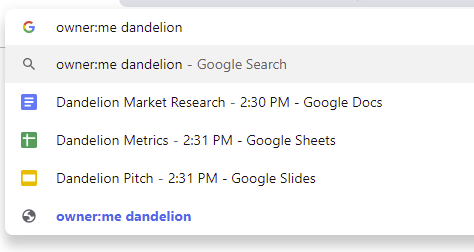
    Google says that Chrome OS 76 may also support CUPS print servers as well as notifications on the lock screen of a Chromebook, and also bring a wider range of USB device support for Linux apps.

    Android Chrome OS Chrome OS 75 Crostini Enterprise Files app Linux Productivity Project Crostini USB VPN
    Share. Facebook Twitter Pinterest LinkedIn Tumblr
    Kevin Tofel
    • Website

    After spending 15 years in IT at Fortune 100 companies, Kevin turned a hobby into a career and began covering mobile technology in 2003. He writes daily on the industry and has co-hosted the weekly MobileTechRoundup podcast since 2006. His writing has appeared in print (The New York Times, PC Magazine and PC World) and he has been featured on NBC News in Philadelphia.

    Related Posts

    Auto DraftStarbucks Partner Hours: Manual to Managing Work Schedules

    January 26, 2026

    Anon Vault For Private Cloud Storage

    January 23, 2026

    GitHub Copilot Statistics [2026]

    January 7, 2026

    Comments are closed.

    Best of AI

    VALL-E Statistics 2026

    January 28, 2026

    StarCoder Statistics And User Trends 2026

    January 27, 2026

    BLIP-2 Statistics 2026

    January 23, 2026

    AI mode Usage Statistics 2026

    January 22, 2026

    Code Llama Statistics 2026

    January 22, 2026
    Trending Stats

    Most searched keywords on Google

    January 27, 2026

    Ahrefs Search Engine Statistics 2026

    January 19, 2026

    Pay Per Click Advertising Statistics 2026

    January 16, 2026

    Google Ads Revenue 2025

    November 29, 2025

    Statistical Analysis Programs for Chromebook 2025

    November 22, 2025
    • About
    • Write For Us
    • Contact
    • Privacy Policy
    • Sitemap
    © 2026 About Chrome Books. All rights reserved.

    Type above and press Enter to search. Press Esc to cancel.