

Close Menu
    Facebook X (Twitter) Instagram
    • About
    • Privacy Policy
    • Write For Us
    • Newsletter
    • Contact
    Instagram
    About ChromebooksAbout Chromebooks
    • News
      • Stats
    • AI
    • How to
      • DevOps
      • IP Address
    • Apps
    • Business
    • Q&A
      • Opinion
    • Gaming
      • Google Games
    • Blog
    • Podcast
    • Contact
    About ChromebooksAbout Chromebooks
    News

    Chrome OS 80 adding a tab strip tablet-optimized interface to Chromebooks

    Kevin TofelBy Kevin TofelDecember 9, 2019Updated:December 9, 2019No Comments2 Mins Read
    Share
    Facebook Twitter LinkedIn Pinterest

    Back in October, Chrome Story reported on a new “tab strip” interface to make switching between tabs a little more finger-friendly. The functionality is currently targeting a Chrome OS 80 implementation and while it’s still a work in progress, the developers have been very active lately.

    If you’re not familiar with the user interface, it is currently working on the Dev Channel of Chrome OS 79 where I took a look at how it’s coming along.

    To see it for yourself, you’ll need to enable these flags and restart your browser:
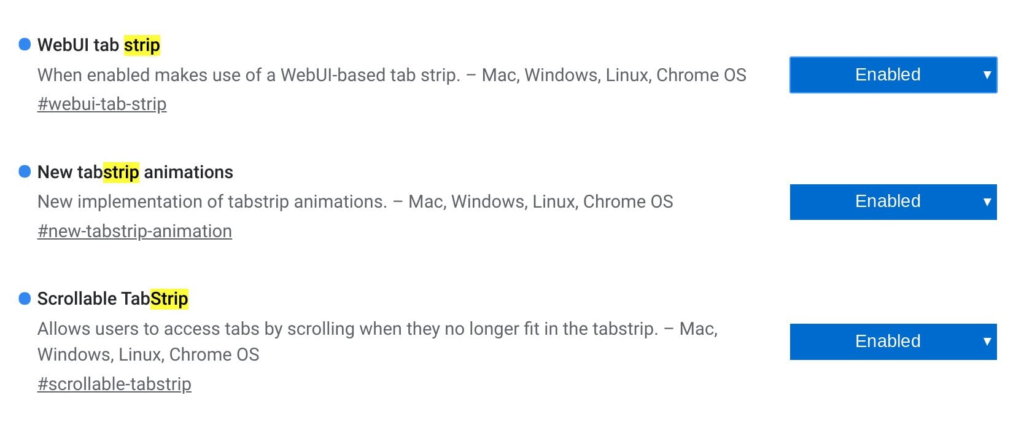
    Once restarted, the browser should show a plus sign and a small up arrow at the top right; tapping plus opens a new tab while tapping the arrow brings the new tablet-optimized overview mode:
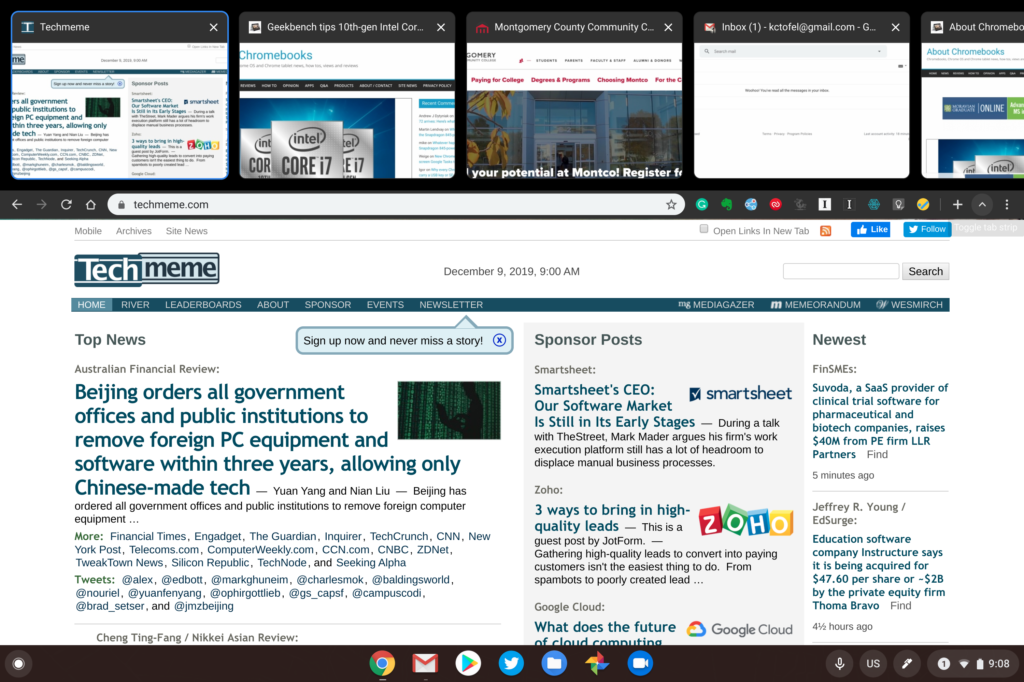
    Tab Strip mode in Chrome OS 79 Dev Channel

    In its current form, it’s clear you won’t want to use this with an attached keyboard, say on the Pixel Slate. You can’t scroll through tabs using trackpad gestures when the tab-strip feature is active.

    Attaching the keyboard doesn’t switch tab-strip functionality off, at least not yet. I hope that’s a feature that gets added for folks that switch between desktop and tablet mode on their 2-in-1 Chromebook.

    That’s because the Chrome OS browser goes into full-screen mode with the focus solely on the current tab in this mode. So you have to click the tab-strip arrow and then tap the tab you want. Scrolling left or right shows all of the currently open tabs.

    The plan is also to support tab movement through drag-and-drop functionality but that’s not working for me at this time. Clearly, this is still a work in progress.

    Regardless, I’m looking forward to seeing the final interface here as I anticipate it will not just work on pure Chrome OS tablets such as the Pixel Slate, but all 2-in-1 Chromebooks when in tablet mode.

    Chrome OS Chrome OS 80 Productivity Tablets
    Share. Facebook Twitter Pinterest LinkedIn Tumblr
    Kevin Tofel
    • Website

    After spending 15 years in IT at Fortune 100 companies, Kevin turned a hobby into a career and began covering mobile technology in 2003. He writes daily on the industry and has co-hosted the weekly MobileTechRoundup podcast since 2006. His writing has appeared in print (The New York Times, PC Magazine and PC World) and he has been featured on NBC News in Philadelphia.

    Related Posts

    Auto DraftStarbucks Partner Hours: Manual to Managing Work Schedules

    January 26, 2026

    Anon Vault For Private Cloud Storage

    January 23, 2026

    GitHub Copilot Statistics [2026]

    January 7, 2026

    Comments are closed.

    Best of AI

    VALL-E Statistics 2026

    January 28, 2026

    StarCoder Statistics And User Trends 2026

    January 27, 2026

    BLIP-2 Statistics 2026

    January 23, 2026

    AI mode Usage Statistics 2026

    January 22, 2026

    Code Llama Statistics 2026

    January 22, 2026
    Trending Stats

    Most searched keywords on Google

    January 27, 2026

    Ahrefs Search Engine Statistics 2026

    January 19, 2026

    Pay Per Click Advertising Statistics 2026

    January 16, 2026

    Google Ads Revenue 2025

    November 29, 2025

    Statistical Analysis Programs for Chromebook 2025

    November 22, 2025
    • About
    • Write For Us
    • Contact
    • Privacy Policy
    • Sitemap
    © 2026 About Chrome Books. All rights reserved.

    Type above and press Enter to search. Press Esc to cancel.