

Close Menu
    Facebook X (Twitter) Instagram
    • About
    • Privacy Policy
    • Write For Us
    • Newsletter
    • Contact
    Instagram
    About ChromebooksAbout Chromebooks
    • News
      • Stats
    • AI
    • How to
      • DevOps
      • IP Address
    • Apps
    • Business
    • Q&A
      • Opinion
    • Gaming
      • Google Games
    • Blog
    • Podcast
    • Contact
    About ChromebooksAbout Chromebooks
    How to

    Service Manual: How to repair or upgrade an HP Chromebox G2

    Kevin TofelBy Kevin TofelMay 21, 2018Updated:September 22, 2025No Comments2 Mins Read
    Share
    Facebook Twitter LinkedIn Pinterest

    Even though HP announced the Chromebox G2 some time ago, you still can’t get one directly from the company. That should be changing soon, however, and if you do buy one, you might be interested in this highly detailed service manual for repairs or upgrades on the HP Chromebox G2.
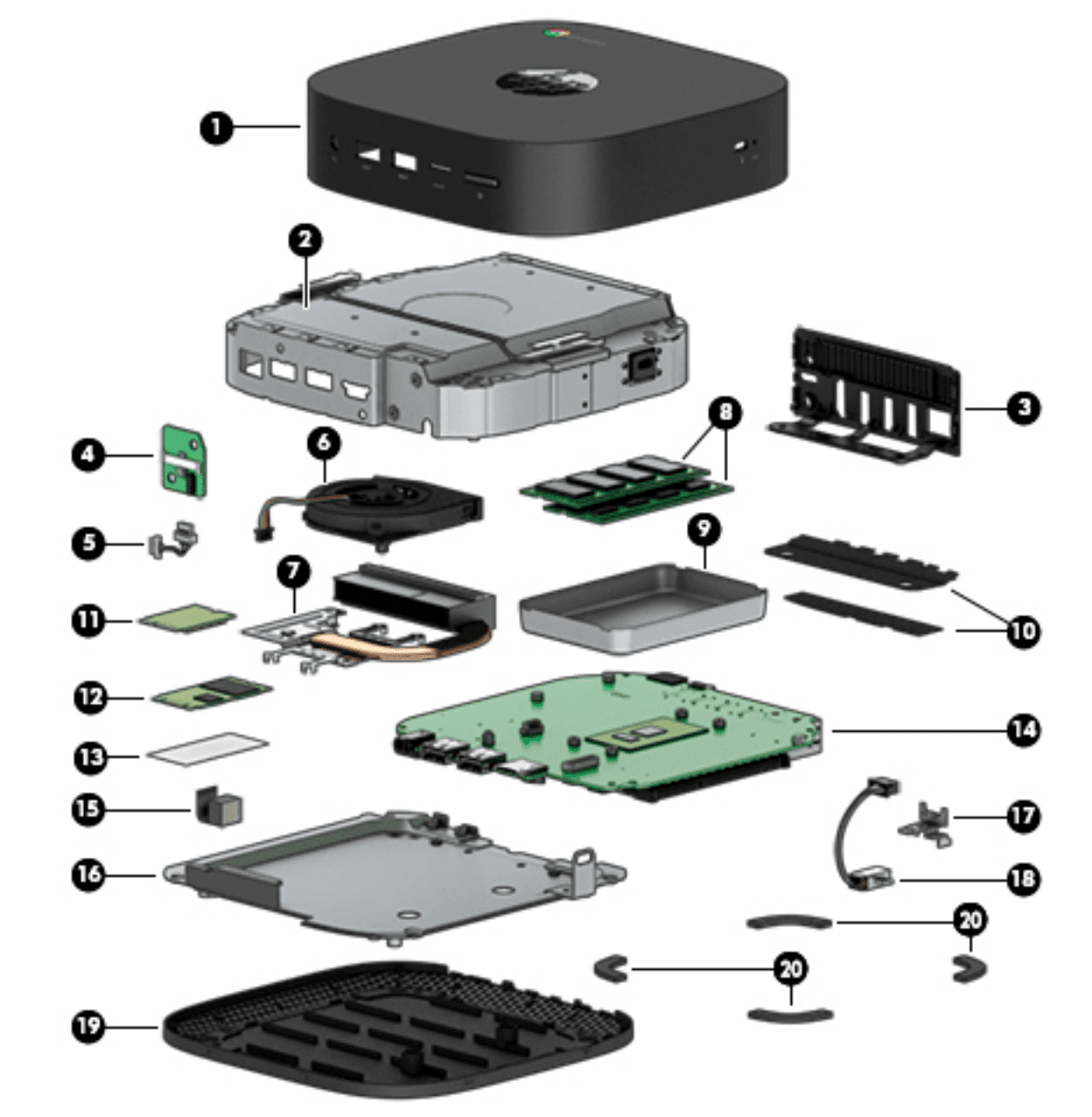
    The manual confirms the specs of the three different models, complete with part numbers for the Intel processors, memory modules, solid-state flash drives, wireless boards and more.

    There are two SODIMM memory slots for RAM and the most powerful Intel Core i7 configuration uses both of those with 8 GB memory boards. According to the manual, only that config supports the full 16 GB of memory, although I’d be game to try a pair of 8 GB boards in the Core i5 or even the Celeron unit, even though the manual says 4 GB is the max for the base Chromebox G2.

    One other interesting thing I learned from the manual is that the HP Chromebox X2 has a single USB port (item 6, below) that can charge external devices even when the Chromebox is powered down. As long as the Chromebox is plugged in you could charge a phone, tablet or other device with that port. That port also works with external monitors that can connect over USB-C — similar to a Thunderbolt 3 port, but with out the super-fast data transfer of one.
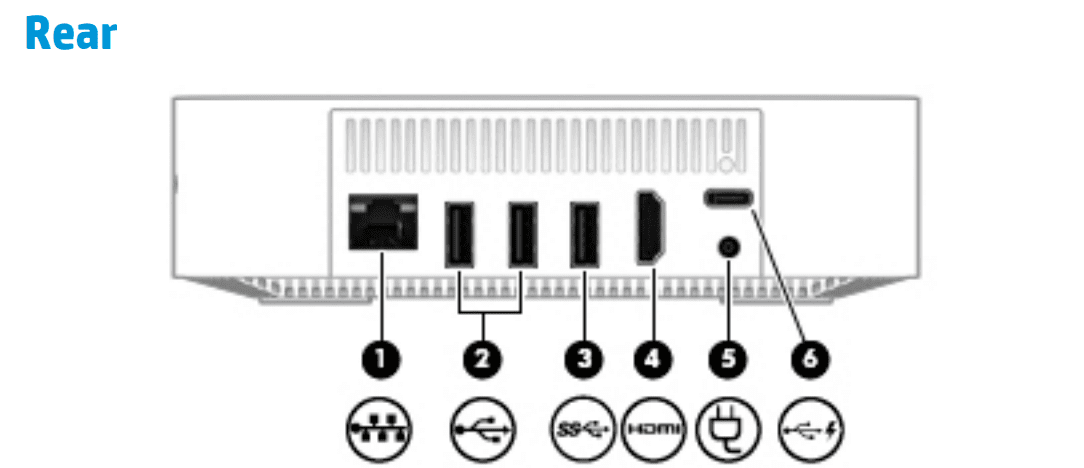
    Also, the manual says there’s a “USB Chrome stand-alone wired keyboard and mouse combo” included so I presume all configurations will come with that.

    The schematics and parts of the entire device are very detailed and set an example for other Chromebox makers to follow. In fact, if I were still in IT support — something I did in a past life — and our organization was considering Chromeboxes, I’d lean towards HP over another brand because of this service manual.


    Chromebox HP HP Chromebox G2
    Share. Facebook Twitter Pinterest LinkedIn Tumblr
    Kevin Tofel
    • Website

    After spending 15 years in IT at Fortune 100 companies, Kevin turned a hobby into a career and began covering mobile technology in 2003. He writes daily on the industry and has co-hosted the weekly MobileTechRoundup podcast since 2006. His writing has appeared in print (The New York Times, PC Magazine and PC World) and he has been featured on NBC News in Philadelphia.

    Related Posts

    Auto DraftStarbucks Partner Hours: Manual to Managing Work Schedules

    January 26, 2026

    Anon Vault For Private Cloud Storage

    January 23, 2026

    How To Use SFM Compile For Manual Model Conversion

    January 15, 2026

    Comments are closed.

    Best of AI

    Chub AI Statistics And User Trends 2026

    February 5, 2026

    Make-A-Video Statistics 2026

    January 30, 2026

    Stable Video Diffusion User Trends And Statistics 2026

    January 29, 2026

    VALL-E Statistics 2026

    January 28, 2026

    StarCoder Statistics And User Trends 2026

    January 27, 2026
    Trending Stats

    Google Penalty Recovery Statistics 2026

    January 30, 2026

    Search engine operators Statistics 2026

    January 29, 2026

    Most searched keywords on Google

    January 27, 2026

    Ahrefs Search Engine Statistics 2026

    January 19, 2026

    Pay Per Click Advertising Statistics 2026

    January 16, 2026
    • About
    • Write For Us
    • Contact
    • Privacy Policy
    • Sitemap
    © 2026 About Chrome Books. All rights reserved.

    Type above and press Enter to search. Press Esc to cancel.