

Close Menu
    Facebook X (Twitter) Instagram
    • About
    • Privacy Policy
    • Write For Us
    • Newsletter
    • Contact
    Instagram
    About ChromebooksAbout Chromebooks
    • Linux
    • News
      • Stats
      • Reviews
    • AI
    • How to
      • DevOps
      • IP Address
    • Apps
    • Business
    • Q&A
      • Opinion
    • Gaming
      • Google Games
    • Blog
    • Podcast
    • Contact
    About ChromebooksAbout Chromebooks
    News

    Microsoft brings official Visual Studio Code to ARM-powered Chromebooks

    Kevin TofelBy Kevin TofelOctober 9, 2020Updated:September 7, 2025No Comments2 Mins Read

    Back in March of 2019, I answered a reader question about getting Microsoft Visual Code installed on a Chromebook. I use Visual Code and it’s easy to install to the Linux container… unless your Chromebook has an ARM processor. There have been community builds of Microsoft’s development software for ARM devices but with its latest software update, Microsoft is officially supporting Visual Code on Chromebooks and other devices with ARM chips.

    The news is tucked in to the September 2020 release notes for Visual Studio Code v. 1.5, and I verified it on Microsoft’s own download page:
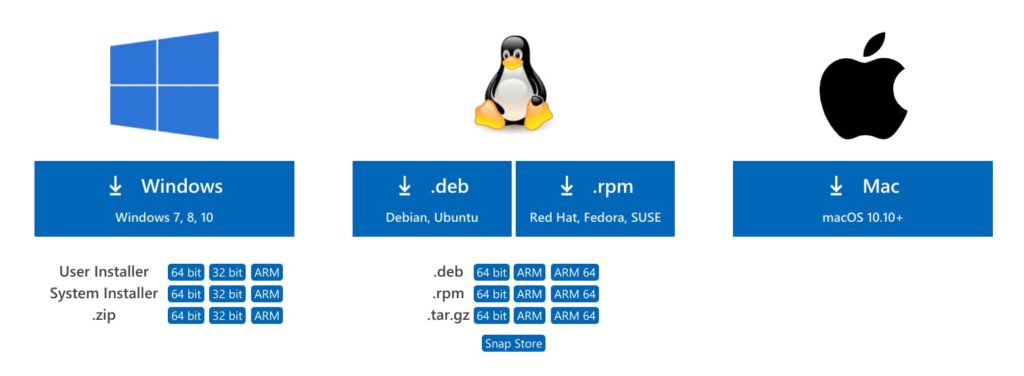
    Installing Visual Studio Code on an ARM Chromebook is no different than installing any other Linux package.

    First, choose to download the .deb file for either ARM or ARM 64, depending on if your Chromebook uses a 32- or 64-bit ARM chip. Once the package is downloaded as a .deb file, navigate to it in your Chrome OS Files app and right-click the file to see your options. One of those will be “Install to Linux”. Click that option to see package details and then click Install. Chrome OS should pop up a notification once the install is complete on the Linux partition of your Chromebook.
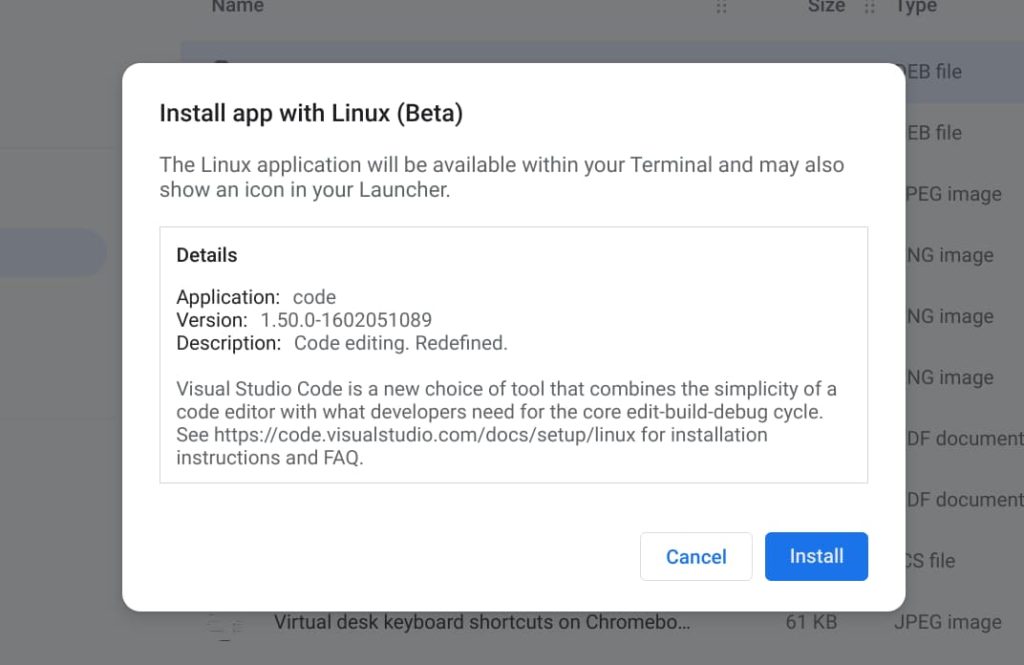
    That’s it! You should have a Visual Studio Code icon available in your Launcher that will open the application. If you’re ever in a Linux terminal on your Chromebook, you can also enter the command code to launch it as well.

    I’ve tried most of the major code editors available for Linux on my Chromebook and I keep coming back to Visual Studio Code time and time again. I won’t say it’s the best for anyone who codes, of course. However, on a Chromebook, it seems to be the most nimble of the pack and has enough features and extensions to help me get through my Computer Science classes at the local community college.

    Kevin Tofel
    • Website

    After spending 15 years in IT at Fortune 100 companies, Kevin turned a hobby into a career and began covering mobile technology in 2003. He writes daily on the industry and has co-hosted the weekly MobileTechRoundup podcast since 2006. His writing has appeared in print (The New York Times, PC Magazine and PC World) and he has been featured on NBC News in Philadelphia.

    Best of AI

    What Does Adobe Firefly AI Do?

    June 16, 2026

    Is Joyland AI Safe For Kids?

    June 12, 2026

    LMArena AI: Chatbot Ranking Platform 2026

    May 27, 2026

    Will AI Take Over the World

    May 25, 2026

    AI21 Jurassic Statistics 2026: Model Size, Usage and AI Performance Trends

    May 19, 2026
    Trending Stats

    Chromebook Repairability Scores Statistics 2026: Hardware Serviceability Reports

    June 22, 2026

    ChromeOS Feature Adoption Rates Statistics 2026: User Adoption Metrics And Data

    June 20, 2026

    Chromebook Storage Usage Statistics 2026: Device Storage Consumption Trends

    June 18, 2026

    Conversational AI Market Statistics 2026: Chatbot Usage And Enterprise Deployment

    June 17, 2026

    Chromebook Gaming Usage Statistics 2026: Player Engagement And Usage Reports

    June 17, 2026
    • About
    • Tech Guest Post
    • Contact
    • Privacy Policy
    • Sitemap
    © 2026 About Chrome Books. All rights reserved.

    Type above and press Enter to search. Press Esc to cancel.