

Close Menu
    Facebook X (Twitter) Instagram
    • About
    • Privacy Policy
    • Write For Us
    • Newsletter
    • Contact
    Instagram
    About ChromebooksAbout Chromebooks
    • Linux
    • News
      • Stats
      • Reviews
    • AI
    • How to
      • DevOps
      • IP Address
    • Apps
    • Business
    • Q&A
      • Opinion
    • Gaming
      • Google Games
    • Blog
    • Podcast
    • Contact
    About ChromebooksAbout Chromebooks
    News

    Linux on Chromebooks: Underappreciated versatility as an app solution

    Kevin TofelBy Kevin TofelJune 25, 2021Updated:September 17, 2025No Comments2 Mins Read

    I’ve previously written an overview with five reasons to run Linux on Chromebooks, but there are tons of specific examples I could share. One arrived just this morning as one of my former Computer Science teachers reached out, asking if MuseScore could run on a Chromebook.

    I had an answer back to her in minutes, along with installation instructions, showing her the versatility of Linux on Chromebooks.

    She had done some research and found the old Crouton method of using Linux. While that could work, it’s an old, non-supported dual-boot solution. (Update: Technically, Crouton is supported internally at Google by an employee. However, it’s not supported for end-users by Google itself. And it’s also a “chroot” solution, not dual-boot as I previously noted. Thanks, Pat!)

    Instead, I explained that Linux on Chromebooks is natively and officially supported by Google. And it’s easy to install from the Settings in Chrome OS:
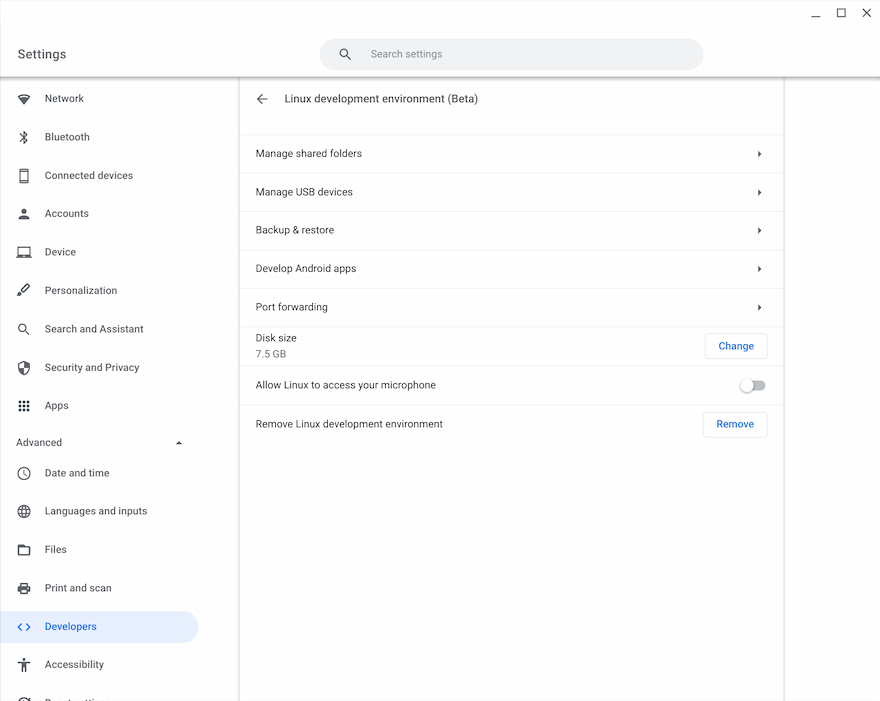
    Linux on Chromebooks

    MuseScore is a music composition and notation application; not something I’ve used before. But that really doesn’t matter.

    I went to the MuseScore website and saw it supports just about every “flavor” of Linux. I opened up the Terminal app on my Chromebook to access the Linux container and typed sudo apt-get install musescore.
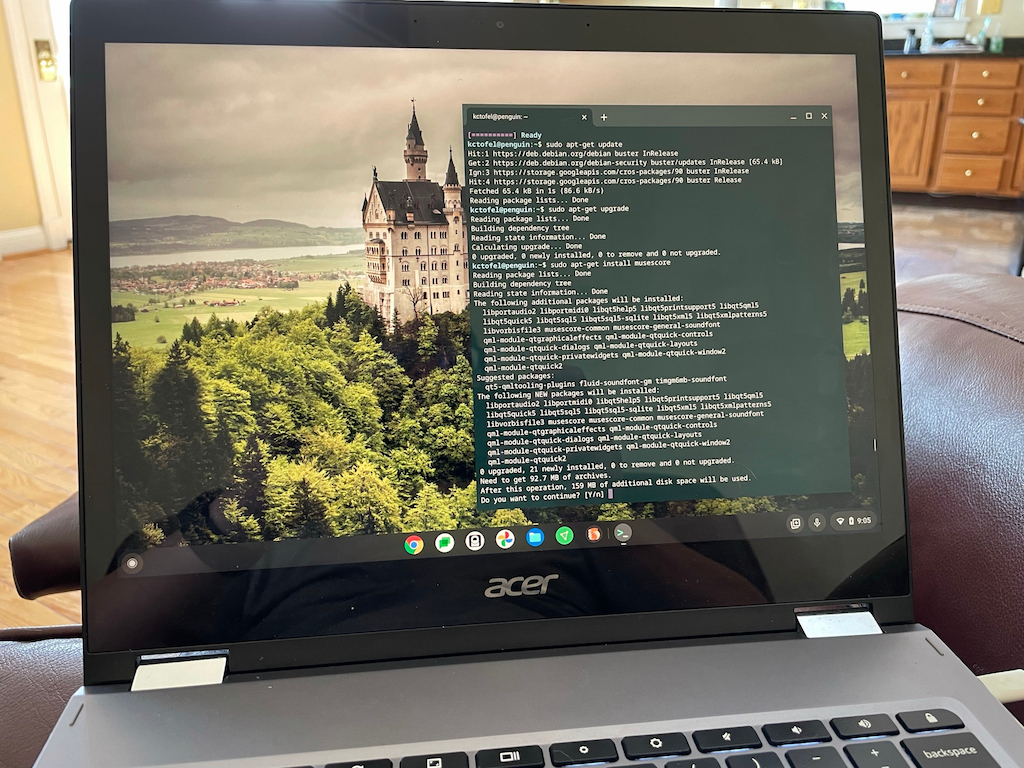
    Installing MuseScore in Linux on Chromebooks

    After about of minute of downloads and installation messages, I had MuseScore on my Chromebook, complete with a Launcher icon.

    Of course, installing a Linux app on a Chromebook doesn’t mean it will work 100% of the time or have full functionality.

    I was concerned that MuseScore might not play back sounds, so I did a very quick test by composing my own score. And by “composing my own score”, I mean adding three random notes. 😉

    Playback worked fine and now she has a solution for her digital music composition needs, all thanks to Linux on Chromebooks.

    Again, there are tons of single-app examples that I could share to exemplify this often underappreciated Chromebook versatility. I use this functionality in my Computer Science coding classes, for example.

    But the general idea is the same: Linux apps are a viable option to adding more capabilities to Chrome OS. So don’t be shy about trying them!

    Kevin Tofel
    • Website

    After spending 15 years in IT at Fortune 100 companies, Kevin turned a hobby into a career and began covering mobile technology in 2003. He writes daily on the industry and has co-hosted the weekly MobileTechRoundup podcast since 2006. His writing has appeared in print (The New York Times, PC Magazine and PC World) and he has been featured on NBC News in Philadelphia.

    Best of AI

    LMArena AI: Chatbot Ranking Platform 2026

    May 27, 2026

    Will AI Take Over the World

    May 25, 2026

    AI21 Jurassic Statistics 2026: Model Size, Usage and AI Performance Trends

    May 19, 2026

    Chub AI Explained

    May 6, 2026

    Stable Diffusion AI: Free Text To Image AI Generator

    May 5, 2026
    Trending Stats

    Chromebook Touchscreen vs Non-Touchscreen Usage Statistics 2026: Device Interaction and Form Factor Data

    June 11, 2026

    Chromebook Performance Across Price Segments Statistics 2026: Benchmark Comparison Data

    June 10, 2026

    Chromebook Daily Usage Hours Statistics 2026: Activity And Engagement Reports

    June 9, 2026

    Chromebook Usage In Developing vs Developed Markets Statistics 2026

    June 8, 2026

    Android App Usage on Chromebooks Statistics 2026: App Adoption And Usage Data

    June 6, 2026
    • About
    • Tech Guest Post
    • Contact
    • Privacy Policy
    • Sitemap
    © 2026 About Chrome Books. All rights reserved.

    Type above and press Enter to search. Press Esc to cancel.