

Close Menu
    Facebook X (Twitter) Instagram
    • About
    • Privacy Policy
    • Write For Us
    • Newsletter
    • Contact
    Instagram
    About ChromebooksAbout Chromebooks
    • Linux
    • News
      • Stats
      • Reviews
    • AI
    • How to
      • DevOps
      • IP Address
    • Apps
    • Business
    • Q&A
      • Opinion
    • Gaming
      • Google Games
    • Blog
    • Podcast
    • Contact
    About ChromebooksAbout Chromebooks
    News

    Got a Chrome OS tablet with touch issues? It appears related to device rotation.

    Kevin TofelBy Kevin TofelJuly 9, 2018Updated:May 6, 2026No Comments2 Mins Read

    I’ve read a few instances where a Chrome OS tablet wasn’t properly responding to touch events in portions of the screen and now I’ve seen it for myself on different devices. In one case, I was browsing the web in portrait mode: Tapping a link on the right side of the display was activating an input box on the left side!

    Luckily, this seems to be happening only on the Chrome OS Dev Channel, although if you’re seeing it in Beta or Stable, let me know.

    It seems that display rotation is at least related to the problem, if not the root cause. I guess you could say the issue is because “you’re holding it wrong.” 😉 The good news is that there’s an open bug report for the problem that was created a few days ago.
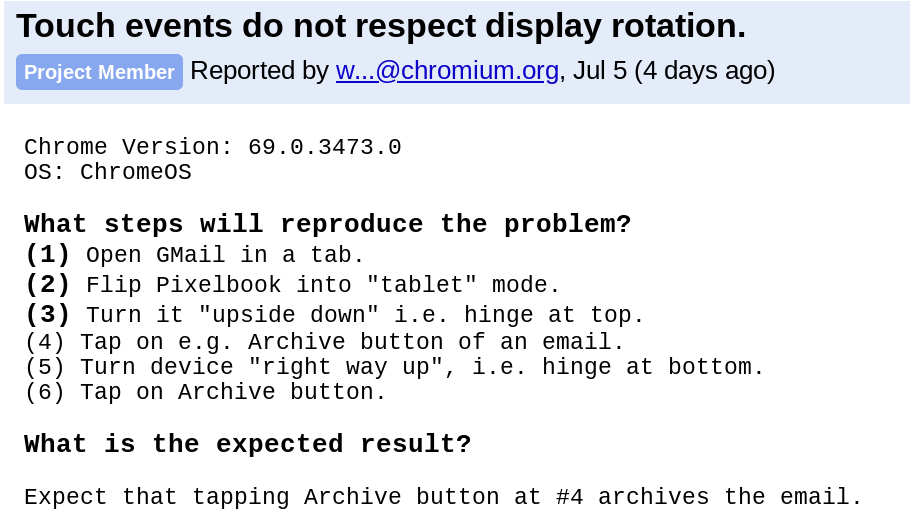
    Touch rotation bug

    Yesterday, I added more information to it because the listed steps to reproduce the issue focused on the Google Pixelbook. Once I experienced it on an HP Chromebook X2, I decided to point that out in the bug because I don’t want the support team approaching this like it’s a hardware issue specific to the Pixelbook. It’s happening on the X2 and on the Acer Chromebook Tab 10 too.

    As of the time of this writing, the bug has not been assigned to a developer. So there’s no timetable on when this might be resolved.

    If you’re experiencing the touch problem, I’d recommend letting Google know by starring the bug; you can do that at the top left of the bug report. That will indicate how many people are affected and will also provide you updates on progress for the solution.

    And keep in mind that the Dev Channel often has bugs or other issues. That’s expected. However, if we, as Chrome OS users, don’t report them, those bugs could filter to a wider audience as code makes its way through the Beta and Stable Channels. So, file those bugs!

    Kevin Tofel
    • Website

    After spending 15 years in IT at Fortune 100 companies, Kevin turned a hobby into a career and began covering mobile technology in 2003. He writes daily on the industry and has co-hosted the weekly MobileTechRoundup podcast since 2006. His writing has appeared in print (The New York Times, PC Magazine and PC World) and he has been featured on NBC News in Philadelphia.

    Best of AI

    Chub AI Explained

    May 6, 2026

    Stable Diffusion AI: Free Text To Image AI Generator

    May 5, 2026

    Imagen AI: The Best Photo Editing AI In 2026

    April 21, 2026

    Alphafold AI from Google Deepmind 2026

    April 21, 2026

    Agentic AI Pindrop Anonybit: The Future of Secure Identity Verification

    April 17, 2026
    Trending Stats

    Education Sector Chromebook Adoption Statistics 2026

    May 4, 2026

    ChromeOS Data Usage Patterns And Statistics 2026

    May 2, 2026

    Auto Update Expiration (AUE) In Chromebooks Statistics 2026

    May 2, 2026

    Chromebook Vs IPad Adoption In Schools Statistics 2026

    May 1, 2026

    ChromeOS Accessibility Feature Usage Statistics 2026

    April 28, 2026
    • About
    • Tech Guest Post
    • Contact
    • Privacy Policy
    • Sitemap
    © 2026 About Chrome Books. All rights reserved.

    Type above and press Enter to search. Press Esc to cancel.