

Close Menu
    Facebook X (Twitter) Instagram
    • About
    • Privacy Policy
    • Write For Us
    • Newsletter
    • Contact
    Instagram
    About ChromebooksAbout Chromebooks
    • Linux
    • News
      • Stats
      • Reviews
    • AI
    • How to
      • DevOps
      • IP Address
    • Apps
    • Business
    • Q&A
      • Opinion
    • Gaming
      • Google Games
    • Blog
    • Podcast
    • Contact
    About ChromebooksAbout Chromebooks
    News

    Chrome OS 74 arrives for enterprises; here’s what it brings

    Kevin TofelBy Kevin TofelApril 24, 2019Updated:September 18, 2025No Comments2 Mins Read

    Per the typical release cycle, enterprises have the Stable Channel of Chrome OS 74 before consumers and today, the release notes for this version were made public by Google.

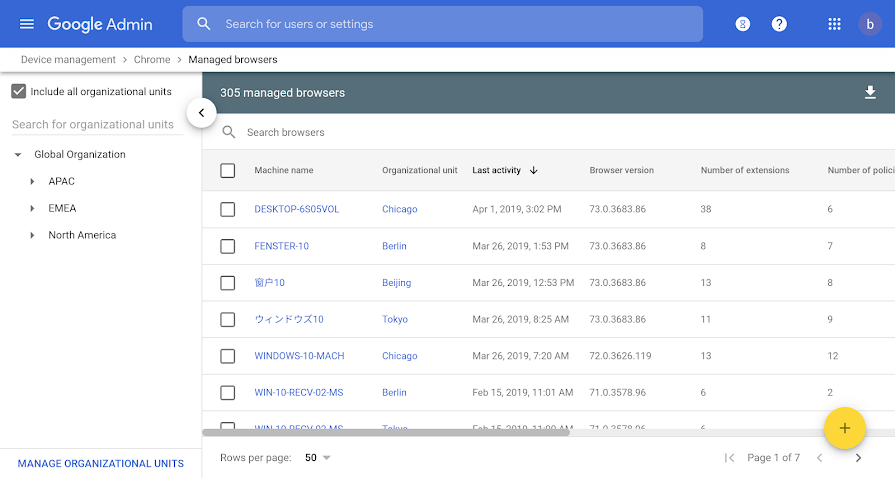
    Some new functionality isn’t specific to Chrome OS but is no less useful. In particular, is the Chrome Browser Cloud Management Console which provides a centralized browser management tool across all device platforms in the enterprise. Legacy Browser Support is now easier to deploy as well.
    For the Chrome OS users, here’s a rundown of what Chrome OS 74 adds, per the release notes:

    • Adobe PDF annotation support: This has been available in the Dev Channel since Chrome OS 73, hidden by a flag setting. Presumably, that flag is now enabled by default for enterprise users or can be managed through the Chrome Admin console.
    • Improved search features: When searching for apps or documents in the launcher search field, auto-suggestions will appear.
    • External camera support: USB cameras can be used with the native Camera app in place of any integrated webcams. This includes cameras for document scanning and USB microscopes; I didn’t make that last one up – that’s a Google example.
    • Top level files and folders: This is another welcome feature we knew was coming. No longer do all saved files or folders have to reside under “My Documents”.
    • Audio support for Linux apps: This is solely for audio playback, not recording, which is still in the works and is likely to arrive in Chrome OS 75. Still, it’s handy for any enterprise workers developing in or working with Linux apps on a Chromebook.
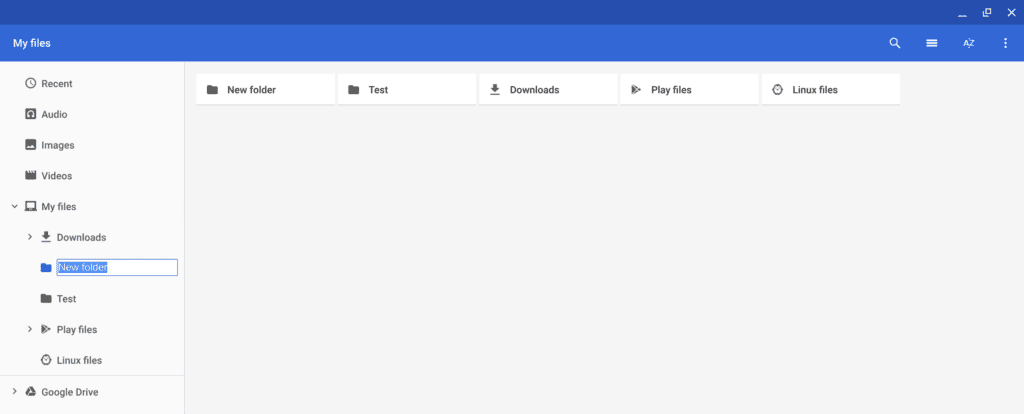
    Top-level folder example

    While several of these features will be useful for consumer Chromebook usage, one final one is very specific to enterprises: Native Active Directory integration policies.

    With Chrome OS 74, enterprises “can now configure an existing domain to manage your Chrome devices with a Microsoft® Active Directory® server. If enabled, Chrome devices are domain joined to AD so you can see them in your domain controllers.”

    Kevin Tofel
    • Website

    After spending 15 years in IT at Fortune 100 companies, Kevin turned a hobby into a career and began covering mobile technology in 2003. He writes daily on the industry and has co-hosted the weekly MobileTechRoundup podcast since 2006. His writing has appeared in print (The New York Times, PC Magazine and PC World) and he has been featured on NBC News in Philadelphia.

    Best of AI

    Chub AI Explained

    May 6, 2026

    Stable Diffusion AI: Free Text To Image AI Generator

    May 5, 2026

    Imagen AI: The Best Photo Editing AI In 2026

    April 21, 2026

    Alphafold AI from Google Deepmind 2026

    April 21, 2026

    Agentic AI Pindrop Anonybit: The Future of Secure Identity Verification

    April 17, 2026
    Trending Stats

    Education Sector Chromebook Adoption Statistics 2026

    May 4, 2026

    ChromeOS Data Usage Patterns And Statistics 2026

    May 2, 2026

    Auto Update Expiration (AUE) In Chromebooks Statistics 2026

    May 2, 2026

    Chromebook Vs IPad Adoption In Schools Statistics 2026

    May 1, 2026

    ChromeOS Accessibility Feature Usage Statistics 2026

    April 28, 2026
    • About
    • Tech Guest Post
    • Contact
    • Privacy Policy
    • Sitemap
    © 2026 About Chrome Books. All rights reserved.

    Type above and press Enter to search. Press Esc to cancel.