

Close Menu
    Facebook X (Twitter) Instagram
    • About
    • Privacy Policy
    • Write For Us
    • Newsletter
    • Contact
    Instagram
    About ChromebooksAbout Chromebooks
    • Linux
    • News
      • Stats
      • Reviews
    • AI
    • How to
      • DevOps
      • IP Address
    • Apps
    • Business
    • Q&A
      • Opinion
    • Gaming
      • Google Games
    • Blog
    • Podcast
    • Contact
    About ChromebooksAbout Chromebooks
    News

    New Google Tasks glanceable shown off in ChromeOS 117

    Kevin TofelBy Kevin TofelSeptember 9, 2023Updated:September 18, 2025No Comments2 Mins Read

    Following news of the Google Chrome browser redesign, I see a new feature in ChromeOS 117. It’s the progression of Google Tasks on Chromebooks. This has been in the works for at least 5 months as a complement to the native Calendar feature in ChromeOS. Google Tasks will be integrated as a ChromeOS widget, just like the Calendar. And ChromeOS 117 shows a glimpse of this Google Tasks glanceable feature.

    When I first found the new Google Tasks integration, I was only able to see the code for it. I didn’t know for sure what the experimental flag name would be, although I surmised it was “GlanceablesV2” at the time.

    That flag name was recently confirmed in the ChromeOS 118 Canary Channel via a Twitter post from C2 Productions:

    @michaelperrigo @GabrielBrangers @jojothetechie @chromeunboxed @NexusBen
    FIRST LOOK: Glanceable Widgets Found by @robby_payne has finally made an appearance in Canary!
    It isn't a widget but a Google Tasks Integration with the formerly added Calendar Widget in the Shelf!
    {1/3} pic.twitter.com/gWRIi6Xkj7

    — C2 Productions (@cr_c2cv) August 13, 2023

    Imagine my surprise when enabling the new glanceables_v2 flag in the ChromeOS 117 Beta Channel and seeing the Google Tasks widget:
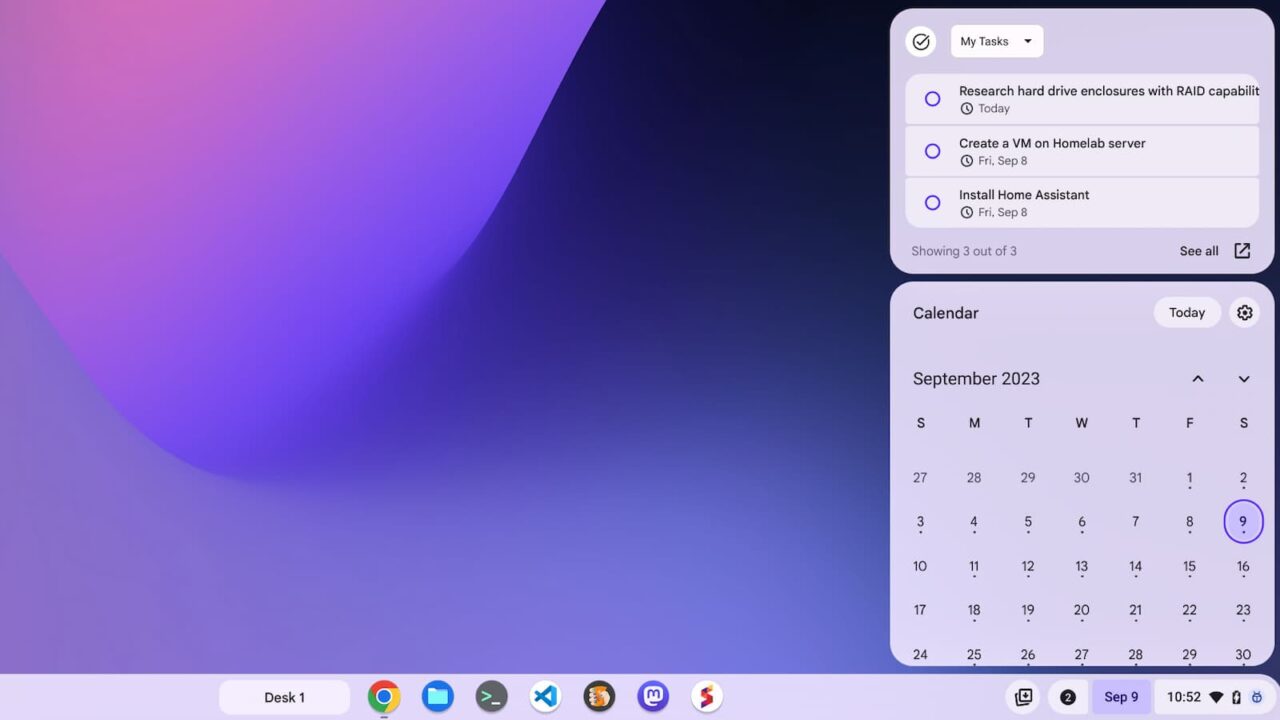
    ChromeOS 117 shows off the Google Tasks glanceable

    Above you can see that I added items to Google Tasks; the widget shows them above my Calendar. Clicking the date to show my Calendar also shows my Tasks. There isn’t a separate button or icon to currently show just the Tasks.

    So far, this early iteration appears fully functional. I can view tasks from among the four lists I’ve set up, for example.
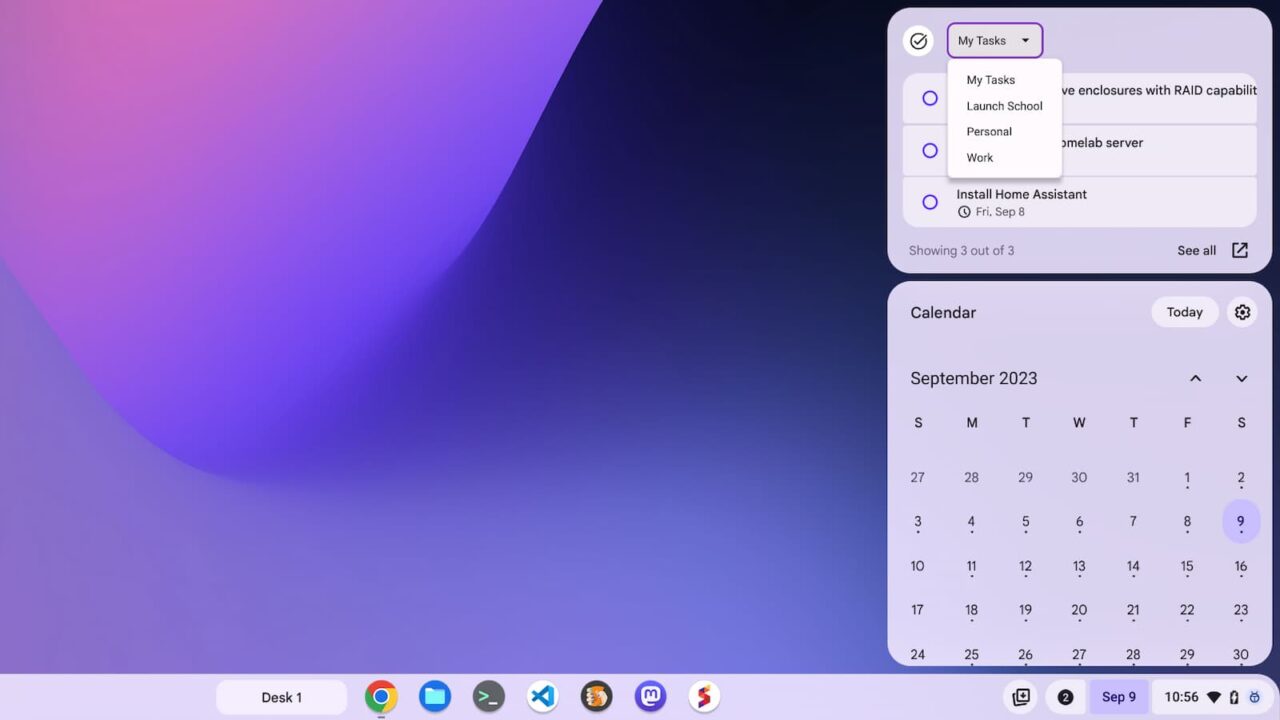
    ChromeOS 117 shows off the Google Tasks glanceable with multiple task lists

    Currently, I don’t see way to add a task in the Google Tasks glancable. It would be nice if I could. However, this user experience is consistent with the Calendar widget. You can view events there but you can’t add them. Perhaps that functionality eventually comes later.

    And for the lists without any tasks, or just a few, there’s an Add New Task button. Clicking it opens up the Google Calendar web app with a focus on the Tasks sidepanel.
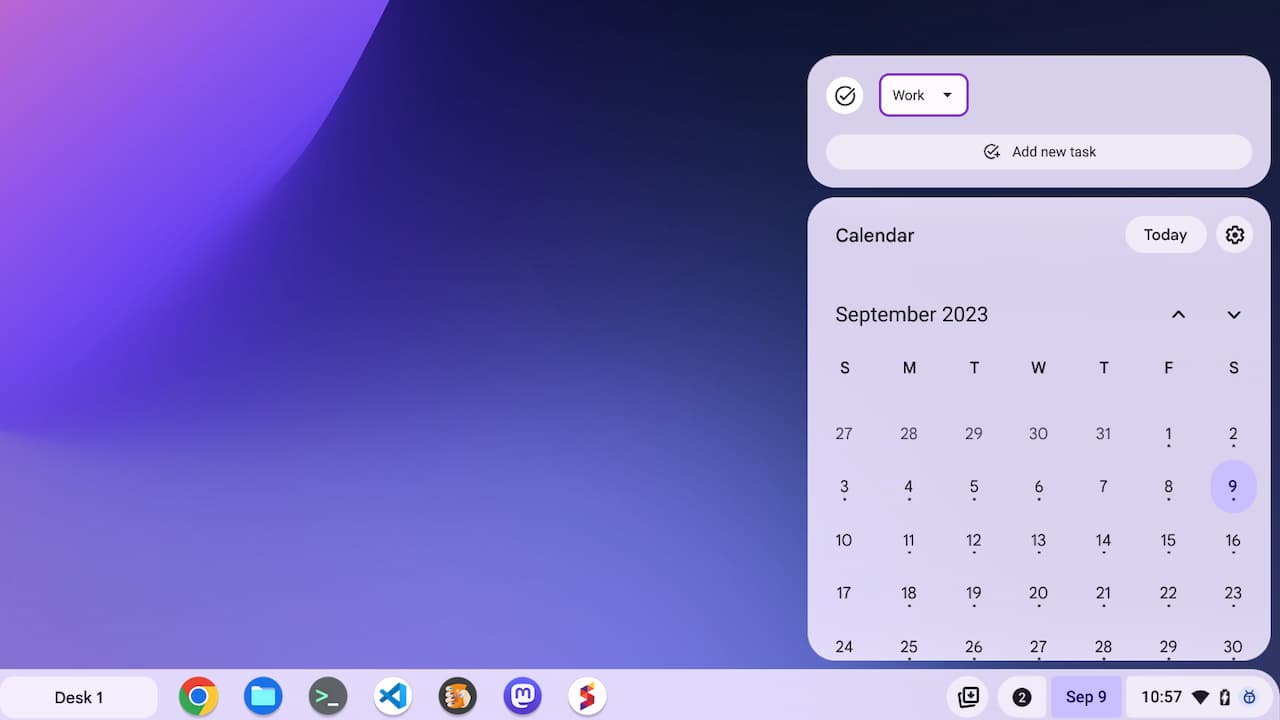
    ChromeOS 117 shows off the Google Tasks glanceable with my Work tasks

    Speaking of later, I fully expected the Google Tasks glanceable to be a ChromeOS 118 debut. Given that it’s working now in the ChromeOS 117 Beta Channel, this could appear in the Stable Channel sooner rather than later.

    Kevin Tofel
    • Website

    After spending 15 years in IT at Fortune 100 companies, Kevin turned a hobby into a career and began covering mobile technology in 2003. He writes daily on the industry and has co-hosted the weekly MobileTechRoundup podcast since 2006. His writing has appeared in print (The New York Times, PC Magazine and PC World) and he has been featured on NBC News in Philadelphia.

    Best of AI

    LMArena AI: Chatbot Ranking Platform 2026

    May 27, 2026

    Will AI Take Over the World

    May 25, 2026

    AI21 Jurassic Statistics 2026: Model Size, Usage and AI Performance Trends

    May 19, 2026

    Chub AI Explained

    May 6, 2026

    Stable Diffusion AI: Free Text To Image AI Generator

    May 5, 2026
    Trending Stats

    Chromebook Price vs Performance Statistics 2026: Value And Hardware Trends

    May 27, 2026

    Chromebook Failure Rates vs Windows Laptops Statistics 2026: Reliability, Repairs And Performance Comparison

    May 26, 2026

    ChromeOS Update Failure Rates Statistics 2026: Stability, Security And System Reliability Trends

    May 25, 2026

    Chromebook User Satisfaction By Use Case Statistics 2026: Education, Work And Entertainment Trends

    May 20, 2026

    Chromebook Adoption in Remote Work Statistics 2026: Workforce Usage and Enterprise Growth

    May 20, 2026
    • About
    • Tech Guest Post
    • Contact
    • Privacy Policy
    • Sitemap
    © 2026 About Chrome Books. All rights reserved.

    Type above and press Enter to search. Press Esc to cancel.