

Close Menu
    Facebook X (Twitter) Instagram
    • About
    • Privacy Policy
    • Write For Us
    • Newsletter
    • Contact
    Instagram
    About ChromebooksAbout Chromebooks
    • Linux
    • News
      • Stats
      • Reviews
    • AI
    • How to
      • DevOps
      • IP Address
    • Apps
    • Business
    • Q&A
      • Opinion
    • Gaming
      • Google Games
    • Blog
    • Podcast
    • Read More
      • Review
      • Insights
    About ChromebooksAbout Chromebooks
    News

    Chrome OS 91 will add Recently Closed tabs in Tab Search

    Kevin TofelBy Kevin TofelApril 14, 2021Updated:September 9, 2025No Comments2 Mins Read

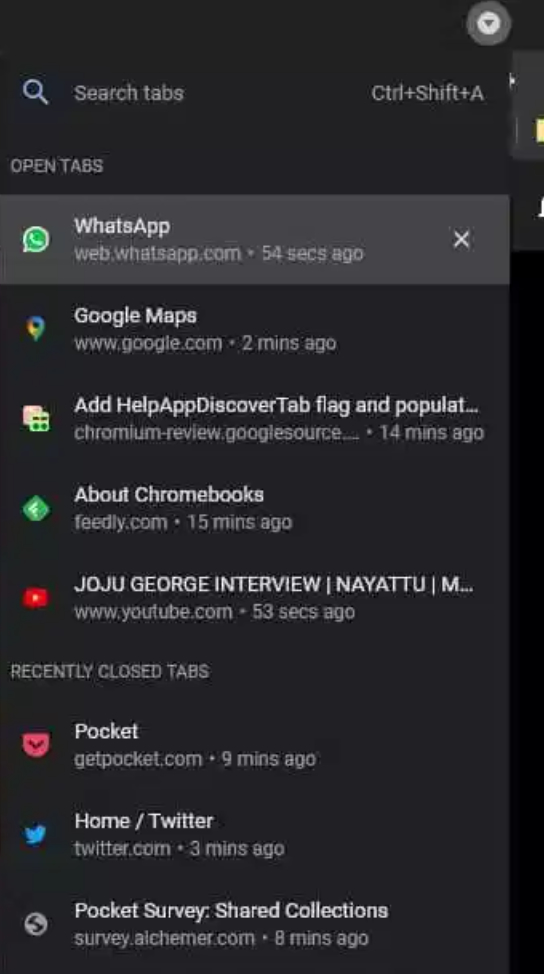
    The new Tab Search feature added in Chrome OS 86 is getting a small but useful upgrade. According to Chrome Story, in the latest Canary Channel release, you can see tabs you might have previously closed. Based on the code commits and this find, it appears Chrome OS 91 will add Recently Closed tabs in Tab Search.

    I don’t yet see this feature enabled on my Chromebook running the Dev Channel of Chrome OS 91, so early adopters might need to be patient.

    And there’s no additional flag to enable it as it’s simply part of Tab Search. If you have Tab Search, you’ll see it show your Recent Tabs in the coming months.

    Here’s what it will look like, much as you’d expect:
    Credit: Chrome Story

    There are several code commits pointing to this update, but there’s not much to glean here.

    Chrome OS will keep an array, or list, of tabs as you close them. When you click the Tab Search drop-down or use the CTRL + SHIFT + A shortcut, you’ll see your currently open tabs along with the list of your most recently closed tabs, along with the relative time you closed them. Just click on one and the tab will be restored.

    I can’t count how many times I’ve had to open up my browser history only to scan for a tab I closed not long ago and need to open again. So this small tweak adds tremendous value to my workflow.

    The better option might be for me to stop closing tabs incessantly, but I doubt that’s going to happen any time soon.

    Am I the only one enjoying Tab Search and looking forward to this useful tweak? Drop a comment below and let me know if you’re a big user of Tab Search. Or if, like me, you just can’t let go of those tabs you closed a wee bit too soon.

    Kevin Tofel
    • Website

    After spending 15 years in IT at Fortune 100 companies, Kevin turned a hobby into a career and began covering mobile technology in 2003. He writes daily on the industry and has co-hosted the weekly MobileTechRoundup podcast since 2006. His writing has appeared in print (The New York Times, PC Magazine and PC World) and he has been featured on NBC News in Philadelphia.

    Best of AI

    Prompt Engineering Salary Statistics 2026

    October 19, 2026

    AI Safety Incident Reporting Statistics 2026

    October 16, 2026

    AI Browser Statistics 2026 [Arc, Dia, Comet]

    October 15, 2026

    ElevenLabs Statistics 2026

    October 9, 2026

    Enterprise LLM Vendor Market Share Statistics 2026

    October 1, 2026
    Trending Stats

    Chromebook Carbon Footprint Statistics 2026

    October 3, 2026

    Linux Kernel Contributor Statistics 2026

    September 26, 2026

    Chromebook Enterprise Deployment Statistics 2026 [Setup Times, Fleet Volumes, Licensing and Migration Data]

    September 22, 2026

    Vector Database Market Statistics 2026

    September 15, 2026

    Chromebook Screen Refresh Rate Distribution Statistics 2026

    September 12, 2026
    • About
    • Tech Guest Post
    • Contact
    • Privacy Policy
    • Sitemap
    © 2026 About Chrome Books. All rights reserved.

    Type above and press Enter to search. Press Esc to cancel.