


A Chromebook can take part in a 3D workflow without running a heavyweight desktop modelling application. Browser services make it possible to prepare references, generate models online and inspect the results.
The practical limit depends on the stage of the work. Waiting for an online generation and rotating a detailed model place different demands on the device. A service handling generation remotely does not remove the Chromebook’s responsibility for displaying the result.
For students, hobbyists and creators considering their first project, the sensible starting point is a small asset with a clear purpose. Establish what works on your particular Chromebook before building a workflow around larger scenes.
“Browser-Based” Covers Different Kinds of Work
A browser is an interface, not a description of where every calculation happens.
An online generation service receives your instructions or reference image and returns a result. A browser viewer then uses the device’s resources to display geometry and textures. Editing, conversion and compression tools may perform their work locally or remotely, depending on the service.
That distinction affects both performance and file handling. Read the relevant tool’s processing information rather than assuming every feature follows the same approach.
It also changes troubleshooting. A failed upload suggests a different problem from a model that loads successfully but stutters whenever you rotate it.
Choose a Project Your Chromebook Can Help You Finish
Begin with one object: a stylised ornament, a simple game prop or a visual concept for a presentation.
Avoid making a detailed animated character your first test. That introduces several separate requirements, including geometry suitable for deformation, rigging and animation review.
Define the intended result before generating. For a presentation, a few screenshots may be sufficient. For an interactive project, you need an exported asset that works in the destination application.
A successful preview answers only part of that requirement. Decide how you will complete any editing and delivery steps before investing time in multiple variations.
Prepare the Reference Before Opening the Generator
Choose an image with a clear subject and an unobstructed outline. Crop unnecessary surroundings while keeping the entire object visible.
Reflective surfaces, overlapping objects and hidden parts make the reference harder to interpret. A photograph showing the front of an object does not provide evidence of its rear construction.
Keep the original image and make a separate preparation copy. Use a descriptive filename so you can connect each generated result with its input later.
On a school- or employer-managed Chromebook, check whether the service and uploads are permitted. A browser application still needs to meet the organisation’s account and data-handling requirements.
Generate a Draft, Then Inspect It
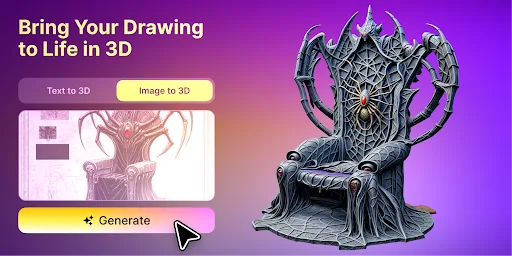
An AI 3D model maker such as Meshy accepts reference images and produces textured models through a browser interface. You can also start from a text prompt instead of a photo, and nothing needs to be installed on the Chromebook.
Start with one result. Rotate it slowly and compare its outline with the reference. Examine the back, underside and thin components before spending time on surface polish.
For a hypothetical desk ornament, ask whether the base is complete, whether separate parts have merged and whether the silhouette remains recognisable from the side. Record the specific issue before deciding to regenerate.
Image-based generation provides an approximation. If the project requires measured dimensions or an exact replica, plan for a more controlled modelling workflow.
Why a Model Can Load but Still Feel Slow
File size is only one part of the workload. Geometry, texture dimensions, materials and the viewer’s implementation all affect how much work the Chromebook must do.
A compressed download can expand into considerably more data during processing. A file that fits within an upload allowance therefore has no guarantee of smooth interaction.
Use a lighter model for comparison. Close unnecessary applications and tabs, then repeat the same viewing action. If the simpler asset responds well while the detailed version struggles, reducing the asset’s complexity is a useful next step.
Preserve the original before simplifying. Check the reduced copy at the intended viewing distance so important features survive.
Check Browser Resource Use Before Blaming the Hardware
If model rotation becomes sluggish, check what else Chrome is running. Other tabs and extensions may be competing for the resources the viewer needs.
Google’s Chrome performance guide explains how to close unused tabs, disable unnecessary extensions and use Chrome’s Task Manager to identify memory-heavy tasks. Save your work before ending a process, as unsaved changes in that task will be lost.
Repeat the test with the same model after reducing background activity. Then compare it with a simpler asset in the same viewer. If only the detailed model struggles, focus on its geometry and textures before considering a hardware upgrade.
This comparison helps narrow the cause. It does not establish a universal model-size limit for every Chromebook.
Plan the Handoff Beyond the Browser
The Chromebook may remain useful even when the next stage requires another computer.
Keep the reference, selected model, review notes and screenshots together. Record which parts need correction so the person opening the asset in an editor can continue without repeating your inspection.
Choose the export format according to the receiving application. Confirm that required materials and other resources travel with the file, then test the actual export.
Check your plan before relying on a download for a deadline. On Meshy, the free plan is enough to generate and preview models; downloading them requires a paid plan. Usage rights and attribution also depend on the plan, so check them for the specific output.
A Practical First-Project Checklist
Before committing to a larger project, confirm that:
- The reference and intended use are clearly defined.
- The model opens and rotates adequately on your Chromebook.
- Important surfaces have been inspected from multiple angles.
- Any remaining editing has an available tool and responsible person.
- The final file works in its intended destination.
A Chromebook is a workable entry point for browser-based 3D exploration and review. Its usefulness grows when the project has a manageable scope and a clear route beyond the first preview.
Judge the workflow by the asset you can finish and use on your equipment. That gives you a firmer basis for deciding whether your next project needs a lighter model, a different tool or access to a more capable machine.
